49
Using the Operator Settings
4.6.1 Daily Income
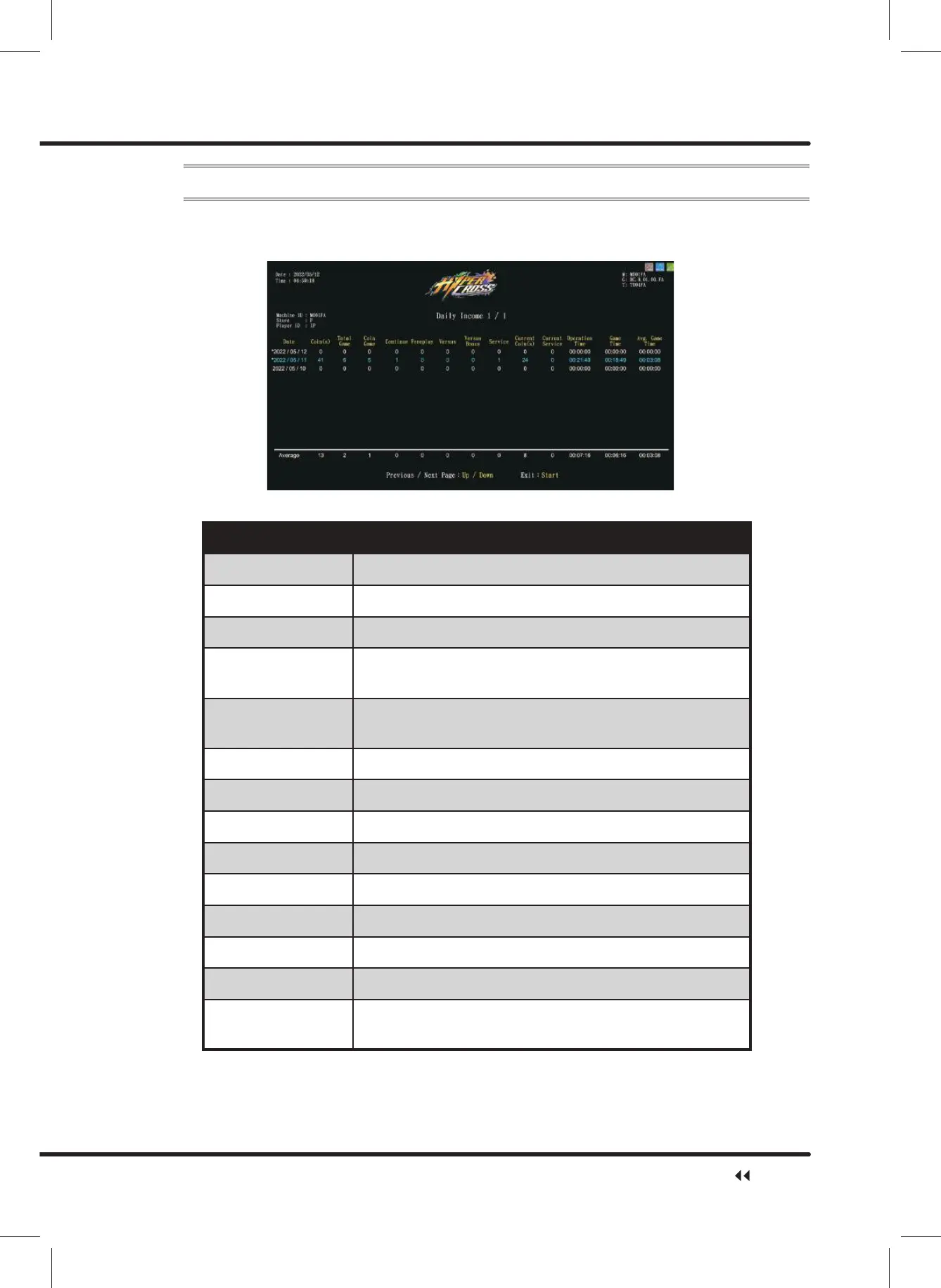
On the page of ȞDaily Incomeȟ, you can check the daily revenue of each cabinet.
ɖ Enter ȞMain MenuȟɚȞ4 Income DataȟɚȞ'DLO\,QFRPHȟ,and the screen will
display as below:
ɖ Descriptions of each item are as follows:
Item Description
Date Date of record
Coin(s) Total number of coins inserted that day
Total Game Total number of games played that day
New Game
Number of times coins were inserted to start new
games that day
Continue
Number of times coins were inserted to continue games
that day
Freeplay Total number of freeplays on that day
Versus Bonus Total number of winner bonus games on that day
Versus Total number of versus games on that day
Service Total number of service buttons used that day
Current Coin(s) Actual number of coins deducted that day
Current Service Actual number of Service deducted that day
Operation Time Total operating time on that day
Game Time Total game time of that day
Avg.Game Time
Average game time of that day
Calculation formula: Game Time/Total Game
ɖ Use theȞUpȟ button and ȞDownȟbutton to move the page.
ɖ Press the ȞStartȟ button to return to Ȟ4 Income Dataȟ.
Income Data



 To Next Page