5
Quick Installation
Quick Installation
Connection Setting
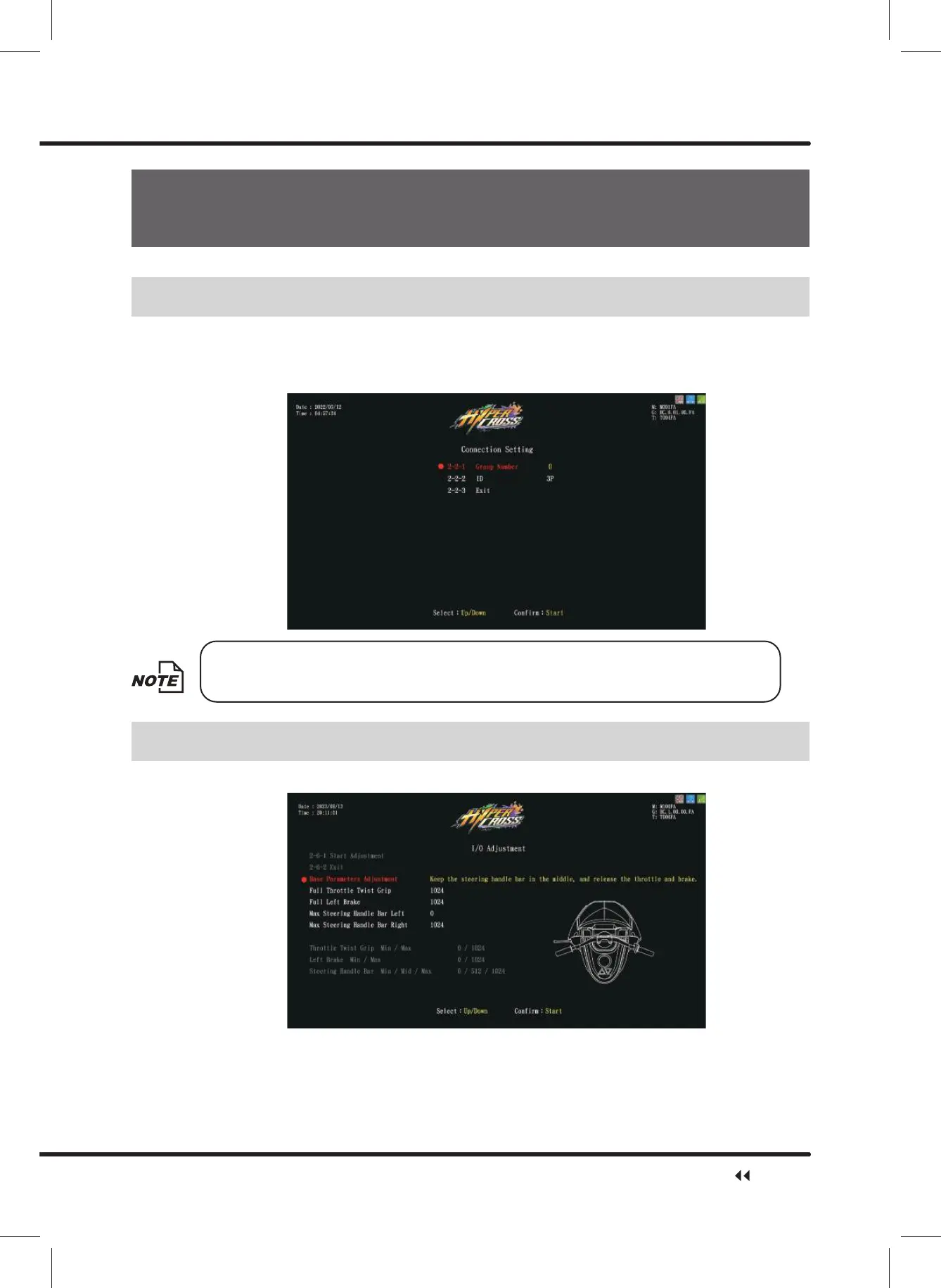
You can enter ȞConnection Settingȟ to set up the group number and ID of the machine.
ɑ Enter ȞMain MenuȟɚȞ2 System SettingȟɚȞ&RQQHFWLRQ6HWWLQJȟ, and appoint all
PDFKLQHLQFRQQHFWLRQLQWRWKHVDPHJURXSEXWSURYLGHHDFKPDFKLQHDGLႇHUHQWPDFKLQH,'
Note: The recommended ID value settings for the machine, from left to right, are: 1P, 2P,
3P, 4P.
IO Adjustment
ɑ Enter ȞMain MenuȟɚȞ2 System SettingȟɚȞ,2$GMXVWPHQWȟWRUXQDGMXVWPHQW
ɑ After selecting Ȟ,2$GMXVWPHQWȟWKHPDFKLQHZLOOEHDGMXVWHGIURPWRSWRERWWRPLQWKH
Following order:
Keep the steering handle bar in the middle, and release the throttle and brake, full throttle
twistgrip, full left brake, max steering handle bar left, and max steering handle bar right.
Quick Installation



 To Next Page