7.1.2ch
7.1ch
5.1.2ch
5.1.4ch
7.1.4ch
5.1ch
57
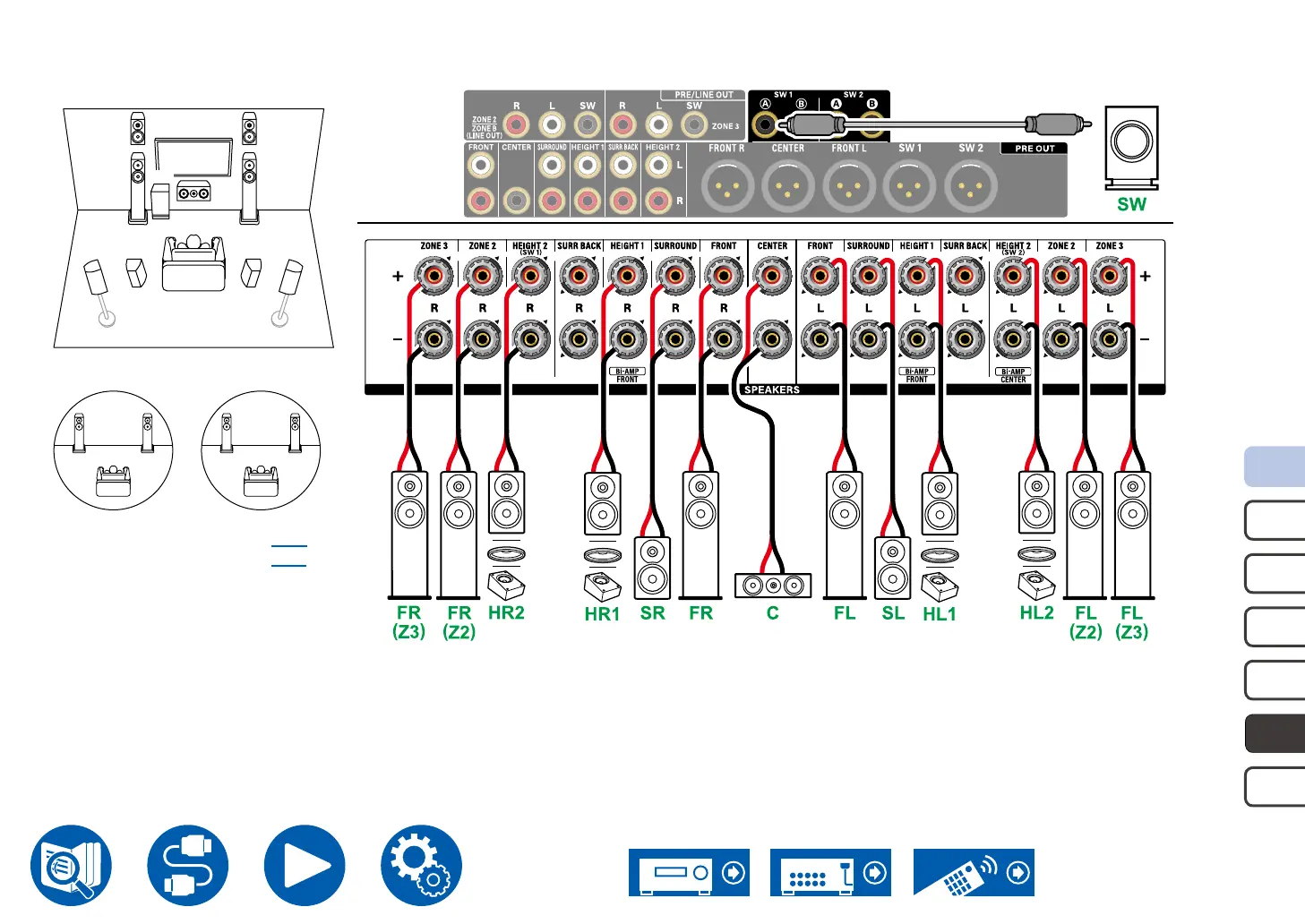
Speaker Connections
5.1.4 Channel System + ZONE SPEAKER (ZONE 2/ZONE 3)
SL SR
FL FR
C
SW
HL1 HR1
HR2HL2
MAIN ROOM
– Playing Back (ZONE 2) ( →p108)
– Playing Back (ZONE 3) ( →p110)
FL(Z3)FR(Z3)
ZONE 2
FL(Z2)FR(Z2)
ZONE 3
• While ZONE 2/ZONE 3 playback is being performed, height 2 speakers installed in the main room cannot play audio.
*1 Connect the Height Speakers you have actually installed (HL1/HR1: Front Height Speakers, Top (front side) Speakers, Dolby Enabled Speakers (Front)).
*2 Connect the Height Speakers you have actually installed (HL2/HR2: Rear Height Speakers, Top (rear side) Speakers, Dolby Enabled Speakers (Surround)).
*1 *2*1*2



 To Next Page