PAMSPAN501x G.SHDSL.bis EFM Gateway
9
2.4 Parts check
Check the following items in your package. Contact our sales representatives if any item is
missing or damaged.
Guide
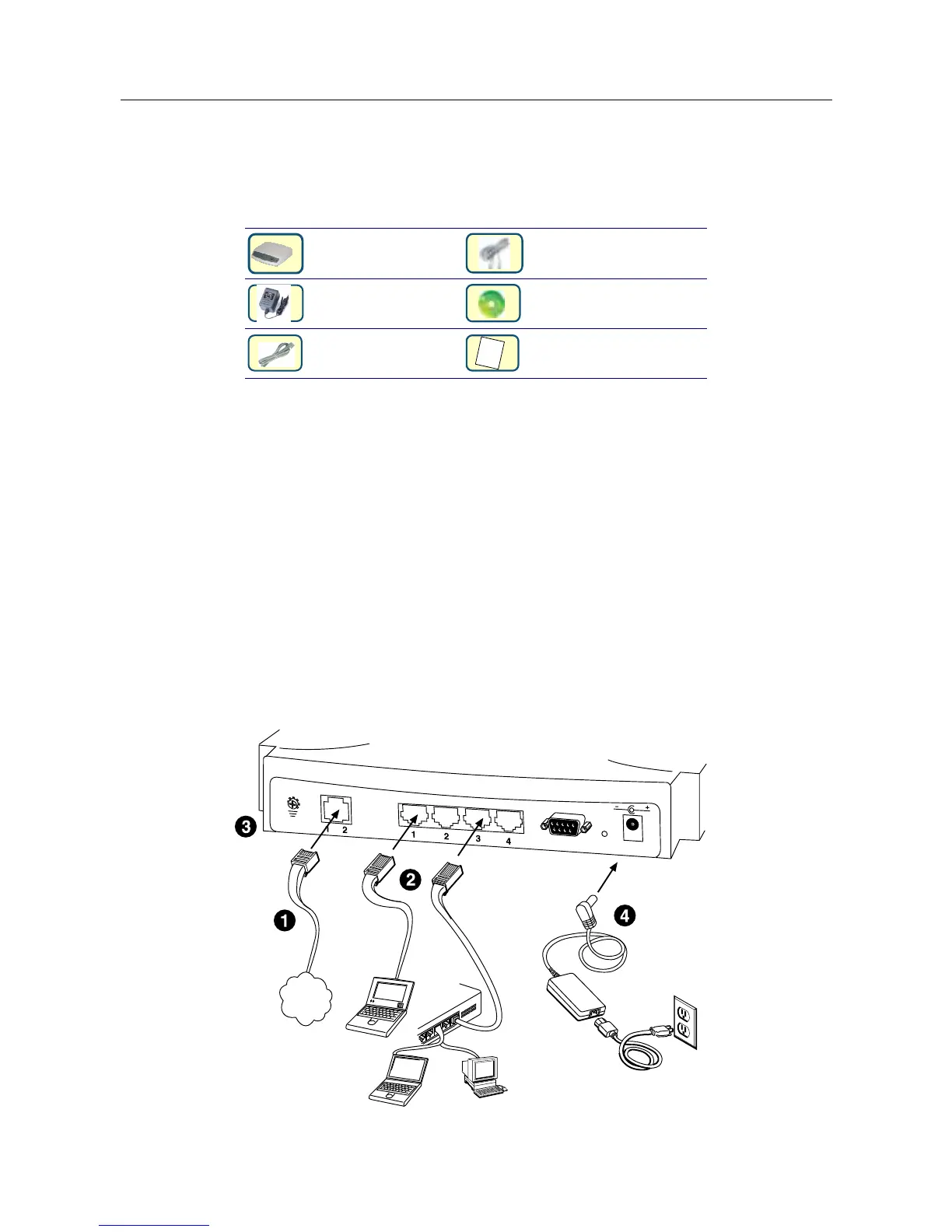
2.5 Hardware Connection
1. Connect the RJ11 cable supplied to the port marked DSL at the back of the
PAMSPAN501X. Connect the other end of the cable to your SHDSL signal source.
2. Insert one end of the RJ45 Ethernet cable into one of the LAN ports on the back of the
PAMSPAN501X. Connect the other end of the cable to the Ethernet Network Interface
Card (NIC) in your PC. Up to four Ethernet devices can be connected to the
PAMSPAN501X.
3. Connect an earth ground to the grounding terminal (marked FG).
4. Connect the external AC adapter supplied to the DC power outlet on the back of the
PAMSPAN501X. Connect the power supply to your wall outlet or surge protector.



 To Next Page