PAMSPAN501x G.SHDSL.bis EFM Gateway
-64
To delete a global address pool, click the Delete hyperlink, and then click the
Delete Global Address Pool button.
Click Return to Interface List to display the Security Interface Configuration page.
To create a reserved mapping, click the Add Reserved Mapping hyperlink.
3.2.4.1.7 Configuring NAT reserved mapping
Reserved mapping allows an outside security interface or an IP address to be
mapped from a global pool to an individual IP address inside the network. Mapping
is based on transport type and port number. Before reserved mapping can be
configured, NAT needs to be configured. For more details, see the Configuring NAT
Section.
To set up a reserved mapping on existing NAT enabled interfaces:
1. From the NAT Security Interfaces table, click the Advanced NAT Configuration
hyperlink for the interface to which reserved mapping is to be added. The
Advanced NAT Configuration page will be displayed.
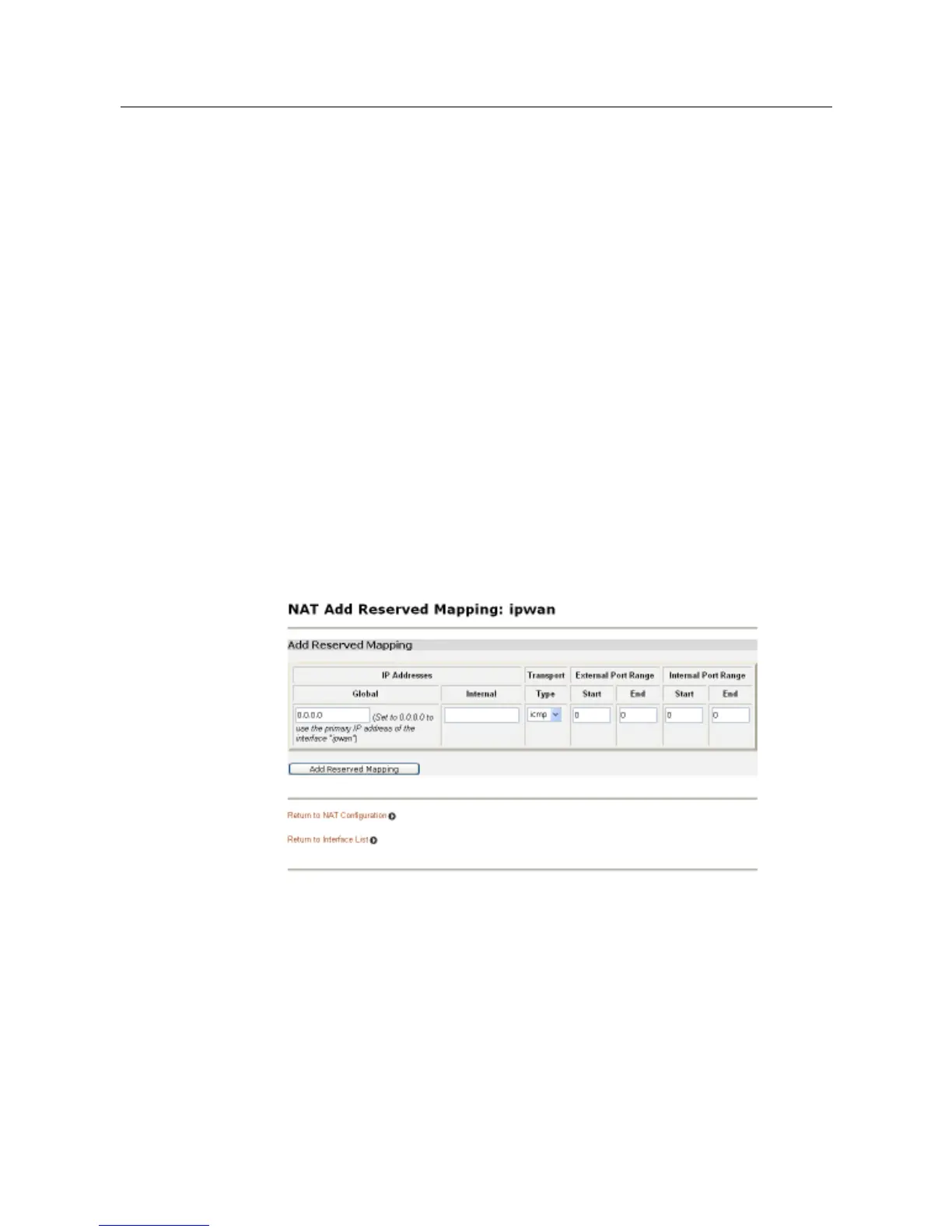
2. Click the Add Reserved Mapping hyperlink. The following page will be displayed:
3. This page allows reserved mapping to be configured. Add specific values for the
following table entries:
• Global IP Address - if mapping from a global IP address, enter the address here.
If mapping from a security interface, enter 0.0.0.0.
• Internal IP Address - the IP address of an individual host inside the network.
• Transport Type - specify the transport type that is to be mapped from the outside
interface to the inside.
• Port Number - the port number that the transport uses.



 To Next Page