PAMSPAN501x G.SHDSL.bis EFM Gateway
-66
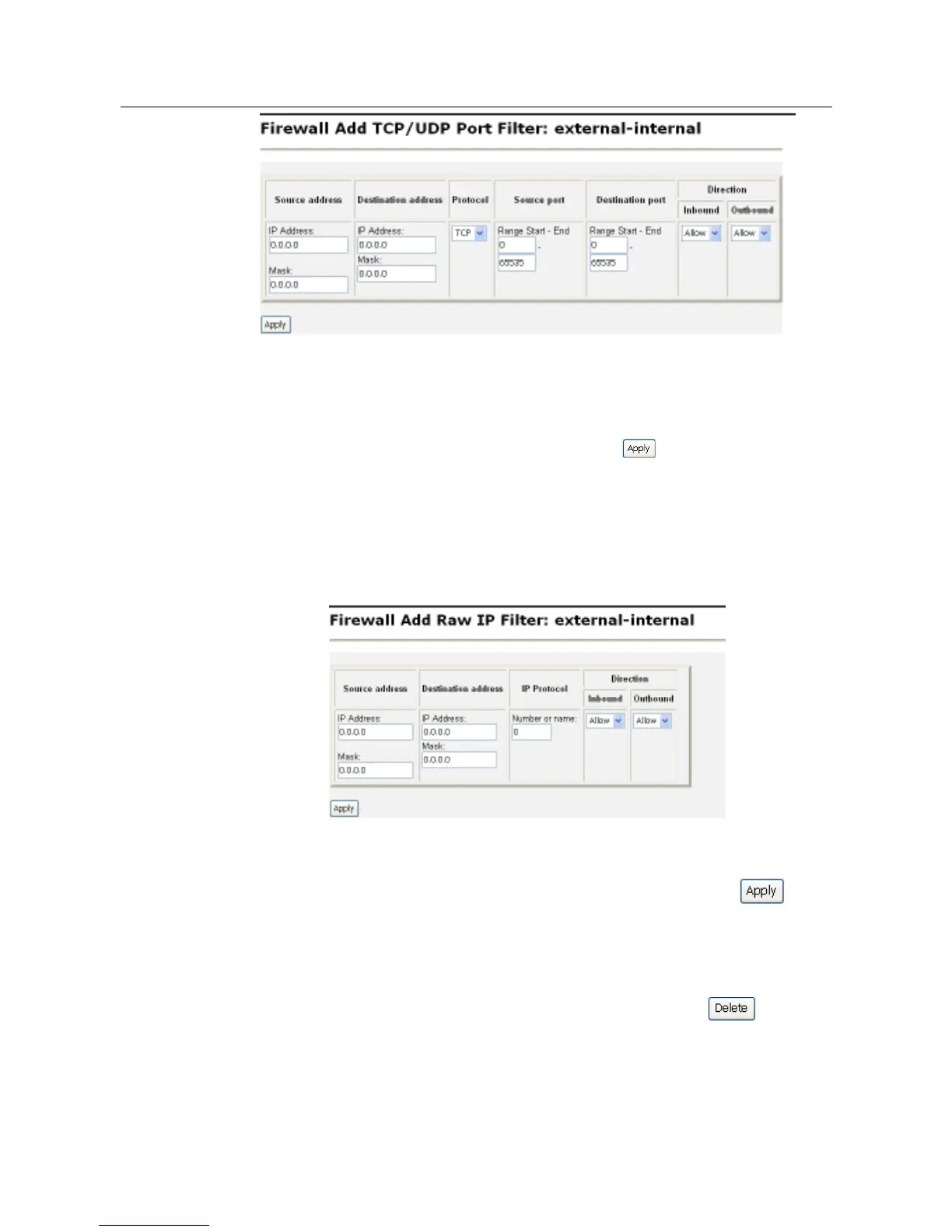
Specify the start and end of the port range for the TCP/UDP protocol that is to be
filtered. Then select either the TCP or UDP protocol from the Protocol drop-down
list. After that, use the Direction drop-down lists to specify whether inbound traffic
and outbound traffic is to be allowed or blocked. Click . The Firewall Port Filters
page will be displayed, containing details of the TCP portfilter that has just been
added.
• For a non-TCP/UDP portfilter, click Add Raw IP Filter. The following page will be
displayed:
Specify the protocol number in the Transport Type text box, for example, for IGMP,
enter protocol number 2. Then use the Direction drop-down lists to specify whether
inbound traffic and outbound traffic is to be allowed or blocked.. Click . The
Firewall Port Filters page will be displayed, containing details of the IP portfilter that
has just been added.
2. Each portfilter displayed in the Firewall Port Filters page has a Delete hyperlink
assigned to it. To delete a portfilter, click this link, and then, click on the
confirmation page. The port filter will be removed from the Firewall configuration.



 To Next Page