MULTIMEDIA 599
will need to manually change the configuration of the USB
connection in order for the Samsung device to send data.
• The Uconnect 4 built-in media functions will be unavail-
able
when Android Auto™/Apple CarPlay® are in use.
Phone Mode
Overview
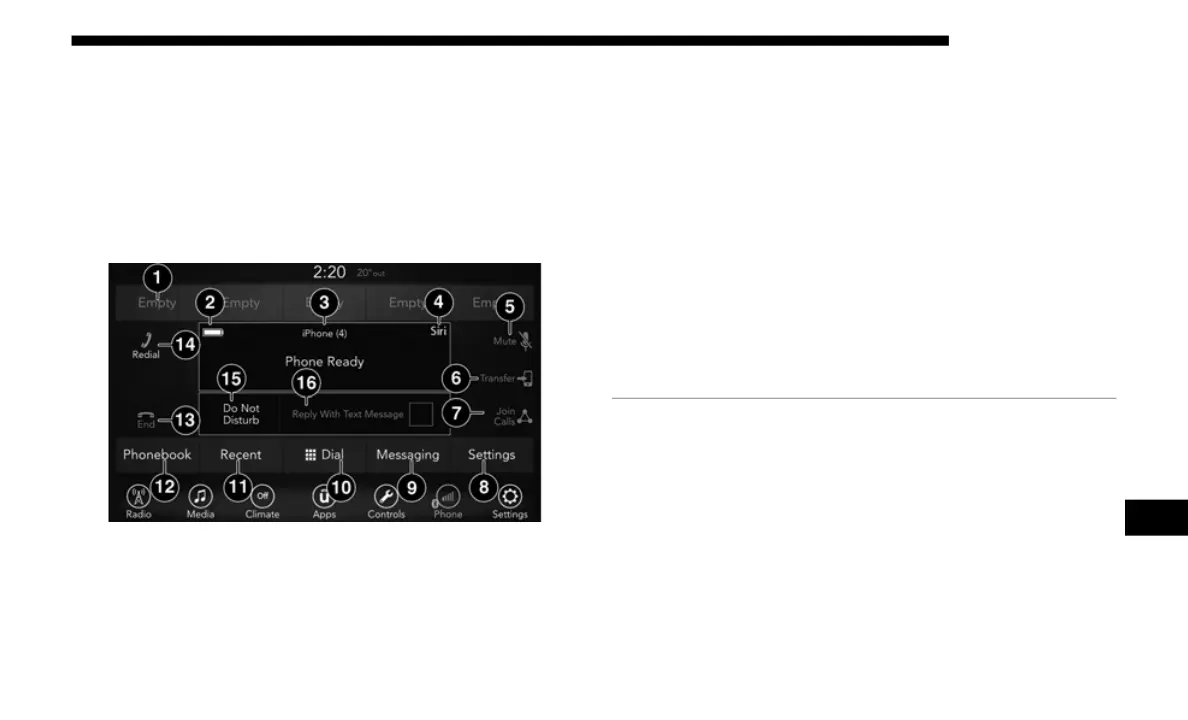
Uconnect 4 With 7-inch Display Radio Phone Menu
Uconnect Phone is a voice-activated, hands-free, in-vehicle
commu
nications system. Uconnect Phone allows you to dial
a phone number with your mobile phone.
Uconnect Phone supports the following features:
Voice Activated Features:
• Hands-Free dialing via Voice (“Call John Smith Mobile”
or,
“Dial 248-555-1212”).
• Hands-Free text to speech listening of your incoming SMS
mess
ages.
1 — Favorite Contacts
2 — Mobile Phone Battery Life
3 — Currently Paired Mobile Phone
4 — Siri
5 — Mute Microphone
6 — Transfer To/From Uconnect System
7 — Conference Call*
8 — Phone Settings
9 — Text Messaging**
10 — Direct Dial Pad
11 — Recent Call Log
12 — Browse Phone Book Entries
13 — End Call
14 — Call/Redial/Hold
15 — Do Not Disturb
16 — Reply With Text Message
* — Conference Call feature only available on Global System Mobile
(GSM)
mobile devices
** — Text messaging feature not available on all mobile phones
[requ
ires Bluetooth® Message Access Profile (MAP) profile]
9














 To Next Page