Chapter 2 OPERATIONS
2.7 SOFT KEY OPERATION
2-25
2
INSTRUCTION MANUAL
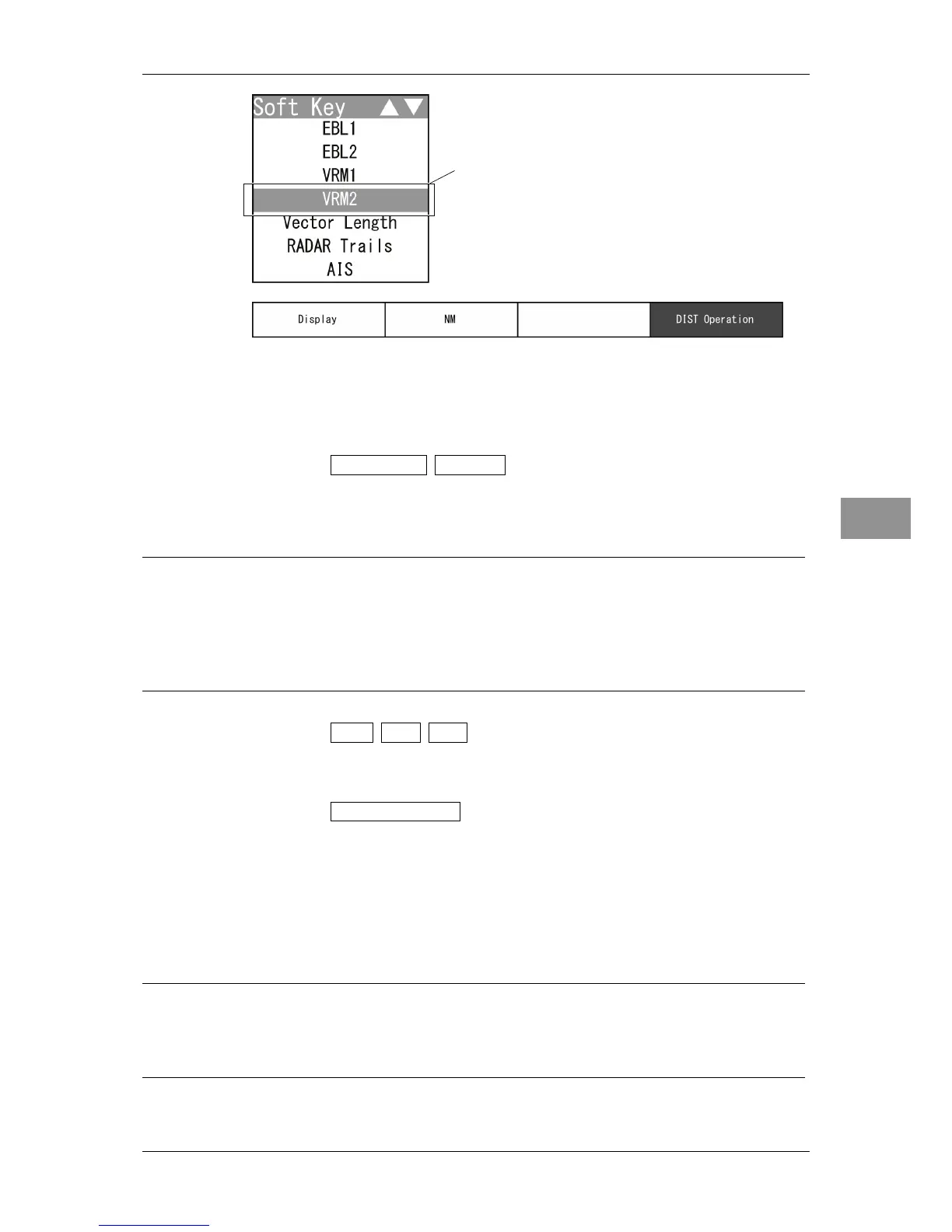
When "VRM1" is selected, the soft key menu is turned off and "DIST Operation" of
the soft key display is color-inverted.
"VRM2" is activated.
2 Operate with the soft keys.
Soft key 1: Display Off Display
"Display Off": "VRM1"/"VRM2" is not displayed.
"Display": "VRM1"/"VRM2" is displayed.
Reference:
When "Display Off" is selected for the soft key 1, the equipment performs the followings:
VRM is not displayed.
The soft key menu and the soft key display disappears, and VRM function is
terminated.
Soft key 2: NM km sm
Selects units of "VRM1"/"VRM2" range.
Soft key 3: Not available
Soft key 4: DIST Operation
When "VRM1" or "VRM2" of the soft key menu is selected, "DIST Operation" of
the soft key display is color-inverted.
Turn the [MULTI] control to operate "VRM1"/"VRM2".
Press the [MULTI] control, the soft key 4 or the [CLEAR] key to determine the
"VRM1" and "VRM2" settings. Distance is set and operation state ends.
Reference:
When "VRM1"/"VRM2" is not selected on the soft key menu, press the soft key 4 to
activate the VRM function.
Select "VRM2" and press the control.


 To Next Page