99
14.3.11 Reset (Advanced Mode)
There are 4 resets: Normal reset, data logger reset, total reset and static info code reset.
Normal reset: The backup log is updated, the calculator is restarted and the configuration parameters reloaded.
Note! This reset does not affect any registers.
Data logger reset: The calculator’s data protocol is reset, which affects the year, month, day and hour log as well
as the info code and configuration log.
Total Reset: Resets all historical as well as legal registers.
Static info code reset: The Info code stays in the meter’s display until a static info code reset is performed, and
only if the meter is configured for “Manual Reset of info codes”.
This does not reset the info code logger.
14.4 METERTOOL HCW Settings
By clicking the “Settings” tab the following can be changed:
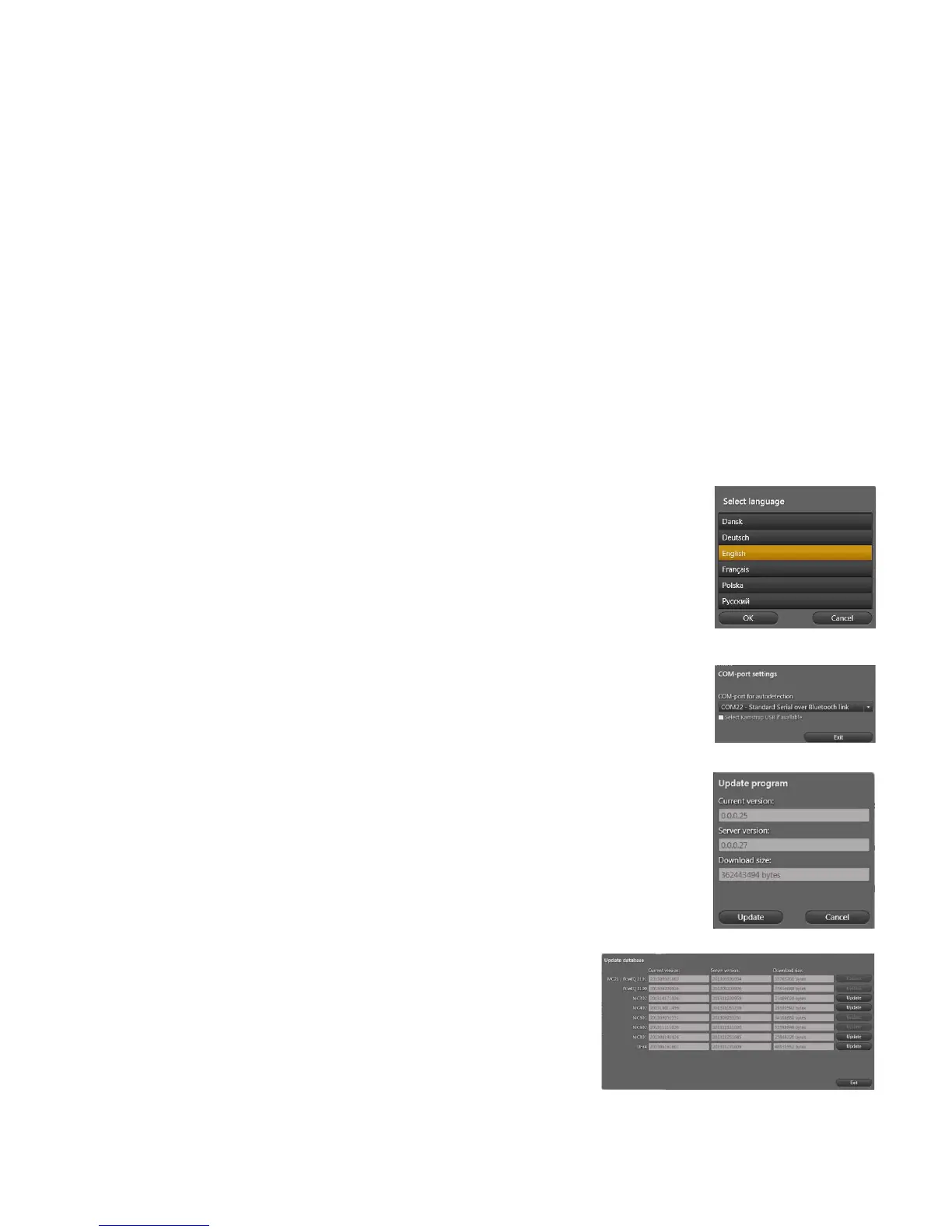
14.4.1 Change language
The program language can be changed to 6 different
languages: Danish, German, English, French, Polish and
Russian.
14.4.2 COM-port settings
The COM-port can be selected manually instead of the
automatically selected default setting.
14.4.3 Update program
In this menu the METERTOOL program can be updated if a
newer revision is available on Kamstrup’s FTP-server.
14.4.4 Update database
In this menu the METERTOOL database can
be updated if a newer revision is available
on Kamstrup’s FTP-server.













 To Next Page