Voicetron
Saving a microphone effect
After you have modified one of the MICRO PRESETS,
you can save it by overwriting the same Preset or
giving a new name. Here is the procedure to follow.
Select a MICRO PRESET.1.
Press the EDIT button on the front panel and edit 2.
the parameters as explained above.
Once finished, press the SAVE button on the front 3.
panel.
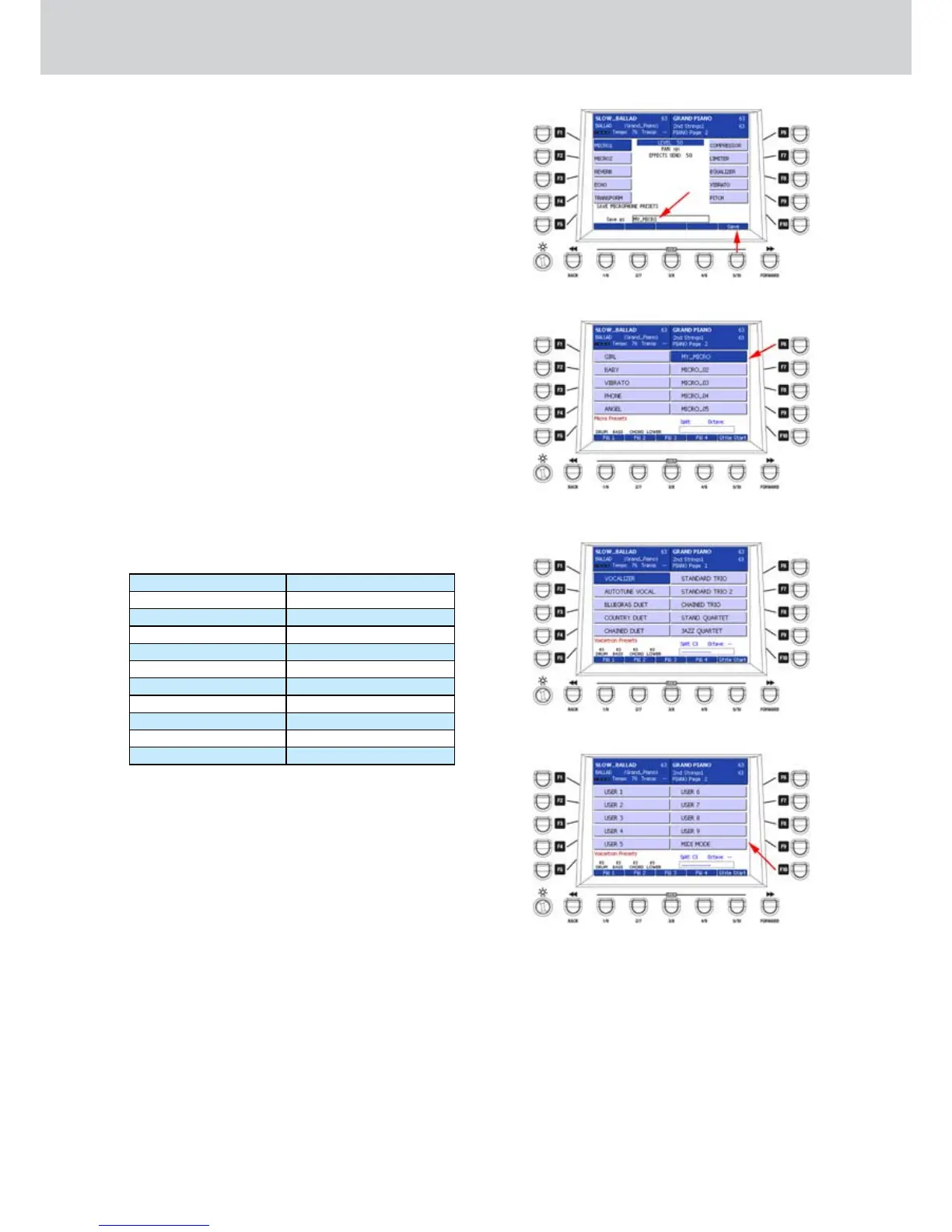
Type a name by using the keyboard (for example 4.
MY_MICRO) and press the USER 5 button (SAVE),
as shown in Figure 302.
By using the F1-F10 buttons is now possible to 5.
select the User Preset from the list, as shown in
Figure 303.
Setting a VOCALIZER effect
Press the VOCALIZER button.1.
The VOICETRON PRESETS window will appear 2.
(Figure 304) that is the effects for the microphone
connected to MICRO 1 on the rear.
Press the F1-F10 buttons to select one of the 3.
VOICETRON PRESETS.
Press the CURSOR 4.
Ó Á
buttons
to scroll the
VOICETRON PRESETS pages.
By using the F1-F10 buttons you can select 20
VOICETRON PRESETS, from two pages.
PAGE 1 PAGE 2
F1–VOCALIZER F1–USER 1
F2–AUTOTUNE VOCAL F2–USER 2
F3–BLUEGRASS DUET F3–USER 3
F4–COUNTRY DUET F4–USER 4
F5–CHAINED DUET F5–USER 5
F6–STANDARD TRIO F6–USER 6
F7–STANDARD TRIO 2 F7–USER 7
F8–CHAINED TRIO F8–USER 8
F9–STAND. QUARTET F9–USER 9
F10–JAZZ QUARTET F10–MIDI MODE
In5. Figure 305 you can see the VOICETRON
PRESETS of the second page.
Please note that the last Preset corresponding 6.
to the F10 button on the second page is “MIDI
MODE” (shown by the arrow on Figure 305),
that is the harmonization mode controlled by
the MIDI file. In this mode, the harmonization
is automatically controlled by the melody track
of the MIDI file. Please see “Setting the VOCAL
mode” on the GM Parts section in this manual.
Figure 302
Figure 303
Figure 304
Figure 305



 To Next Page