VOICE EDIT
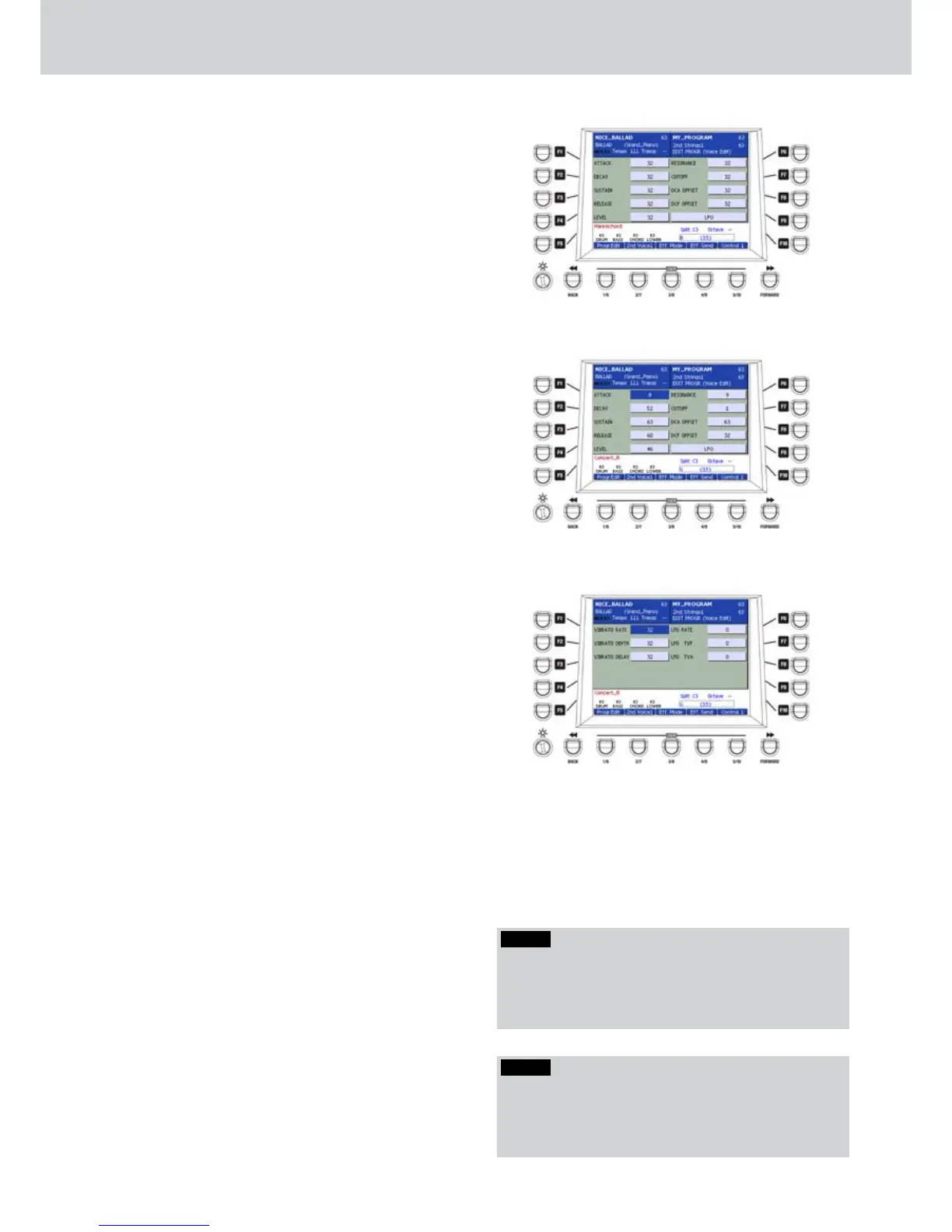
Press the USER 1 button to access the edit page of
each VOICE of the PROGRAM. You will see a screen
similar to Figure 70 where all the parameters of the
VOICE of the PROGRAM will appear. By using the
F1 to F10 buttons you can select a parameter and
modify the value using the DATA/VALUE wheel or the
CURSOR Ó Á buttons . Press the CURSOR Ó Á
buttons together to set the default value (32).
F1–ATTACK: modifies the attack time of the
•
envelope. Values from 0 to 63 (default 32) (Figure
71).
F2–DECAY: modifies the decay time of the
•
envelope. Values from 0 to 63 (default 32).
F3–SUSTAIN: modifies the sustain time of the
•
envelope. Values from 0 to 63 (default 32).
F4–RELEASE: modifies the release time of the
•
envelope. Values from 0 to 63 (default 32).
F5–LEVEL: modifies the envelope level. Values
•
from 26 to 63 (default 32).
F6–RESONANCE: modifies the resonance level.
•
Values from 0 to 63 (default 32).
F7–CUTOFF: modifies the cutoff frequency.
•
Values from 0 to 63 (default 32).
F8–DCA OFFSET: modifies the OFFSET of the
•
DCA (Digital Controlled Amplifier) envelope.
In other words, it raises/lowers the influence on
the amplifier. Values from 0 to 63 (default 32).
F9–DCF OFFSET: modifies the OFFSET of the
•
DCF (Digital Controlled Filter) envelope. In other
words, it raises/lowers the influence on the filter.
Values from 0 to 63 (default 32).
F10- LFO. The F10 button opens a further edit
•
page to modify LFO parameters (Figure 72),
that is the parameters of the Low Frequency
Oscillator.
You can access the LFO parameters by using the
F1... F10 buttons. The selected parameter can be
modified by using the DATA/VALUE wheel or the
CURSOR Ó Á buttons. The value range for each
parameter is from 0 to 63. Press the CURSOR Ó Á
buttons together to set the default value (32).
F1–VIBRATO RATE: vibrato frequency.
F2–VIBRATO DEPTH: vibrato depth.
F3–VIBRATO DELAY: vibrato delay.
F6–LFO RATE: oscillator frequency.
F7–LFO TVF: LFO amount on the filter.
F8–LFO TVA: LFO amount on the amplifier.
After you have modified the parameters of each
VOICE in the VOICE EDIT page, press the USER 1
button (Progr. Edit) to return to the previous page.
Select a different VOICE by using the F1 or F6
buttons and press the USER 1 button (Voice Edit) to
modify the voice parameters.
Figure 70
Figure 71
Figure 72
Program
NOTE
If you set an organ DRAWBARS on the VOICE number
3 of the PROGRAM, the parameters of the VOICE EDIT
page are visible but you cannot modify the organ voice
parameters.
NOTE
Press the USER 1 button (Progr. Edit) to return from
the LFO page to the VOICE EDIT page. Press the USER
1 button (Progr. Edit) again to return to the initial
PROGRAM EDIT page.



 To Next Page