8 | 01 Getting started
• PORTAM.: Press this button to enable “Portamento” already assigned within the
Voice.
• DSP: Press this button to open DSP Effect Control, here you can control EQ effects,
you can assign it on GLOBAL or to single keyboard-played parts.
• USER VOICE: If active, the list of Voices accesses the USER Voices; otherwise, the list
refers to the factory voices.
• USER STYLE: If active, the list of accompaniment styles displayed are USER Styles,
otherwise the list displayed are factory styles.
• PERFORM.: provides access to Performance feature.
• REGISTR.: Press this button to go to Registration and Playbox.
• VOICE 1: Switch on or off VOICE 1’s sound.
• VOICE 2: Switch on or off VOICE 2’s sound.
• DRAWBAR: Switch on or off the Drawbar sound.
• MICRO: Press this button to turn on the microphone connected to the MICRO 1 input.
By holding it down for a few moments, you access the MICRO 1 and MICRO 2
microphone Edit page.
• VOICETRON: Press this button to turn on the vocal harmonizer for MICRO 1. By
holding it down for a few moments, you access the edit page of the vocal harmonizer.
• Slider area: the six sliders control the volume level of the VOICE 1, VOICE 2,
DRAWBAR, MICRO (microphone), VOICETRON parts and overall MASTER volume.
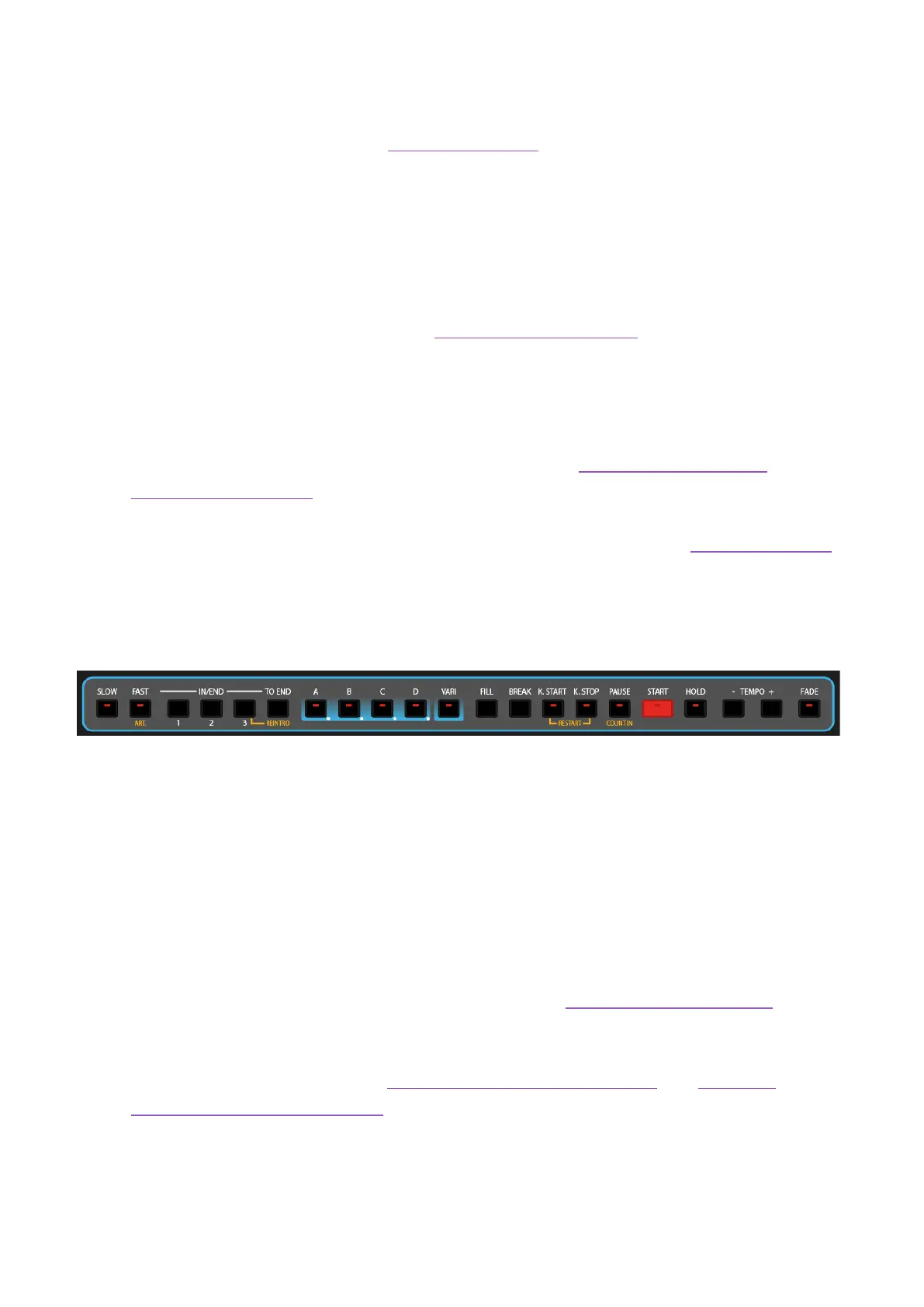
Cross-buttons at the bottom of the panel
This is the Accompaniment style control area:
• SLOW/FAST: The two keys allow you to get the behavior of the classic Leslie speakers
that gradually changed the speed of the rotor by switch.
• ART.: The Articulation button alternates the varied sound with the normal one.
• IN(TRO)/END 1, 2, 3: Start and stop songs played with accompaniment.
• TO END: This is to end immediately the playing style.
• ABCD: Open the four main variations of the ABCD arrangement
• VARI: Activates an alternate rhythm track with more ‘color’.
• FILL, K.START, K.STOP, PAUSE, START, HOLD) see the dedicated paragraph.
• TEMPO +/-: press this buttons to increase and decrease the tempo (BPM), adjusting
the accompaniment style and the backing tracks being played by the PLAYER. For all
the details, see the paragraphs Tempo in accompaniment styles and Tempo in
musical pieces (MIDI and MP3).
• FADE: Press this button (while playing) to stop the performance by slowly fading out
the volume. It acts on the accompaniment style, on the song played by the PLAYER,
and on the keyboard-played parts in real time.
Warning



 To Next Page