Features of your vehicle
1284
Rear View Monitor (RVM)
tings' from the Settings menu
whilst the engine is on.
䳜 In the Display Contents, you can
change settings for 'Rear View
Parking Guidance', and in the Dis
-
play Settings, you can change the
screen's 'Brightness' and 'Con
-
trast'.
䳜 Deselect 'Camera Settings →
Keep Rear Camera' from the Set
-
tings menu of the Infotainment
system to turn off the function.
䳜 If you maintain the setting, the
function will turn on.
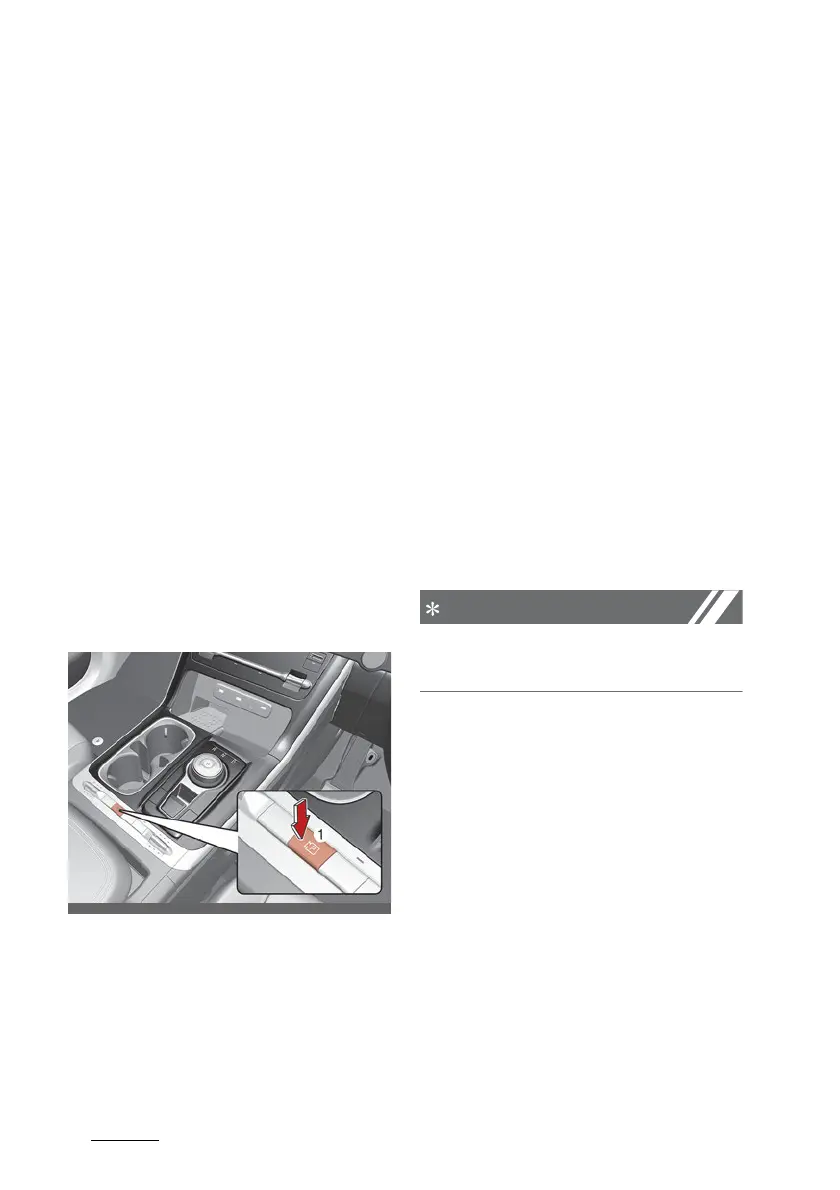
Rear View Monitor operation
Operating button
Parking/View button
Press the Parking/View button (1)
to turn on Rear View Monitor.
Press the button again to turn off
the function.
Rear view
Operating conditions
䳜 Shift the gear to R (Reverse), the
image will appear on the screen.
䳜 Press the Parking/View button (1)
whilst the gear is in P (Park), the
image will appear on the screen.
Off conditions
䳜 Press the Parking/View button (1)
again whilst the gear is in P (Park)
with the rear view on the screen,
the rear view will turn off.
䳜 Shift the gear from R (Reverse) to
P (Park), the rear view will turn
off.
The rear view cannot be turned off
when the gear is in R (Reverse).
Extended rear view function
The rear view will maintain showing
on the screen to help you when
parking.
Operating conditions
Shift the gear from R (Reverse) to N
(Neutral) or D (Drive), the rear view
will appear on the screen.



 To Next Page