Driving your vehicle
226
Automatic transmission (Shift Lever)
In manual mode, moving the shift
lever backwards and forwards will
allow you to make gearshifts rap
-
idly. In contrast to a manual trans
-
mission, manual mode allows
gearshifts with the accelerator
pedal depressed.
䳜 Up (+): Push the lever forward
once to shift up one gear.
䳜 Down (-): Pull the lever backwards
once to shift down one gear.
䳜 The driver must execute upshifts
in accordance with road condi
-
tions, taking care to keep the
engine speed below the red zone.
䳜 Only the 8 forward gears can be
selected. To reverse or park the
vehicle, move the shift lever to
the R (Reverse) or P (Park) posi
-
tion as required.
䳜 Downshifts are made automati
-
cally when the vehicle slows
down. When the vehicle stops, 1st
gear is automatically selected.
䳜 When the engine rpm approaches
the red zone shift points are var
-
ied to upshift automatically.
䳜 To maintain the required levels of
vehicle performance and safety,
the system may not execute cer
-
tain gearshifts when the shift
lever is operated.
䳜 When driving on a slippery road,
push the shift lever forward into
the +(up) position. This causes the
transmission to shift into the 2nd
gear which is better for smooth
driving on a slippery road. Push
the shift lever to the -(down) side
to shift back to the 1st gear.
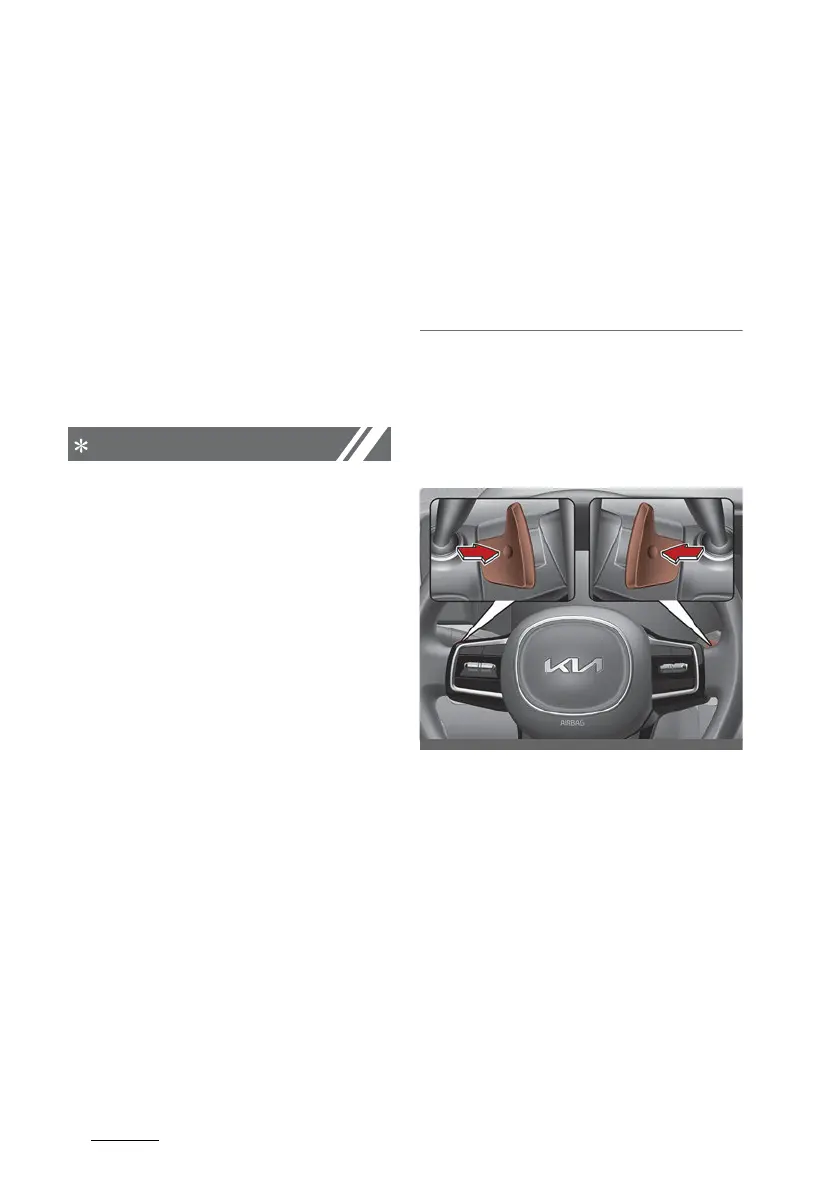
Paddle shifter (if equipped)
The paddle shift function is available
when the shift lever is in the D
(Drive) position or the manual mode.
With the shift lever in the D posi
-
tion
Pull the [+] or [-] paddle shifter once
to shift up or down one gear and the
system changes from automatic
mode to manual mode.
To change back to automatic shift
mode from manual shift mode, do
one of the followings:
䳜 Pull the [+] paddle shifter for
more than one second



 To Next Page