7
5
5
Infotainment system Audio (Without Touch Screen)
Audio (Without Touch Screen)
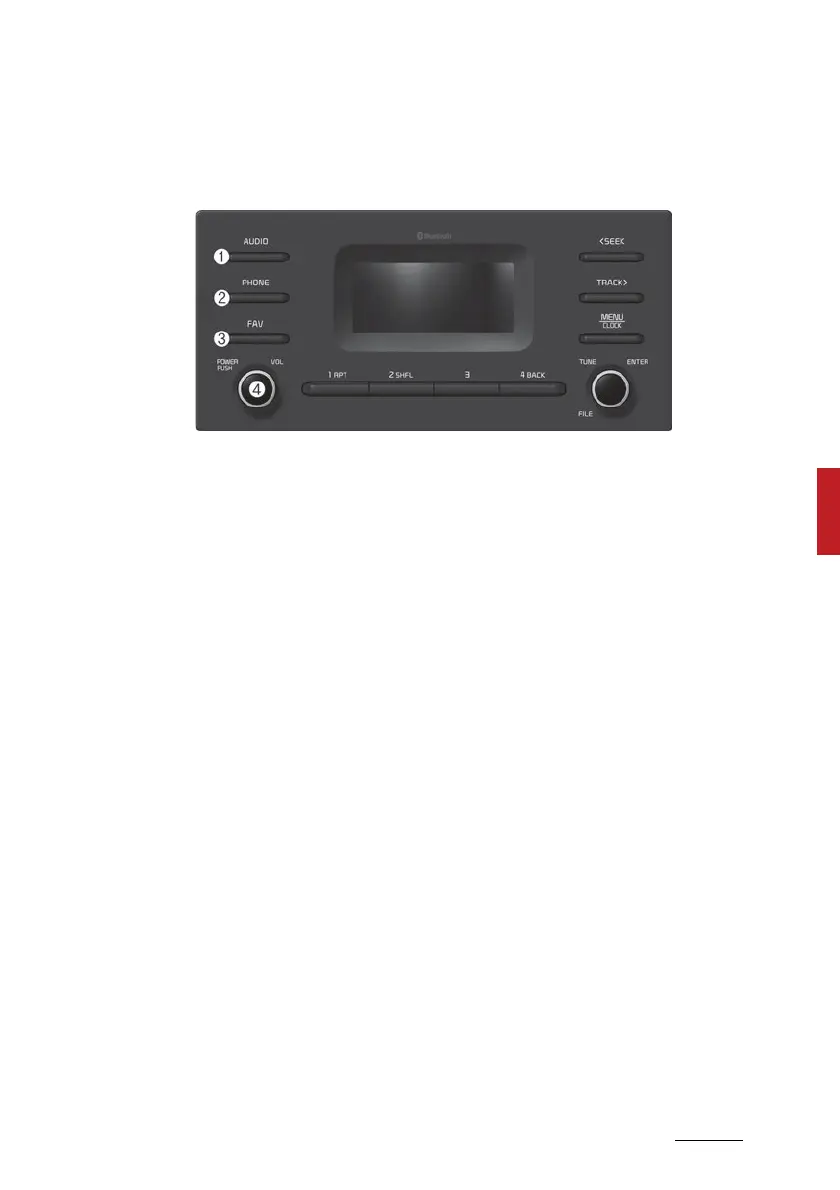
System layout 䳍 control panel
(With Bluetooth
Wireless Technology)
* The system's actual appearance and layout may differ depending on the
vehicle model and specification.
1. AUDIO button
䳜 Press to display the radio/
media mode selection window.
䳜 When the mode selection win
-
dow displays, turn the [TUNE]
knob to select the desired mode
and then press the knob.
䳜 When the Mode popup is not
selected in [MENU/CLOCK] ▶
Mode popup, press the [AUDIO]
button on the control panel to
change the mode.
Each time you press the
[AUDIO] button on the control
panel, the mode switches to
radio ▶ media in order.
2. PHONE button
䳜 Press to start connecting a
mobile phone via Bluetooth.
䳜 After a Bluetooth phone con
-
nection is made, press to access
the Bluetooth phone menu.
3. FAV button
䳜 Whilst listening to the radio,
press to move to next page of
the preset list.
4. POWER button/VOL knob
䳜 Press to turn the system on or
off.
䳜 Turn to the left or right to
adjust the system sound vol
-
ume.



 To Next Page