Infotainment system
185
Media player
media mode switches to USB ▶
Bluetooth audio in order.
䳜 Depending on vehicle models and
specifications, available buttons
or the appearance and layout of
the USB port in your vehicle may
vary.
䳜 Do not connect a smartphone or
an MP3 device to the system via
multiple methods such as USB,
Bluetooth simultaneously. Doing
so may cause a distorted noise or
a system malfunction.
䳜 When the equaliser function of
the connected device and Equal
-
iser (Tone) settings of the system
are both activated, the effects
may interfere with each other
and may lead to sound degrada
-
tion or distortion. Deactivate the
device's equaliser function if pos
-
sible.
Using the USB mode
You can play media files stored in
portable devices, such as USB stor
-
age devices and MP3 players. Check
compatible USB storage devices and
file specifications before using the
USB mode.
Connect your USB device to the USB
port in the vehicle.
䳜 Playback starts immediately.
䳜 Press the [AUDIO] button on the
control panel to display the mode
selection window, turn the [TUNE]
knob to select USB and then press
the knob.
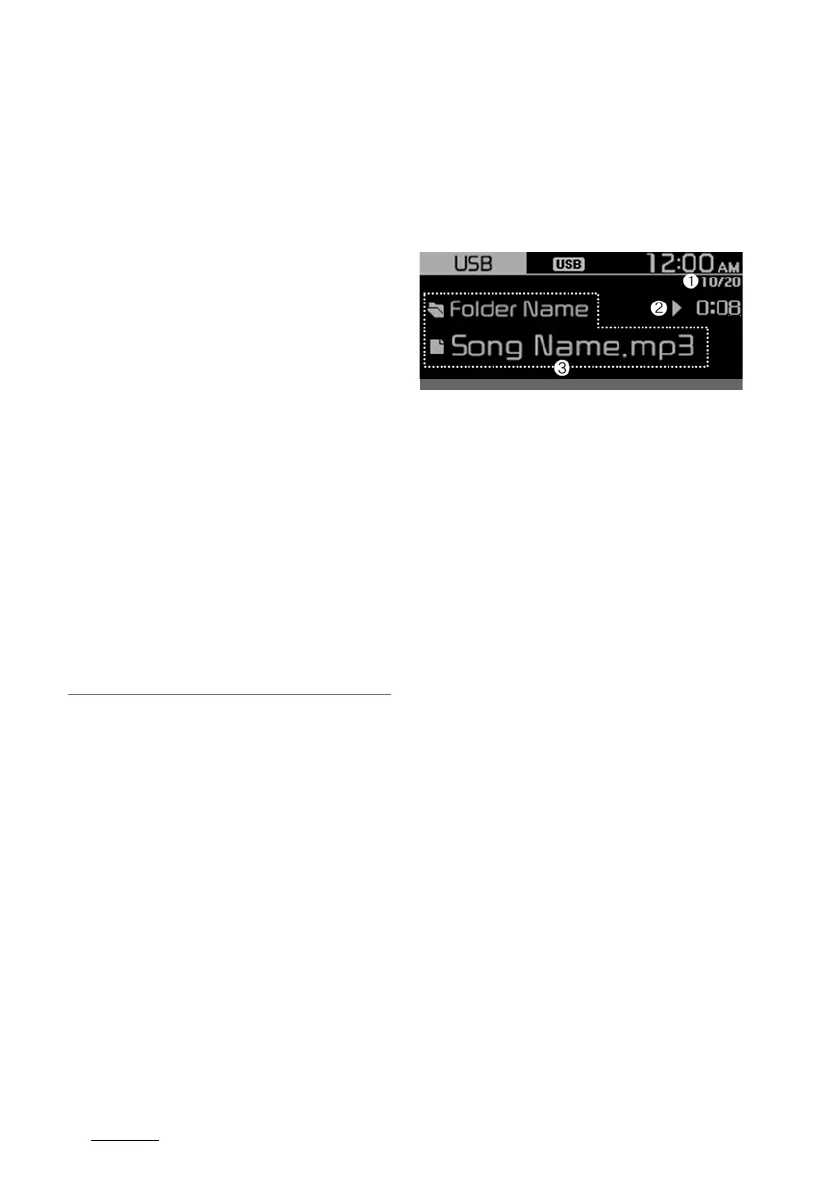
1. Current file number and total
number of files
2. Playback time
3. Information about the song cur
-
rently playing
Press the [MENU/CLOCK] button on
the control panel to access the fol
-
lowing menu options:
䳜 List: Access the file list.
䳜 Folder list: Access the folder list.
䳜 Information: Display information
about the song currently playing.
䳜 Sound settings: You can change
the settings related to sounds,
such as location where sound will
be concentrated and the output
level for each range.
- Position: Select a location
where sound will be concen
-
trated in the vehicle. Select
Fade (Fader) or Balance, turn
the [TUNE] knob to select the
desired position, and then press
the knob. To set sound to be
centred in the vehicle, select
centre (Centre).



 To Next Page