205
6
6
Driving your vehicle Reverse Parking Collision-Avoidance Assist (PCA)
Reverse Parking Collision-Avoid
-
ance Assist (PCA) (if equipped)
Reverse Parking Collision-Avoidance
Assist will can warn the driver or
assist with braking to help reduce
the possibility of collision with a
pedestrian or an object when back
-
ing up.
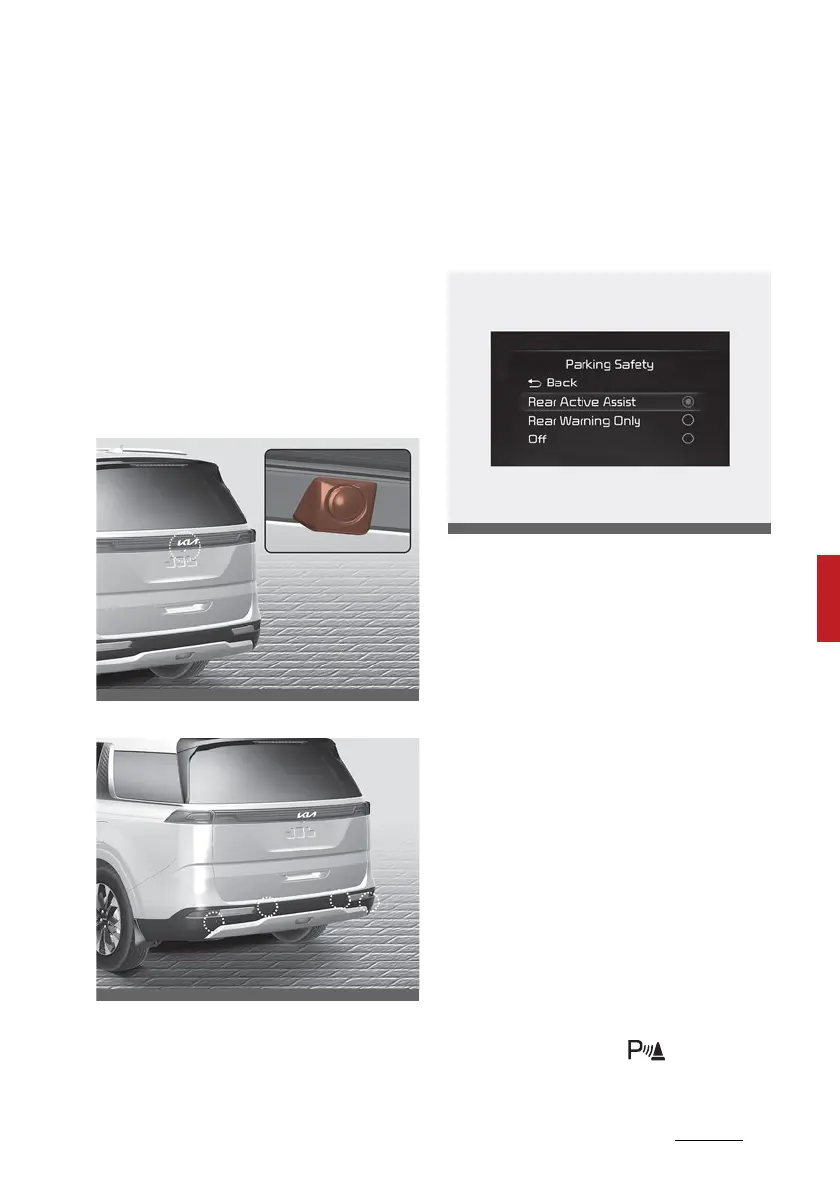
Detecting sensor
Rear view camera
Rear ultrasonic sensors
Refer to the picture above for the
detailed location of the detecting
sensors.
Reverse Parking Collision- Avoid
-
ance Assist settings
Setting features
Parking Safety
With the vehicle on, select or dese
-
lect 'Driver Assistance → Parking
Safety' from the Settings menu to
set whether or not to use each
function.
䳜 If 'Rear Active Assist' (or 'Active
rear assist') is selected, Reverse
Parking Collision-Avoidance Assist
will warn the driver and assist
with braking when a collision with
a pedestrian or an object is immi
-
nent.
䳜 If 'Rear Warning Only' (or 'Rear
warning only') is selected, Reverse
Parking Collision-Avoidance Assist
will warn the driver when a colli
-
sion with a pedestrian or an
object is imminent. Braking will
not be assisted.
䳜 If Parking Safety ( ) button is
pressed more than 2 seconds,



 To Next Page