Infotainment system
85
Audio (Without Touch Screen)
(With Bluetooth
Wireless Technology)
* The system's actual appearance and layout may differ depending on the
vehicle model and specification.
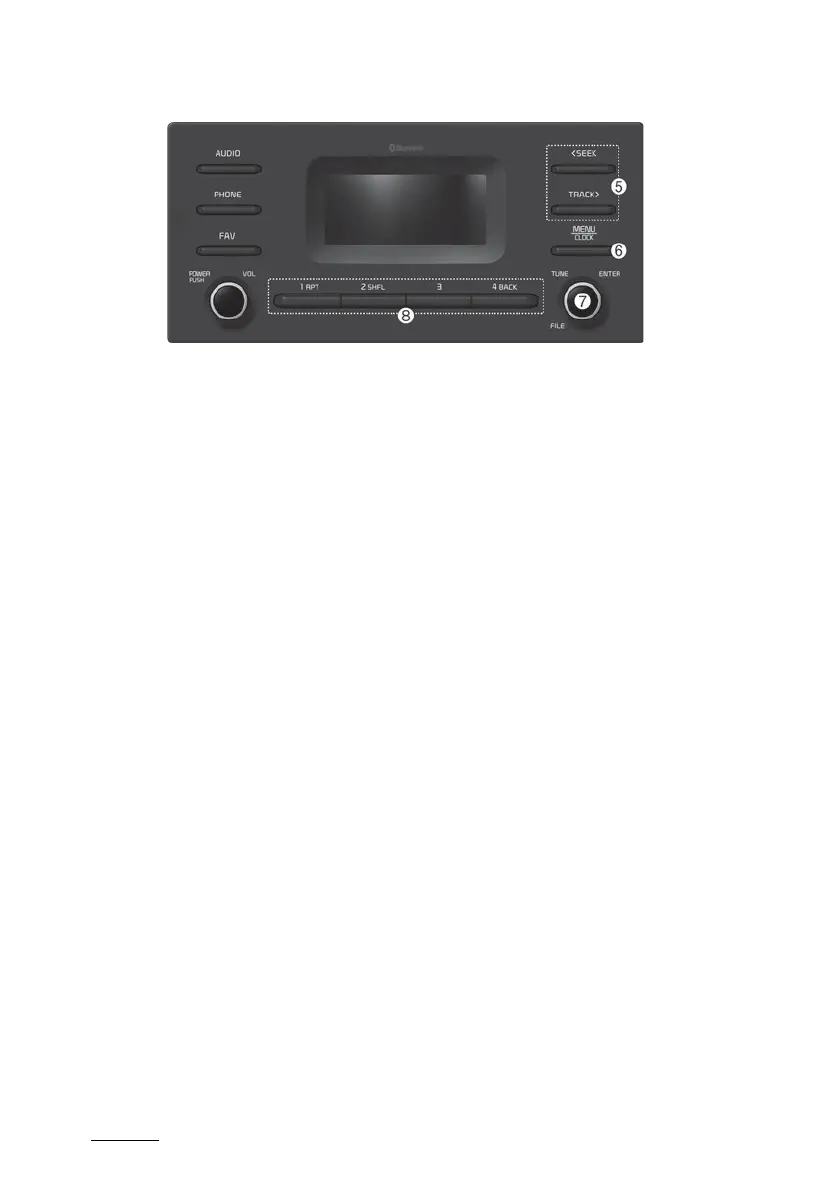
5. SEEK/TRACK button
䳜 Change the station/track/file.
䳜 Whilst listening to the radio,
press and hold to search for a
station.
䳜 Whilst playing media, press and
hold to rewind or fast forward
(except for Bluetooth audio
mode).
6. MENU button/CLOCK button
䳜 Press to access the menu
screen for the current mode.
䳜 Press and hold to access the
time setup screen.
7. TUNE knob/FILE knob/ENTER but
-
ton
䳜 Whilst listening to the radio,
turn to adjust the frequency.
䳜 Whilst playing media, turn to
search for a track/file (except
for Bluetooth audio mode).
䳜 Whilst searching by turning the
knob, press to select the cur
-
rent track/file (except for the
Bluetooth audio mode).
8. Number buttons (1 RPT ~ 4 BACK)
䳜 Whilst listening to the radio,
press to listen to a saved radio
station.
䳜 Whilst listening to the radio,
press and hold to save the cur
-
rent radio station to the preset.
䳜 In the USB/Bluetooth audio
modes, press the [1 RPT] but
-
ton to change the repeat play
mode. Press the [2 SHFL] but
-
ton to change the shuffle play
mode.
䳜 Press the [4 BACK] button to
return to the previous screen
(except for the radio preset
list).



 To Next Page