5
Infotainment system
Audio (Without Touch Screen)
5
7
Audio (Without Touch Screen)
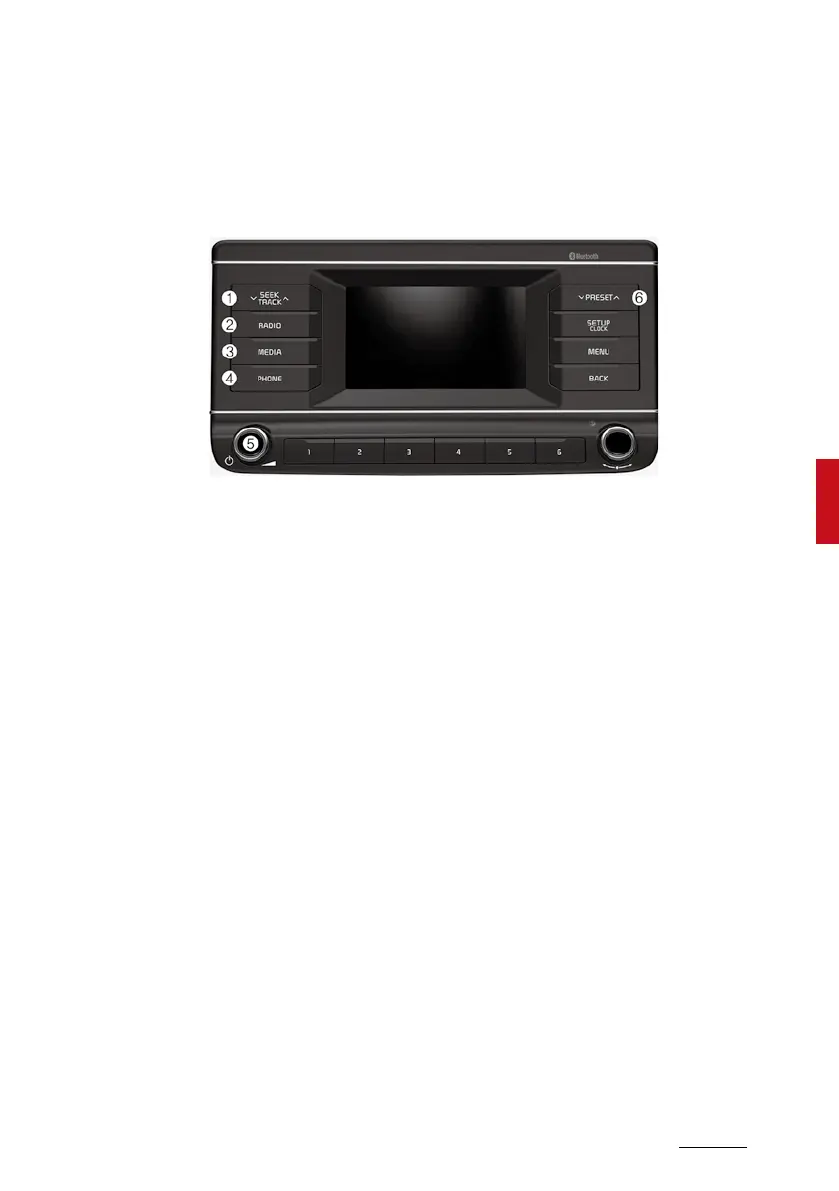
System layout - control panel
WithBluetooth®WirelessTechnology
*Thesystem’sactualappearanceandlayoutmaydifferdependingonthe
vehiclemodelandspecification.
1. SEEK/TRACK button
•Changethestation/track/file.
•Whilelisteningtotheradio,
pressandholdtosearchfora
station.
•Whileplayingmedia,pressand
holdtorewindorfastforward
(exceptfortheBluetoothaudio
mode).
2. RADIO button
•Presstoturnontheradio.While
listeningtotheradio,pressto
changetheradiomode.
3. MEDIA button
•Presstoplaycontentfroma
mediastoragedevice.Press
repeatedlytoswitchmodes
betweenUSB(iPod)and
Bluetoothaudio.
•Ifyouhavemultiplemedia
storagedevices,selectonefrom
themediaselectionwindow.
4. PHONE button
•Presstostartconnectinga
mobilephoneviaBluetooth.
•AfteraBluetoothphone
connectionismade,pressto
accesstheBluetoothphone
menu.
5. POWER button/VOL knob
•Presstoturnthesystemonor
off.
•Turntotheleftorrighttoadjust
thesystemsoundvolume.
6. PRESET button
•Whilelisteningtotheradio,press
tomovetopreviousornextpage
ofthepresetlist.


 To Next Page