Issue: 08/2012
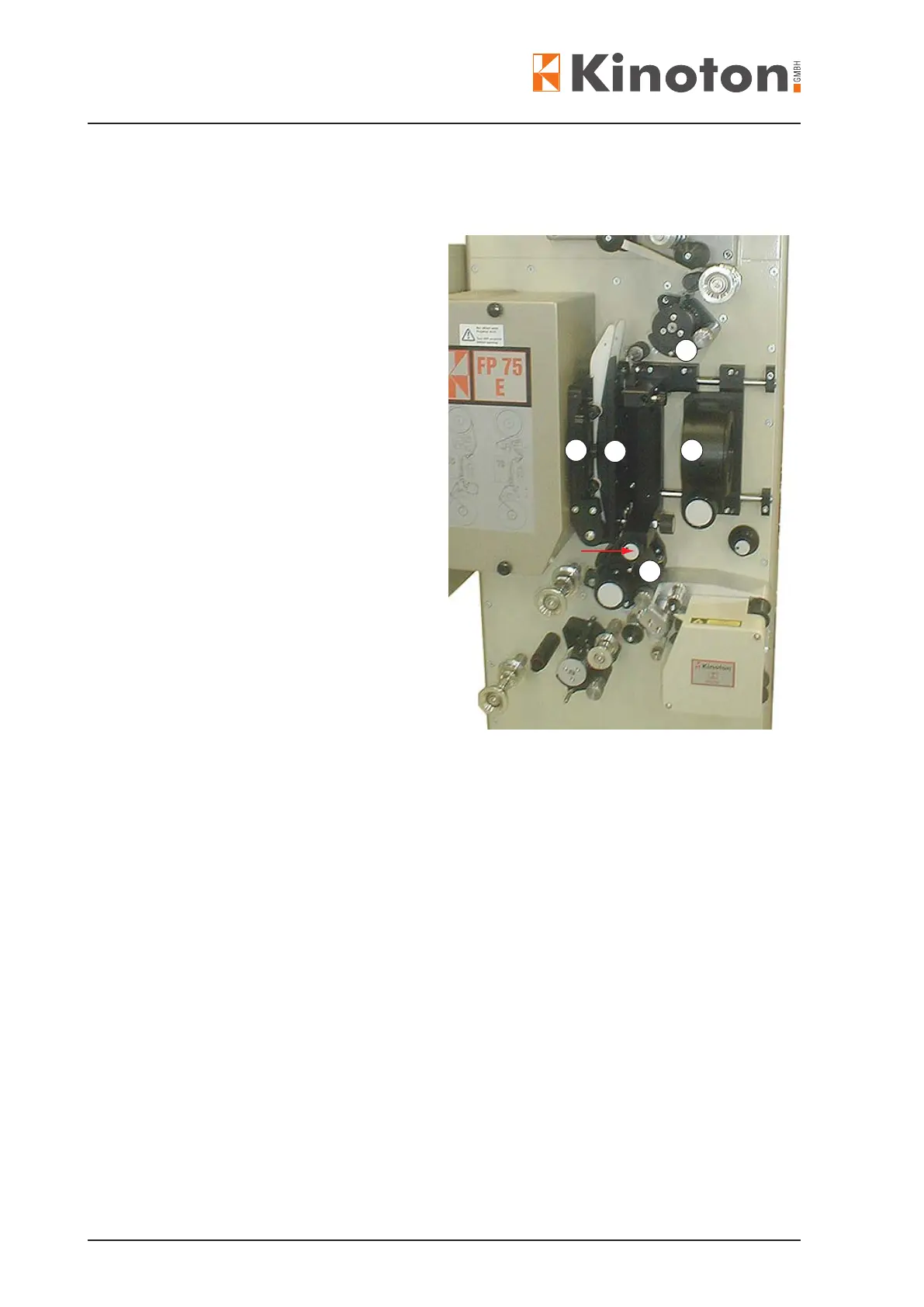
The following parts can be changed corresponding to the lm format:
of the combined feed
and bottom sprockets
- Removing:
Turn the chuck knob clockwise
and pull out the pad shoe.
- Inserting:
Pre-stress the chuck knob by
turning it clockwise and insert
the pad shoe shaft.
Release the chuck knob when
the pad shoe arrests.
Á
Loosen the knurled screw,
pull out the lm gate, push in the
other lm gate and
fasten the knurled screw again.
Â
Hang in or out the 35 mm or
70 mm lm skate
Ã
- Removing:
Loosen the handwheel (arrow) and pull out the lens together with the arresting
tube.
- Inserting:
Insert the corresponding lens together with the arresting tube and fasten it by
turning the handwheel.
- Removing:
Loosen the 3 Allen screws and remove the friction shaft.
- Inserting:
Insert the 35 mm or 70 mm friction shaft (do not forget to add the distance disk
when inserting the 35 mm lm shaft. Then fasten the Allen screws again.
Set on the operating panel to select the desired lm format and
restart the projector.
2
1
4
3
1



 To Next Page