Chapter 3 Basic operation MDC-2200/2500 Series
0093125002-04 3-8
3.10 Measure distance and bearing of a target
Measure distance (VRM: Variable Range Marker)
The VRM is used to measure the distance of a target from the own ship’s position and the optional
position.
Two types, [VRM1] and [VRM2] are provided.
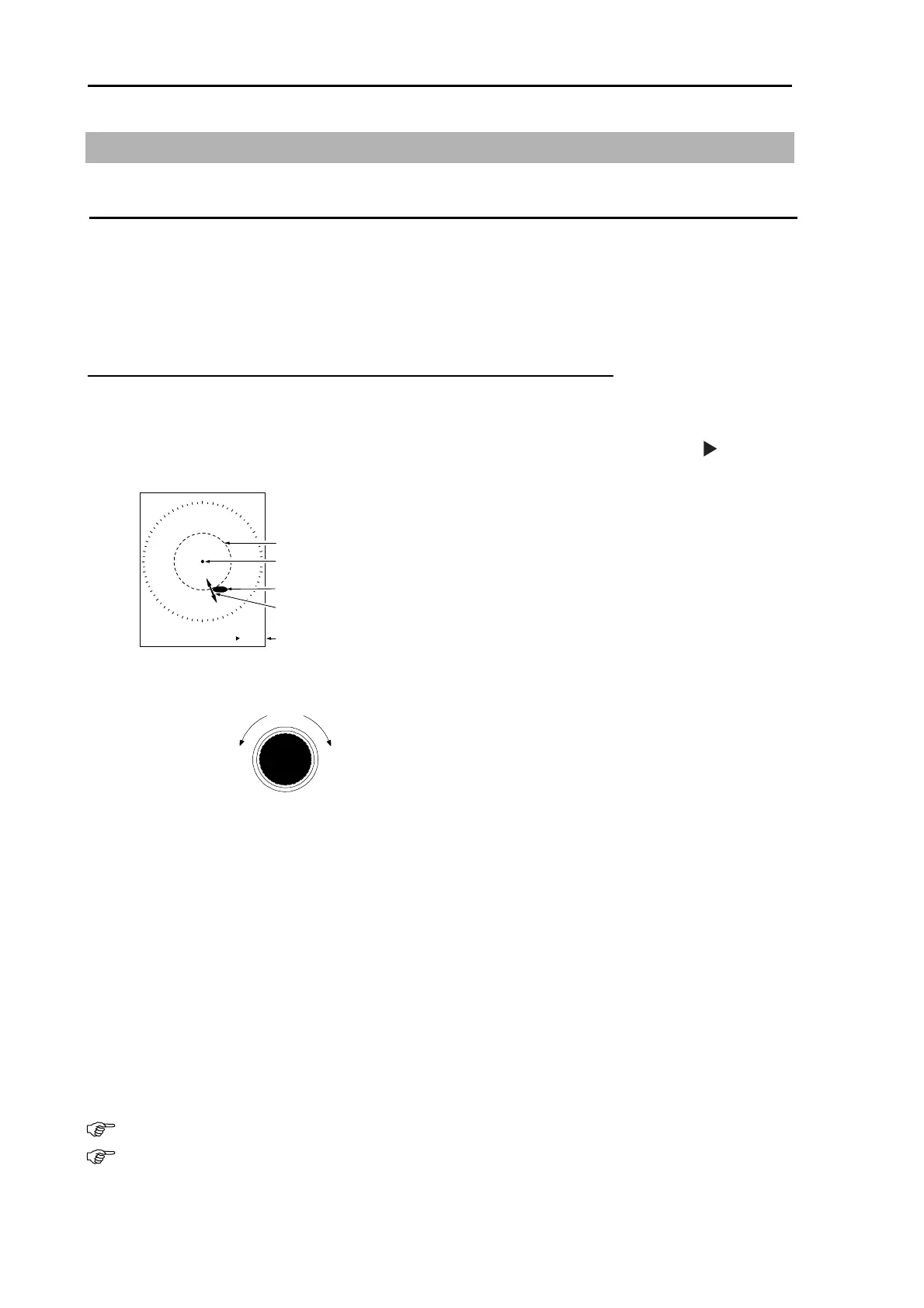
After selection of [VRM1] or [VRM2], Adjust [VRM] to the target by turning knob and then measure the
distance.
VRM can be shifted quickly when being operated by pressing the knob.
1 Press [VRM1] key to display a dotted line circle of [VRM1].
The distance to VRM1 is indicated on the lower right on the screen, and also a
symbol is
displayed on the left side of the distance display.
VRM1
Target
VRM1
8.990NM
Own ship
Distance to Target
Radius changed by VRM knob
2 The dotted line circle is aligned to the target to be measured its distance by turning [VRM] knob.
The value of distance display is the distance to the target.
Increace o
range
Decreace of
range
VRM knob
3 Press again the [VRM1] key to turn VRM1 off. The distance display in lower right of the screen is
turned off simultaneously.
4 Press [VRM2] key to display the broken line circle of VRM2. Operation procedure and distance
display are the same procedure as for [VRM1].
5 Both VRM1 and VRM2 can be displayed simultaneously by pressing [VRM1] key and thereafter
[VRM2] key.
6 Switching over of VRM1 and VRM2 are performed by pressing [VRM] key to be used.
(For MDC-2500 series. selected VRM key color changes to red.)
・ The unit of VRM distance can be selected from “NM, km, sm, and RANGE LINK.
To be set up as follows: Detail menu => “ MARKER” => “ VRM1 UNIT” or “ VRM2 UNIT”
Detail menu shall be referred to “Display detailed menu” (page 4-2)” for release protection.
Refer to “Measure distance and bearing between two points (Offset)” (page 3-13) in order to
offset the center point of VRM to the intended position (position of cross cursor).



 To Next Page