7-60
Setup Mode
The Setup Editor
Signal Flow
Whenusingeffects,itisimportanttounderstandhowyoursignalisbeingprocessed.Foreach
zone(ortrackinSongMode)yoursignalcanbesenttotheAuxeffectsbeforeorafterbeing
processedbytheProgram’sInserteffects.
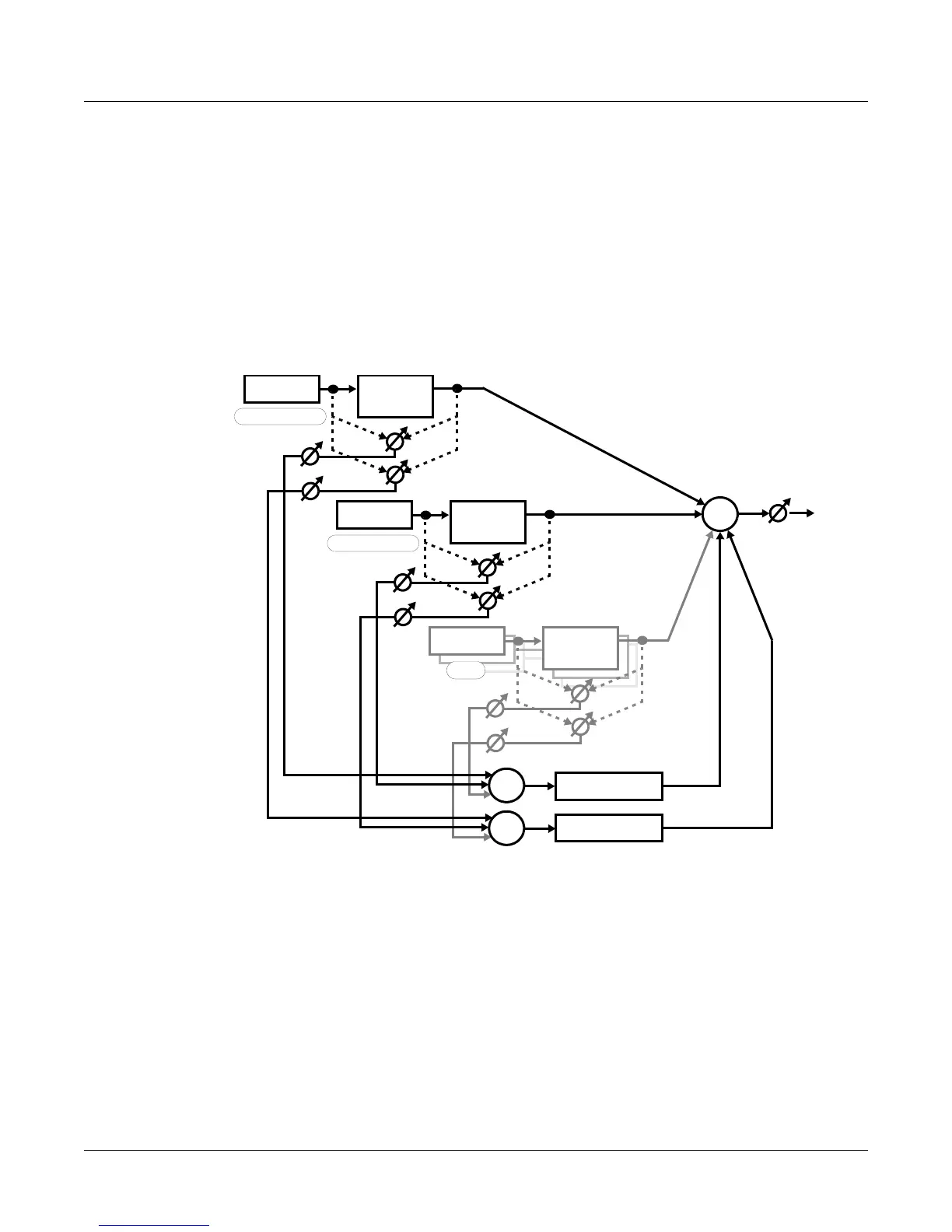
Thediagrambelowshowsthepossibleroutesthatthesignal
ofaprogramcan“flow”throughto
reachthedifferenttypesofeffects.Followtheappropriateroutetohelpvisualizethestagesin
whichthesignalisbeingprocessed.Thefirsttwozones(ortracksinSongMode)arediagramed
asanexample(representedbydarklines.)The14additional
availablezones(ortracksinSong
mode)arerepresentedbygraylines(label edasEtc.)Thedottedlinesrepresentyouroptionsfor
choosingeitherapre‐orpost‐insertAuxsendforeachzone/track.Acirclewithanarrow
throughitshowsapointwherethesignallevelcanbe
adjusted.Acircledsigma()shows
wheresignalsaremixedtogether.
Whenusingeffects,thefirstdecisiontomakeiswhetheryouwanttouseanInsertorAuxeffect
(seetheInsertEffectsandAuxEffectssectionsabove.)Ifyouareusingbothtypesofeffectsfora
zone
(ortrackinSongMode,)youcanchoosetohaveyoursignalsenttotheAuxeffectsbefore
orafterbeingprocessedbytheInserteffects.WhenyoursignalissenttotheAuxEffectsafter
beingprocessedbytheProg ram’sInsertEffects,thisiscalledapplyingtheAuxEffectpost
‐
Insert.WhenyoursignalissenttotheAuxEffectsbeforebeingprocessedbytheProgram’sInsert
Effects,thisiscalledapplyingtheAuxEffectpre‐Insert.
WhenanAuxEffectisappliedpost‐Insert,thewet(processed)Auxsignalhasaseriesofeffects
appliedtoit—i.e.,cascaded
effects.Thismeansthatthesignalthatisblendedbackinfromthe
resultoftheAuxEffectwillalsocontaintheresultoftheInsertEffect.
WhenanAuxEffectisappliedpre‐Insert,thewetAuxsignalhasnoInserteffectappliedtoit,
andthefinaloutput
hasparalleleffects—i.e.,distincteffects.Thismeansthatthesignalthatis
blendedbackinfromtheresultoftheAuxEffectwillnotcontaintheresultoftheInsertEffect.
Insert
Program
Pre Post
Send Levels
Chain
Insert
Program
Pre Post
Send Levels
Chain
ZONE/TRACK 1
ZONE/TRACK 2
Etc.
AUX 2 Chain
AUX 1 Chain
Output








 To Next Page