Setup Mode
The Setup Editor
7-61
The FX Page
UsetheFXPagetodistributeprocessingpower(DSPunits)fortheeffectsofthezone(s)(or
track(s)inSongMode)assignedtoeachMIDIchannel.(SeeChannel on page 7‐7andTrack
Channels on page 10‐7fordetailsonsettingtheMIDIchannelforeachzone/trackinSetup/Song
moderespectively.)EachEffectChain
iscomposedofaneffect‐boxoraseriesofeffect‐boxes.
Eacheffect‐boxusesacertainamountofthePC3LE’seffectsprocessingpower.Theamountof
processingpowerusedbyaneffect‐boxorChainreflectshowcomplextheeffect’salgorithm
is—morecomplexeffectsrequiremoreprocessingpower.
Accordingly,eachChainandeffect‐
boxusesacertainnumberof“DSPunits”—youcanhaveupto10DSPunitsusedatatimeinthe
currentsetuporsong.ThenumberofDSPunitsrequiredtoloadeffectsforthecursor‐
highlightedchannelisshownatthetopofthe
page,followedbythenumberoftotalDSPunits
requiredtoloadalleffectsforthesetuporsong.Ifyouattempttousemorethan10DSPunits,
thePC3LEwillindicatethatyouhavegoneoverthelimitbydisplaying(Max10)onthetopline
ofthe
page.
Effectsareloadedforasmanychannelsasispossible,untilalloftheDSPunitsareusedup.In
SetupandSongMode,theMIDIchannelofthelowestusedzone/trackwillhavepriorityfor
usingDSPunits.Thiszone/trackwilluseasmanyDSPunitsasitneed
foritseffects,thenthe
MIDIchannelofthenexthighestusedzone/trackwilluseDSPunitstoloaditseffects, andthis
continuesuntilalloftheDSPunitsareusedup.
IfyourunoutofavailableDSPunits,thereareafewmethodsyoucanuseinorder
tomanage
andfreeupadditionalDSPunits.First,youcansimplydisableeffectsallocationfortheMIDI
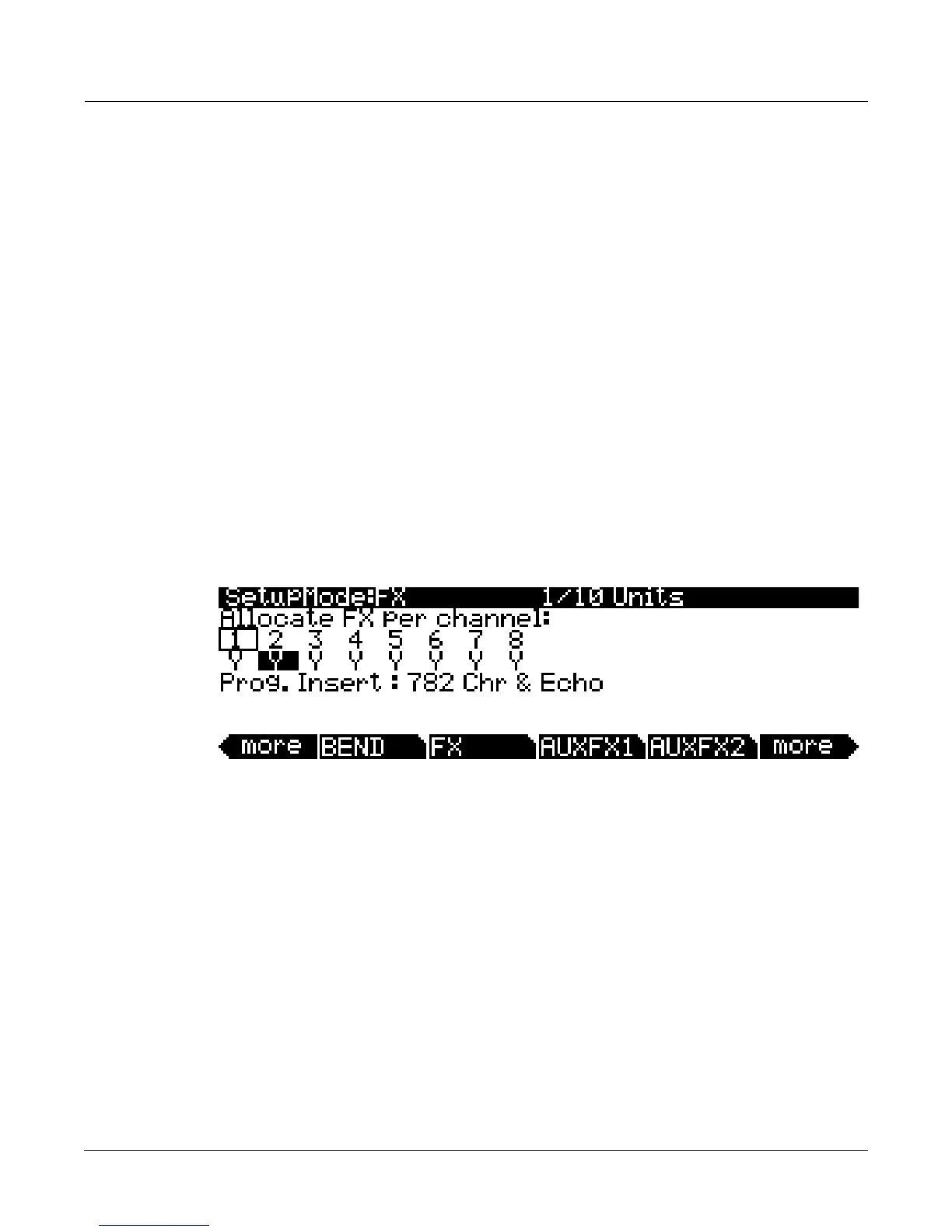
channelsoflessimportantzones/tracks. ThisisdoneontheFXpage(ineitherSetuporSong
mode,)whichprovidesper‐channelcontrolovereffectsallocation(seebelow.)
Usethecursorbuttons
toselectachannelnumber(onlythe channelnumbersusedinthecurrent
setup/songareshown.)TheselectedchannelwillhaveitsYorNhighlighted.Thechannel
numberwithaboxarounditisthespecifiedAuxEffectchannelinSetupandSongmode(see
AuxFXChannel on page 7‐64
forSetupmodeandFXTrack on page 10‐20forSongmode.)Each
channelcanbesettoYtoallocateeffectsforthezone(s)/track(s)assignedtothatMIDIchannel,
ortoNtonotallocateeffectsforthatchannel.UsetheAlphaWheelor‐/+buttonstochange
betweenY
andN.SomechannelssettoYmaybedisplayedas(Y).Thismeansthattherearenot
enougheffectsresourcesavailableforthatchannel,andthatchannel’seffectsarenotloaded.As
thecursorismovedfromlefttoright,theID#andnameoftheInsertandAux
Effectschainsfor
eachselectedchannelaredisplayedonthebottomhalfofthepage(theAuxchainisshownonly
ifthespecifiedAuxEffectschannelisselected.)
Alternatively,ifyoudon’twanttodisableeffectsforanychannelsinordertofreeupDSPunits,
youmaywant
toeditsomeprogramstousedifferenteffectsthatusefewerDSPunits(seeThe
EFFECTS(FX)Page on page 6‐13.)YoucanentertheProgramEditorforazone’sprogramfrom
withintheSetupEditor.Todothis,selecttheProgramfieldontheCH/PROGpageoftheSetup
Editorand
presstheEditbuttontotheleftofthedisplay.Whenfinished,exittheProgram
EditortoreturntotheSetupEditorofthecurrentsetup.Insongmode,youmaywishtoallocate
onlyonechannelatatimewhenrecordingtracksoneatatimetoanexternalmulti
‐track
recorder.Byrecordingeachchannelseparately,eachchannelwillbeabletouse10DSPunitsfor
itseffects.














 To Next Page