Program Mode
V.A.S.T. and KB3 Programs
6-7
YoucanalsochangetheprogrammedsettingsfortheKB3‐modebuttonstoperformnon‐KB3
functions,suchascontrollinganAuxeffect,bychangingthesettingsontheProg ramEditor
Parameterspage.
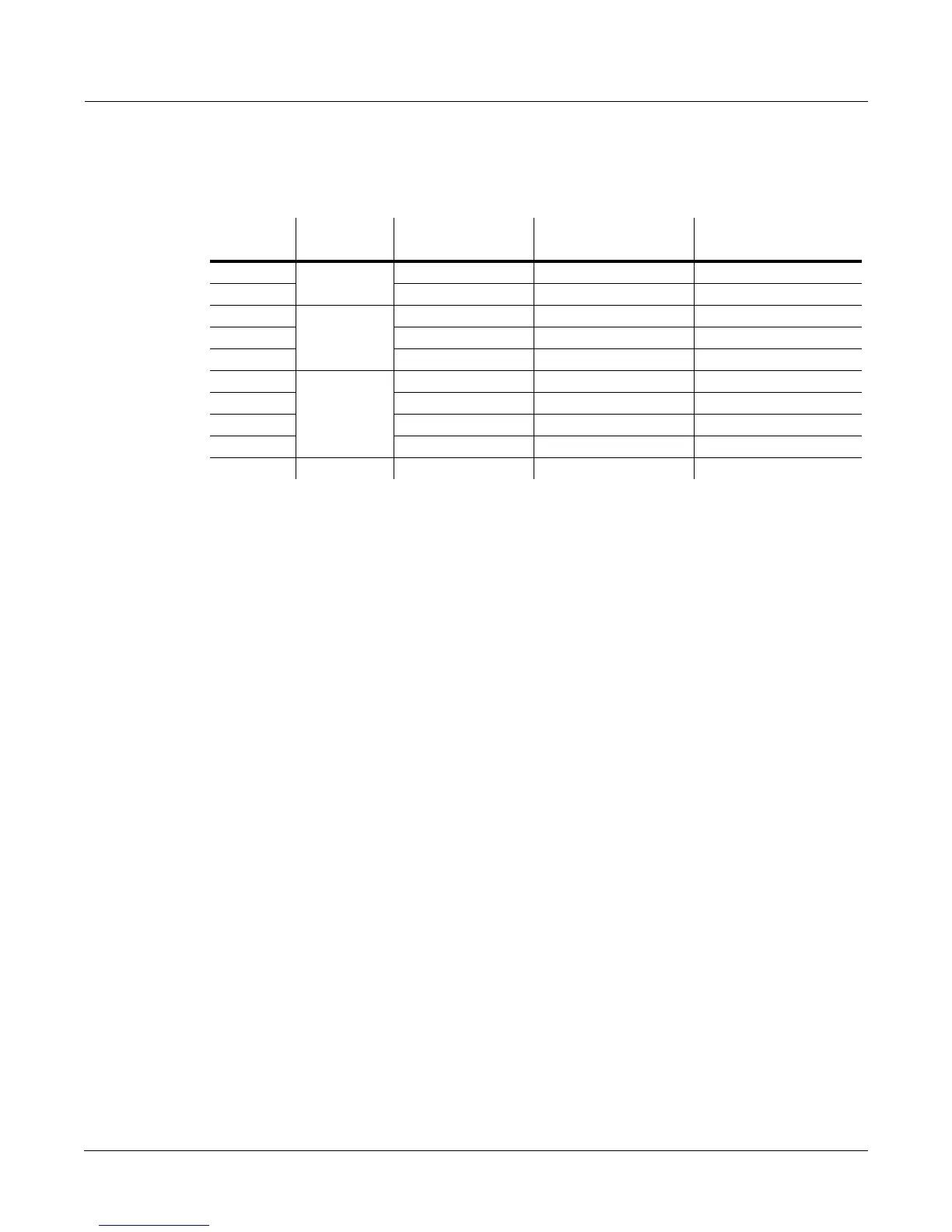
Table 6-2 KB3 Mode Effects Buttons and Corresponding Parameters
Additional Controller Assignments In KB3 Mode
OtherdefaultassignmentsforfactoryKB3programsinclude:
Knob10andCCPedal1controltheSwell
(volumepedal)parameter.
Knob11controlstheLeakageparameter,whichcontrolsthelevelofsimulatedsignal“bleed”of
adjacenttonewheels.Generally,turninguptheleakageparametercreatesa“dirtier”organ
sound.Thiscanbeusedforemulatingdifferentagedorgans,asanolderorganwillhavemore
leakageas
itagesanditscapacitorsbegintoleak.
TheModWheelcontrolsDistortionDrive.
SwitchPedal1(thesustainpedal)controlstheRotaryFootSwparameter,whichtogglesthe
Rotaryspeedbetweensloworfast.
Switch #
Effect
Category
Button Name
Corresponding
Parameter
Comments
1
Rotary
Slow/Fast Rotary Slow/Fast
2 Brake Rotary Brake
3
Vibrato
On / Off Chorus/Vibrato On/Off
4 Chorus / Vibrato Chorus/Vibrato Select Disabled if Switch 3 is off
5 Depth 1 / 3 Chorus/Vibrato Depth Disabled if Switch 3 is off
6 (row 2)
Percussion
On / Off Percussion On/Off
7 (row 2) Volume Loud / Soft Percussion Level Disabled if Switch 6 is off
8 (row 2) Decay Fast / Slow Percussion Decay Disabled if Switch 6 is off
9 (row 2) Pitch High / Low Percussion Pitch Disabled if Switch 6 is off
10 (row 2) Click On / Off KeyClick On/Off














 To Next Page