9. DRIVE AND DRIVEN PULLEYS
9-13
MX’er SYSTEM
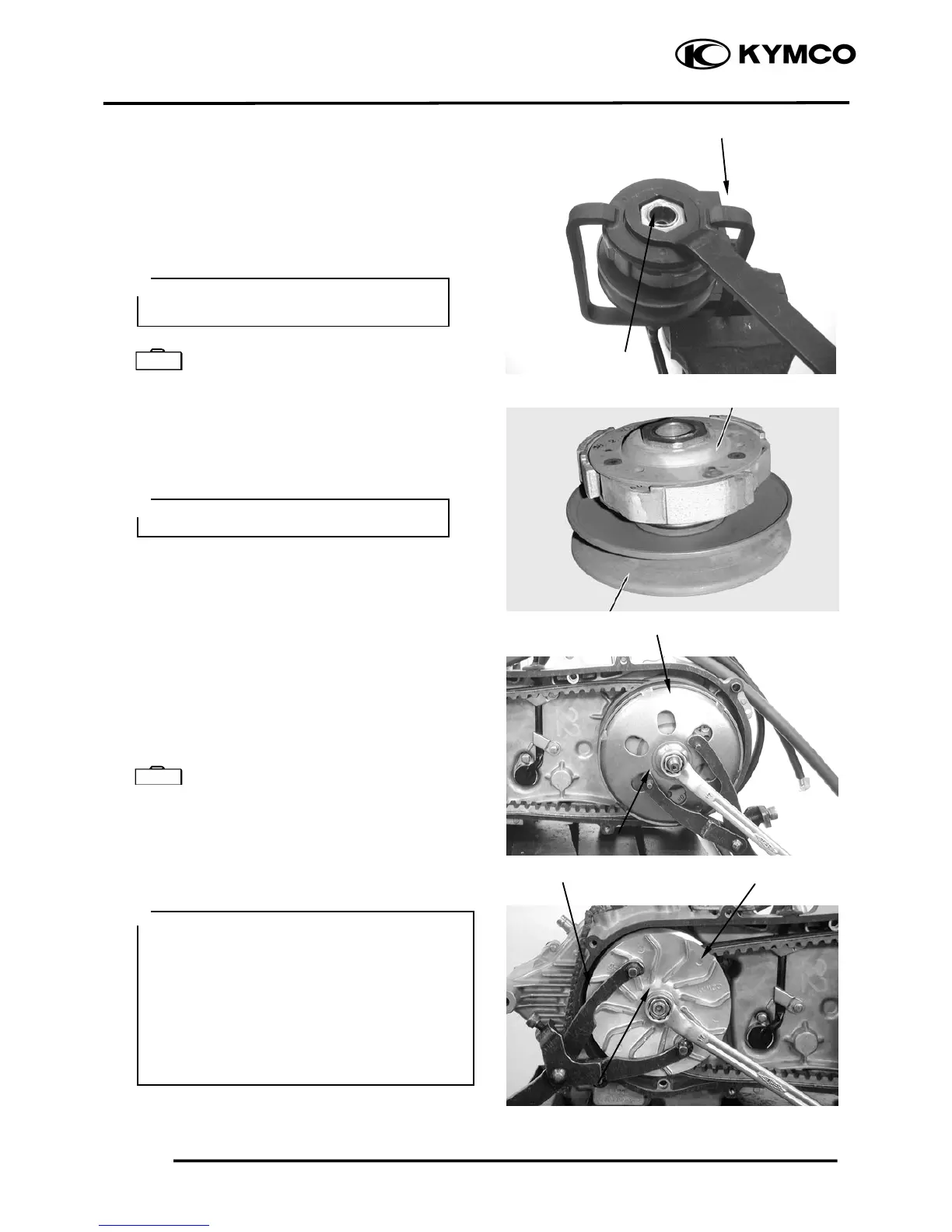
Compress the clutch spring compressor and
install the drive plate nut.
Set the clutch spring compressor in a vise and
tighten the drive plate nut to the specified
torque.
Torque: 5.06.0kgf-m
Clutch Spring Compressor E027
INSTALLATION
Install the clutch/driven pulley onto the drive
shaft.
Install the clutch outer.
Hold the clutch outer with the flywheel
holder.
Install and tighten the clutch outer nut.
Torque: 5.5kg-m
Universal Holder E017
Install the drive belt.
Install the drive pulley face, starting ratchet
and drive face nut.
T orque: 5.56.5kgf-m
Clutch Spring Compresso
Be sure to use a clutch spring
compressor to avoid spring damage.
Special
Lock Nut Wrench
Clutch
Keep grease off the drive shaft.
en installing the drive pulley face,
com ress it to let the drive belt move
downward to the lowest position so that the
drive pulley can be tightened.
Install the starting ratchet by aligning the
starting ratchet teeth with the crankshaft
teeth.
Do not get oil or grease on the drive belt or
pulley faces.
p



 To Next Page