LaCie Ethernet Disk RAID (Firmware version 1.4)
User Manual
page 11
About Your LaCie Ethernet Disk RAID
Front View (continued)■
7
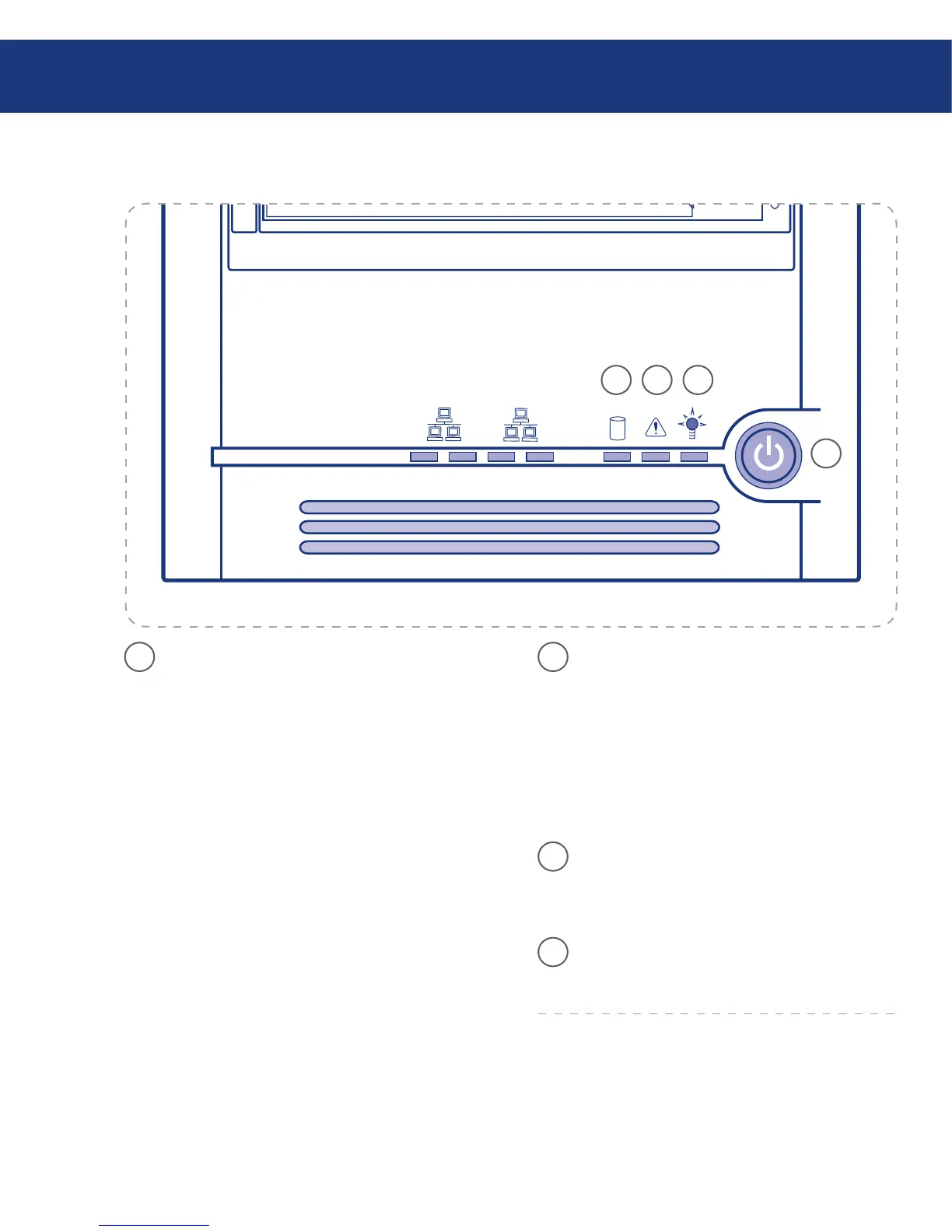
Global Disk Status LED –
Continuous GREEN indicates hard disk health
is good (1-4 hard disks).
Continuous YELLOW indicates a critical or
non-recoverable condition exists. It also indicates
the hard drives are not configured when initially
setting up the system.
Blinking YELLOW indicates (1) one or more
hard disks are experiencing a fault condition or
(2) a RAID is being rebuilt.
❖
❖
❖
7 8
10
9
8
System Status LED –
Continuous GREEN indicates the system is
running and operating normally.
Blinking GREEN indicates the system is in pro-
cess of powering up or shutting down.
Continuous YELLOW indicates a fault is pres-
ent, either a critical or non-recoverable condi-
tion.
9
Power LED – Continuous GREEN indicates
the system has power applied to it. No light indi-
cates the system does not have power applied to
it.
10
Power Button – Toggles the system power on/
off.
❖
❖
❖














 To Next Page