137
16/09/2013MM00778-a-
H4652
LN4652
0 675 92
2 3
4
5 6
1
DC - In
MH201
MH201
EN
8 key multifunction control
BUS SCS
Deleting a scenario
To delete the scenario, the procedure is as follows:
1) The F420 scenario module must be in configuration mode with self-learning enabled;
2) Press and release the programming key of the multifunction control; the LEDS start
flashing slowly (1 sec. ON and 1 sec. OFF);
3) Within 20 seconds press and hold down for 4 seconds the key of the scenario to be
cancelled on the multifunction control;
4) The LEDs flash quickly for 4 seconds, after which it will be possible to repeat point 2 to
delete the other programming.
5) Press and quickly release the programming pushbutton on the back of the control, or
wait 20 seconds to exit the deleting procedure.
NOTE: to reset the whole memory, it will be necessary to directly act on the
scenario module: press “DEL” for ten seconds, after enabling the scenario module for
programming.
4) Swivelling modes M=0/I; ↑↓; ↑↓M
These modes ensure quick installation without the need for further learning, or
scenario modules, enabling the control of 4 light points or shutters with consecutive
addresses.
The A PL address is the light point or shutter controlled by the first pair of keys (the
keys are paired horizontally), the subsequent pairs controls the subsequent light points
or shutters.
If the Amb or Gr configurators are connected to A, in the same way, the 4 pairs of
keys control consecutive rooms or groups starting from the one indicated by the PL
configurator.
5) Scenario programmer mode, M=CEN
The matching between a scenario configured in the scenario programmer MH200N or
MH201, and the corresponding controls keys of the multifunction control, is completed
during the programming of the scenario itself using the dedicated software.
Always assign to the control a unique A/PL address on the system (it must not be
used by any other device installed on the BUS); the A=0, PL=0 configuration is not
acceptable. This operating mode can only be used if the system includes a scenario
programmer (MH200 or MH201).
Possible function Value of M congurator
ON/OFF control: On control with the left key, O control
with the right key.
For point-to-point controls the key perform the On/O
function with a short pressure and
the adjustment with an extended pressure: for the other
controls, only On/O are performed
0/I
Control (UP/DOWN for shutters): up and down control,
until fully open or closed
↑↓
Monostable control (UP/DOWN for shutters): up and
down control, for the time the key is pressed
↑↓ M
LED configurator
Setting the backlight intensity
The configurator in the LED housing gives the possibility of setting the backlight at the
desired level; see table:
LED configurator Brightness level
0 default setting = 30%
1 level 10 %
2 level 15 %
3 level 20 %
4 level 25 %
5 level 30 %
6 level 40 %
7 level 50 %
8 level 60 %
9 level 80 %
OFF level OFF
ON level 100 %
This is performed using the appropriate MyHOME_Suite application. This mode has
the advantage of offering many more options when compared with the physical
configuration. The software configuration requires Ethernet connection between the
system and the PC, through the IP MH201 scenario module.
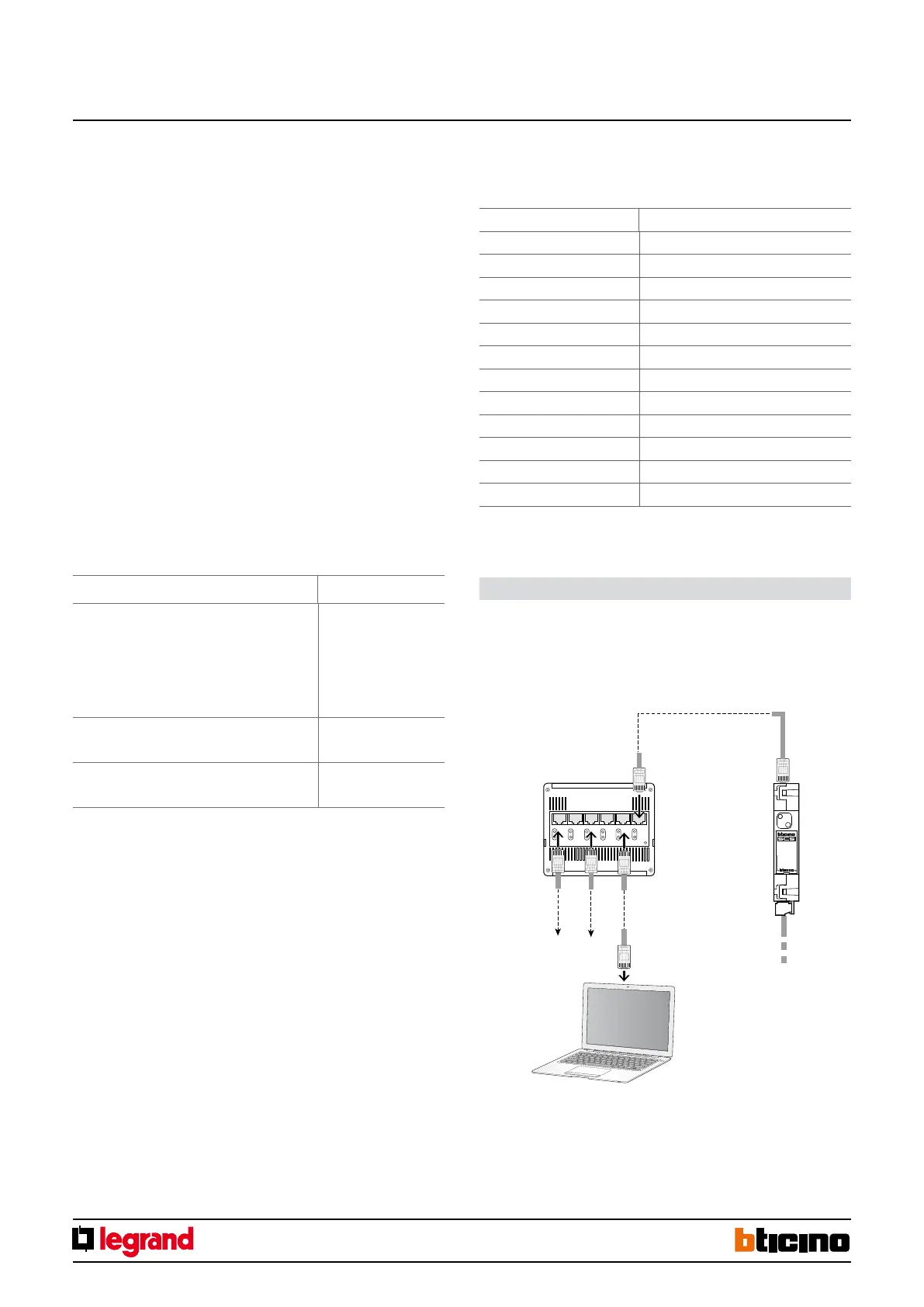
Configuration using the software in a typical hotel system
Ethernet connection to the system
HUB Switch
BUS-SCS
PC for room management
Ethernet
network
Ethernet
network



 To Next Page