HC4654
N4654N
HS4654
NT4654N
L4654N
AM5834
067216
HD4654
573900
573901
153
PL2/PF2
A
PL1/PF1
M
PL3/PF3
PL4/PF4
1
2
8
4
7
6
5
3
Technical data
Power supply via SCS BUS: 27 Vdc
Operating power supply with SCS BUS: 18 – 27 Vdc
Current draw: 8.5 mA
Operating temperature: 5 – 35°C
Size: 2 ush-mounted modules
Description
The receiver allows you to add or replace the manual control with the remote control via
the remote controls 3527N and 3529.
The buttons on the remote control can be paired with: commands intended for actuators
with 1 relay for single loads, commands for actuators with 2 relays for double loads
(rolling shutter motor, etc.), scenario controls, and sound system and video door
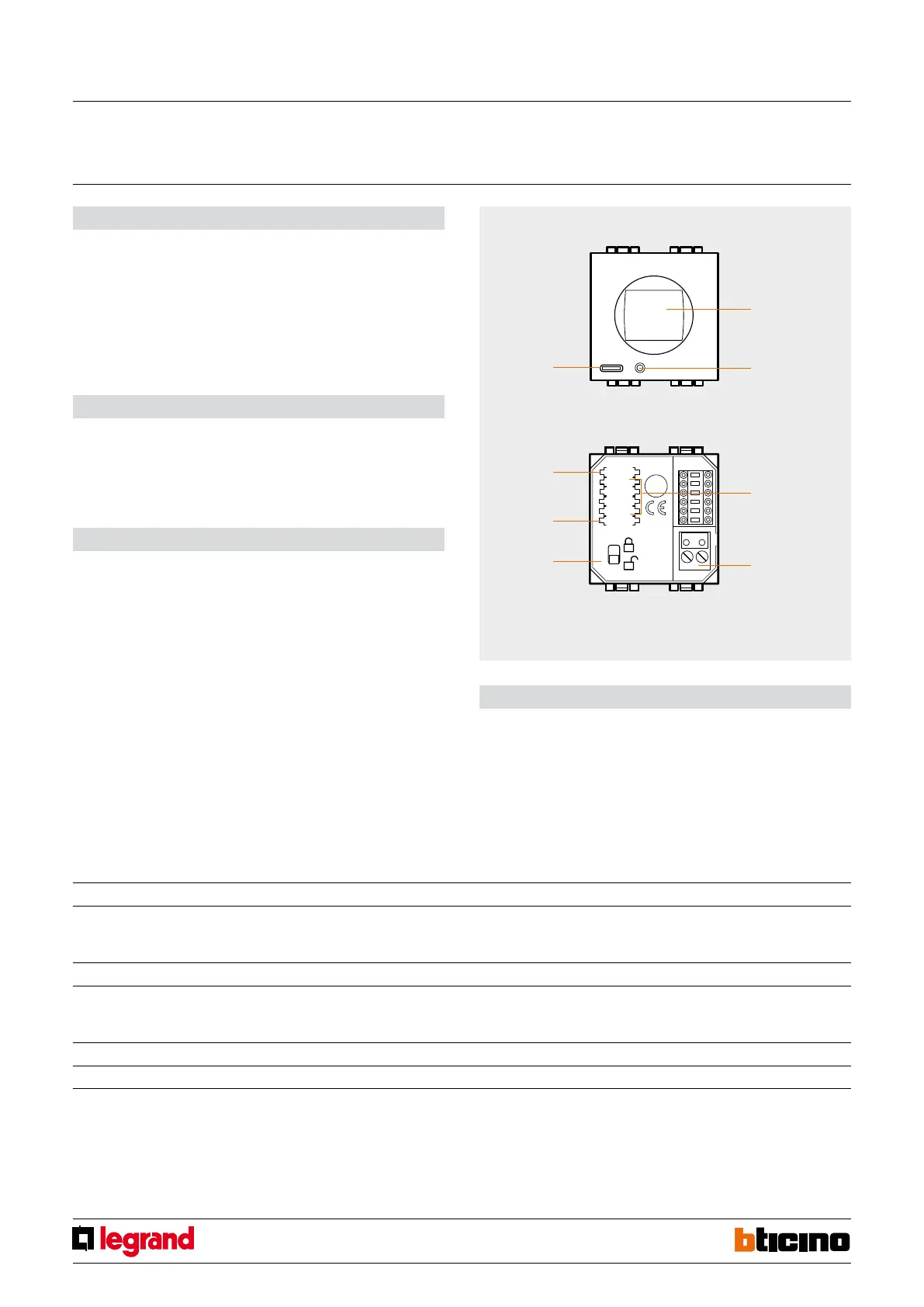
entry controls. On the front of the device, in addition to the IR receiving lens, there is
a programming button and a LED to indicate reception of the IR signal sent from the
remote control and the programming phase.
Mode M Possible functions
A - remote control 1 – 4 repeat 4 generic controls (On/O, Up/Down) with 4 buttons on the remote control. The required commands are saved by the receiver
during installation by inserting the congurators in positions A, PL1 - PL4 and M. Changing the preset functions requires reconguring
the IR receiver.
B - advanced scenarios CEN activate scenarios managed by the MH200N scenario programmer.
C - self-learning remote none repeat generic controls (On/O, Up/Down) with the buttons on the remote control. In this case the commands are saved by the
receiver with a self-learning procedure. The customer can at any time change the order and the saved commands to be called via the
remote control.
D - scenario module control 6 control, via the remote control, up to 16 scenarios saved in the scenario module F420.
E - sound system 9 control, via the remote control, the amplier you want to control.
Front view
Rear view
Conguration
If the device is installed in a My Home system it can be configured in two ways:
- PHYSICAL CONFIGURATION, inserting the configurators in position.
-
Configuration via MYHOME_Suite software package, downloadable from
www.homesystems-legrandgroup.com.
Depending on the conguration of the positions A, PL1, PL2, PL3, PL4 and M it is possible
to set the IR receiver for 5 dierent operating modes.
Legend
1. Receiving lens
2. Programming/reset button
3. Channel selection
4. BUS
5. Switch to enable programming
6. Operating modes
7. Control destination room number
8. LED
IR Receiver
MQ00071-d-EN 05/06/2014



 To Next Page