24
24/09/2013
M A PL
5
9
8
10 3
4
1
7 6
2
PL
A
M
7
6
58
1
2
4
3
9
10
0672 40
HA/HB4589
L/N4589N
078449
079149
663099
4 scenario control RF
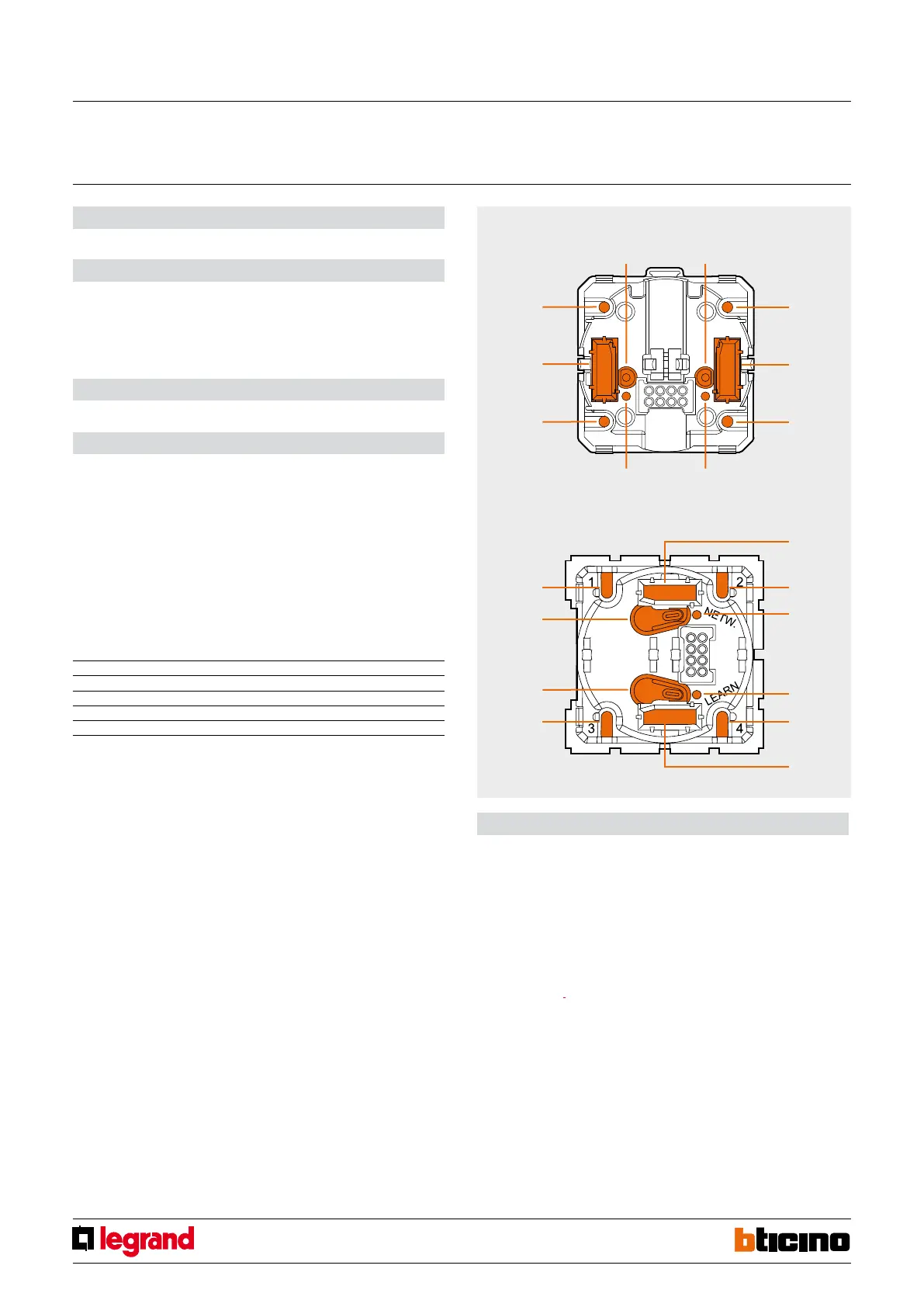
Legend
1. LEARNING key
2. NETWORK key
3. Scenario no. 2 key
4. Configurator socket (A, PL)
5. Scenario no. 4 key
6. NETWORK LED
7. LEARNING LED
8. Scenario no. 3 key
9. Configurator socket (M)
10. Scenario no. 1 key
Front view
Scenario programming
To program, change or delete a scenario, the programming of Module F420 must be enabled.
This is conrmed by the status LED turning green (press the lock/unlock key of the scenario
module for at least 0.5 seconds). After this has been done, proceed as follows:
1. press one of the four control keys to which the scenario should be associated to for 4
seconds. The corresponding LED starts ashing;
2. Set the scenario using the corresponding controls for the various Automation, Temperature
control, Sound system, etc. functions;
3. conrm the scenario by quickly pressing the corresponding key on the control to exit the
programming mode;
4. to change a scenario, or to create new ones to use with the other keys, repeat the procedure
starting from point 1;
To recall an already set scenario, a quick pressure of the corresponding key on the scenario
control is enough.
NOTES:
Once the necessary operations have been completed, lock the programming procedure,
by pressing the lock/unlock key of the scenario module for at least 0.5 seconds, until the
corresponding LED turns red.
To delete a scenario, proceed as follows:
1. The scenario module must be enabled for programming;
2. press the pushbutton of the to delete for at least 10 seconds. The corresponding LED will
ash quickly for approx. 2 seconds, conrming that the scenario has been deleted. If the LED
does not ash, the procedure has been unsuccessful.
To reset the whole memory, press the DEL key of the scenario module for 10 seconds. The yellow
LED, “reset scenarios”, will ash quickly.
Radio control device used for saving and managing up to 4 scenarios max.
Description
Power supply: No. 1 lithium battery, 3 V, CR2032 type
Duration of the batteries: 5 years
Operating temperature: 5 – 45 °C
Technology: Radio 2.4 GHz standard ZigBee®
Capacity: 150 m free field, 15 m in rooms with concrete walls
Technical data
Size: 2 modules
Dimensional data
Radio system: “Push and Learn” self-learning type.
Wire system: If the device is integrated with the BUS Automation system using the Gateway
SCS/Zigbee interface, it will be possible to manage scenarios saved in the scenario module
item F420, which address must be specified by connecting the configurators to the A, PL, and
M housings as indicated:
Use with scenario module F420:
A = Room
PL = Light point
M = operating mode (1 – 4). It associates to the 4 pushbuttons the scenarios saved by the
scenario module (max. 16). The correspondence between the 4 control keys and the scenario
numbers saved in the module is as follows:
Configurator in M Scenario saved
1 scenario 1 – 4
2 scenario 5 – 8
3 scenario 9 – 12
4 scenario 13 – 16
Configuration
MQ00399-c-EN



 To Next Page