229
4
3
1
7 6
5
2
9
8
3485B
Legend
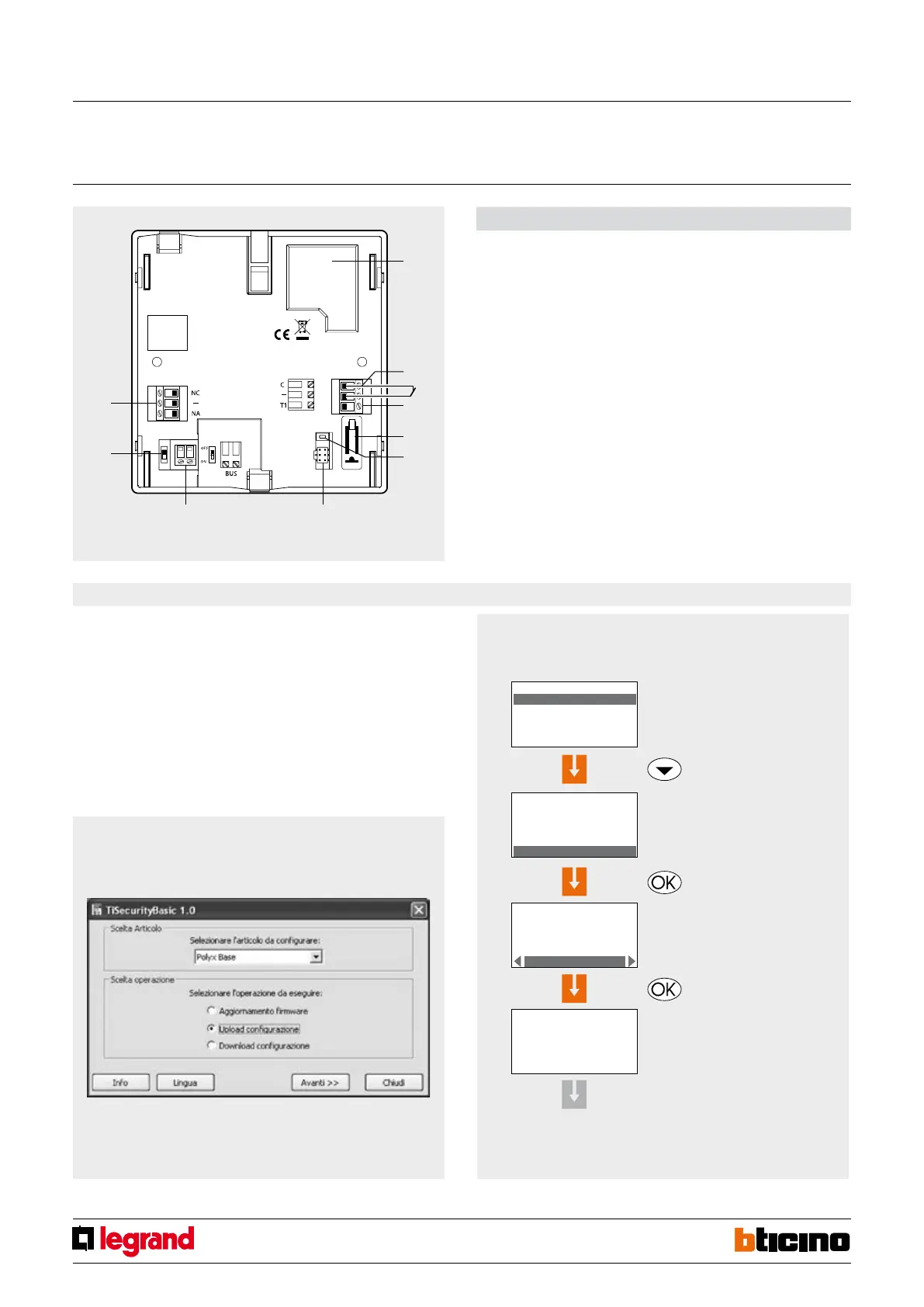
1 - Battery housing;
2 - Local contact;
3 - Tamper line (see note);
4 - T1 local tamper;
5 - Reset key;
6 - Firmware update serial connector;
7 - Burglar alarm BUS;
8 - ON/OFF slide switch;
9 - Relay for automation in case of alarm.
NOTE: The central unit is supplied with the clamps (-/T1) of the Tamper line shorted for
the use of the T1 local tamper (wall mounted installation on metal base).
Rear view
Conguration
The central units do not need congurators. The functions can be set directly on the
device itself (keypad and display), or using the appropriate software, either TiSecurity
Basic.
For detailed information refer to the corresponding manuals supplied with the products.
Software conguration
The program enables acquiring the conguration on the central unit, saving it in a le to
be used to reinstate the conguration of the same, or to congure other central units. It
is also possible to update the permanent software of the central unit using new versions
published by BTicino.
Example
Example of conguration performed on the central unit.
- Detection of devices
After pressing OK, the
following screen appears
Press OK to start learning
Select
Learning
Press OK to conrm
LEARNING
zone: 0 num.: 1
type: not exist
tamper: OFF
automatic
Predisporre
l’impianto
alla
configurazione
invia = OK
non invia = CLEAR
Vuoi inviare la
configurazione a
dispositivi di
visualizzazione?
invia = OK
non invia = CLEAR
Learning
ended
no problem
errore trasmiss.
Configurazione
riprova TX =OK
exit conf. =CLEAR
configurazione
impianto OK
MAINTENANCE
Language
Key program
System test
Learning
MAINTENANCE
Language
Key program
System test
Learning
NEXT
(See the manual of the central unit)
Base central unit
MQ00023-c-EN 24/04/2014


 To Next Page