299
1
2
34
C1 C2
1234
1
2
34
C1 C2
1234
1
2
34
C1 C2
1234
1
3
4
5
2
6
5739 18 (White)
5739 19 (Magnesium)
067456
3550
1
3
4
5
2
ZONE 1
ZONE 2
BUS
6
Legend
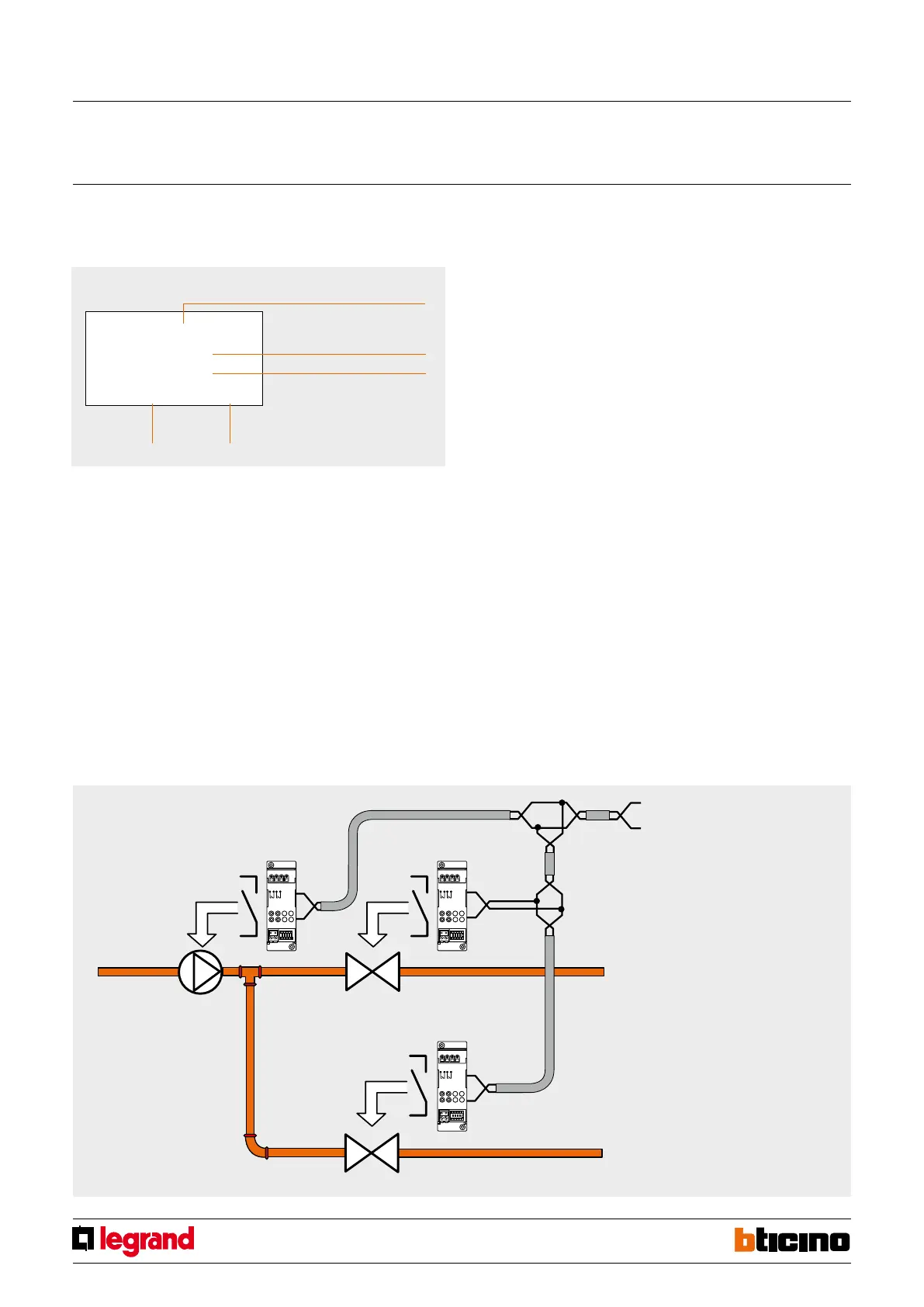
1. circulation pump
2. pump actuator
3. zone 1 solenoid valve
4. zone 1 actuator
5. zone 2 solenoid valve
6. zone 2 actuator
System with one circulation pump
The system shown only has one circulation pump, that only supplies two zones, controlled
by two solenoid valves. The pump is managed by a dedicated actuator congured in zone
00. In the same way as the pump, also the two valves are controlled by two dierent
actuators. The circulation pump will remain active until at least one of the two valves
remains open and will stop when both valves are closed.
Programming
To complete the learning procedure of all zones within the system, use the item
“Congure Zone” of the “Maintenance” menu. It will be necessary to dene if the zone
should manage a heating system, a cooling system, or a combined one. Using the same
menu item, also select the type of load to control, choosing between: ON/OFF, OPEN/
CLOSE, 3SP FAN-COIL, and GATEWAY, and indicate which pumps the zone must control,
and the delay. When performing programming operations from the central unit, refer to
the installation manual supplied with the central unit itself.
Circulation pump
In addition to controlling the zone valves, for some types of systems it will also be
necessary to control one or more water circulation pumps.
When programming the operating mode of the circulation pumps is not necessary to
connect any special congurators: it will be sucient to use the central unit through the
“Pump” item; inside the “Maintenance” menu, select the zones that must be served by
a circulation pump.
Using the programming procedure, set a logic link between the zones, and the pump
that hydraulically supply them.
To complete the programming procedure, the pump management mode must also be
selected, thus dening if the pump supplies a heating, a cooling, or a combined system.
Depending on the needs of the hydraulic system, one “circulation pump” or “several
circulation pumps” may be installed, to supply one or more zone groups.
If necessary, it is also possible to set a “pump switch-on delay”, in relation to the opening
of the zone valves. In the following cases, pump control is not necessary, or needed:
- in systems where the pump is always in operation (thanks to water recirculation
hydraulic systems, or the presence of three-way valves);
- in systems where the pump is managed automatically (it comes on by itself when
water is required, and turns o again when all valves are closed);
- in system where the pump has simply not been installed (for example for air
conditioning units or electric heating control).
NOTE: for details of the programming operations to be performed from the central unit
refer to the installation manual supplied with the central unit itself.
2 3
3
DEF
2
ABC
1
6
MNO
5
JKL
9
WXVZ
8
YUV
7
0
4
GHI
PQRS
OK
CLEAR
Weekly
Example
Winter
Wed. 01 Oct 00:01
OK
1 : Weekly
2 : Manual
3 : Scenarios
4 : Holiday
MANUAL
ALL ZONES
Manual
1 : Zone 1
2 : Zone 2
OK
OK
CLEAR
CLEAR
CLEAR
MODE
Graphic display
In normal working conditions the Central unit display shows the following information
on the initial page:
Operating mode
Name of the program
being run
State:
Winter (heating)
Summer (Cooling)
HourDate
99-zone central unit
MQ00187-c-EN 29/04/2014



 To Next Page