498
H4890
573958
LN4890
HW4890
LN4890A
AM5890
067292
078479
Conguration
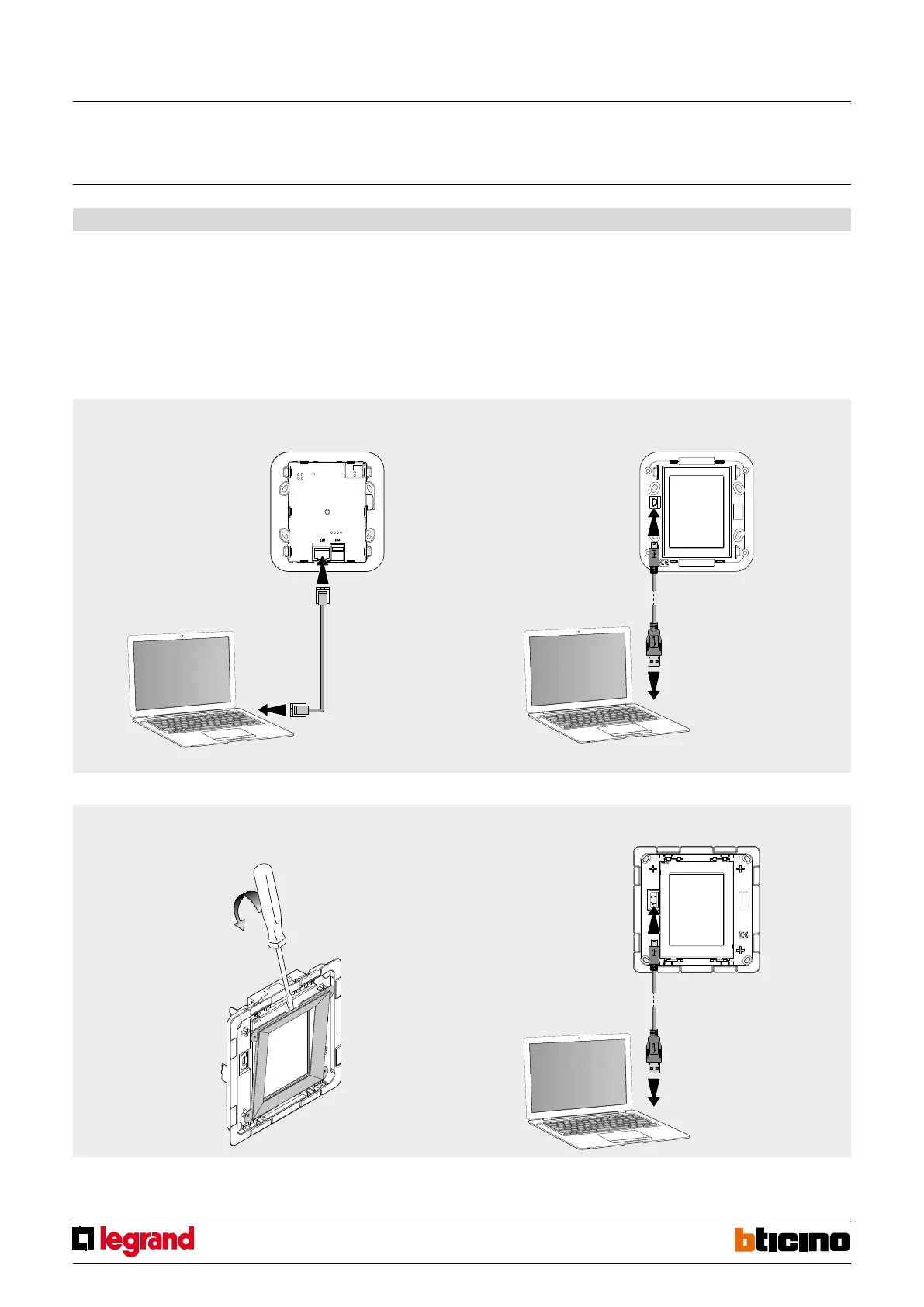
Touch Screen is programmed by connecting it to a PC using the interface cable,
item 335919 (RS232 version), 3559 (USB version), or an Ethernet cable, and the
TiTouchScreen software.
The software creates a link between the preconfigured icons, which will be shown on
the Display, and the functions that must be managed and performed by the devices
of the Automation and lighting, Sound, burglar-alarm, temperature control, energy
management and scenario systems.
Based on the requirements of the customer, it is possible to create a new configuration,
or manage an existing one. The program also gives the possibility of configuring extra
Touch Screen functions, such as scenarios with logic or time conditions, the display of
the time and the date, and the setup of a protection password.
It is also possible to define the graphic style of the icons to complement the look of the
device. For further information refer to the software documentation.
Connection to the Personal Computer
USB/mini USB
Crossover type
Ethernet cable
Connection to the Personal Computer for HW4890
USB/mini USB
Touch Screen
MQ00699-b-EN 17/04/2014



 To Next Page