507
3559
MH200N
Configuration
For the configuration of the device the TiMH200N program must be used, for creating
scenarios (actuation of light points, rolling shutters, etc.) of different degrees of
complexity, based on time events or events detected on the system (alarms, pushbuttons
pressed, etc.). If the scenario is activated by a control device (configured with M=CEN), it
will be possible to associate the corresponding key to the scenario itself.
The scenarios are grouped in a collection directly saved in the project.
The collection enables saving several scenarios, with only the required ones being
activated.
The project created must then be transferred (downloaded) to the scenario programmer.
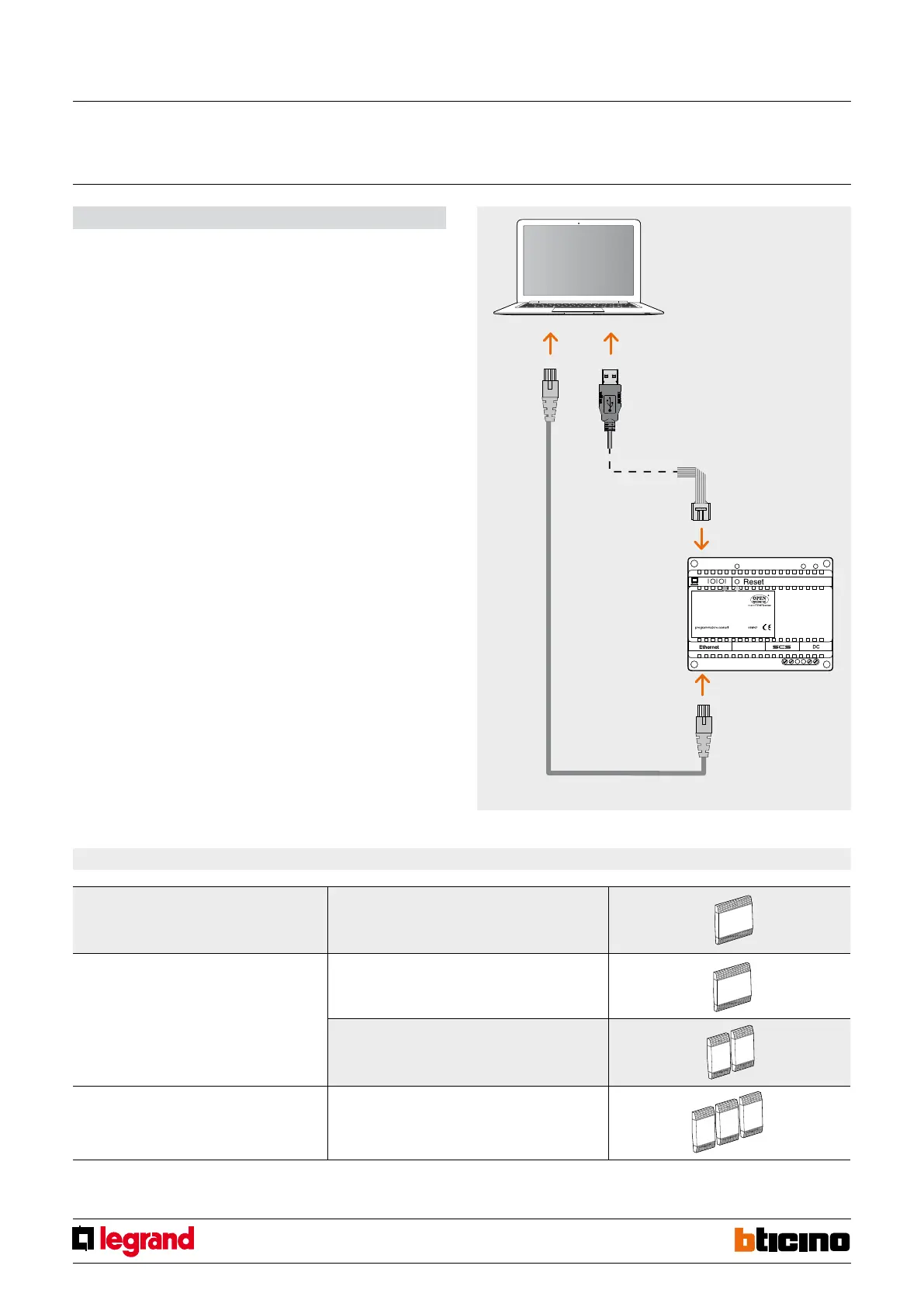
This is done by connecting the device to the PC using a crossover type Ethernet cable (see
figure). In alternative, it is also possible to update MH200N remotely. To do this, both
the IP address and the OPEN password must be known (see manual found inside the CD
supplied with the device).
In the same way, it is possible to upload the files from the device to check the saved
configuration. The TiMH200 program also enables updating the unit permanent base
MH200 software, by downloading any new versions published on the Bticino website
(Update Firmware).
CEN operating mode
This special mode is used for managing MH200N scenario programmers, by manually
activating the control device or the MY HOME automation range set by connecting the
CEN configurator in M.
The association between the key (upper or lower) of the control device and the scenario
to be activated, is obtained using the MiMH200N software. For example, it is possible to
activate two independent scenarios using the special H/L4651M2, AM5831M2, 067553
control, using the T1 (upper) and T2 (lower) pushbuttons. For the correspondence
between the control keys and the scenarios to activate see the table below.
In addition to the listed devices, the CEN operating mode may be managed using the
Touch Screen, the Multimedia Touch Screen, the Web Server, and a Personal Computer
with the MHVisual supervision software installed.
NOTE: The control devices configured with M=CEN mode can be connected to any point
of the system; The address specified in the A and PL positions must be different from the
addresses assigned to the actuators.
MH200N scenario
programmer
Personal Computer
with TIMH200N software
Type of control Configuration Identification of scenario activation keys
067553, H/L4651M2 and AMS831M2 special control A=0-9; PL=0-9; M=CEN; LIV1/AUX=-; LIV2=-; SPE=-;I=-
Basic control for 2 independent loads, 067552,
H/L4652/2 and AM5832/2
A=0-9; PL1=0-9; M1=CEN; A2=-; PL2=-; M2=-
A=0-9; PL1=0-9; M1=CEN; A2=-; PL2=-; M2=CEN
Basic control for 3 independent loads, 067554,
H/L4652/3 and AM5832/3
A=0-9; PL=0-9; M=CEN; LIV1/AUX=-; LIV2=-; SPE=-;I=-
T1
T2
T1
T2
T2
T4
T1
T3
T1
T3
T2
T4
T3
T6
Scenario programmer
MQ00319-b-EN 22/04/2014



 To Next Page