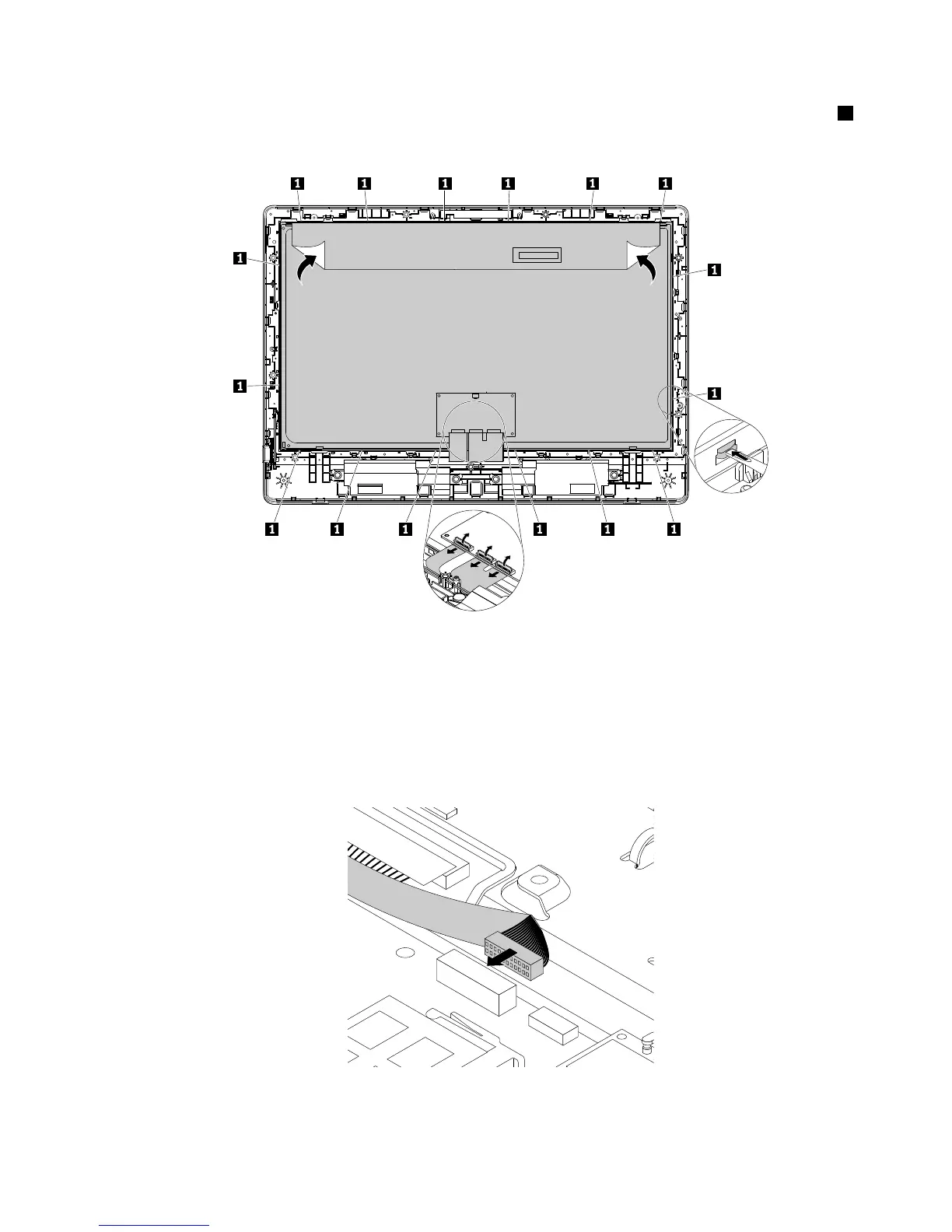
10.DetachthetapeandconnectorsthatsecuretheLCDpanelasshown.Then,pivottheretainingclips1
asshownonebyonetoremovetheLCDpanelfromtheLCDfrontbezel.
Figure42.RemovingtheLCDpanel
11.ToinstallthenewLCDpanel,alignthenewLCDpanelwiththeLCDbezel.Then,attachthetapeand
connectorstosecuretheLCDpaneltotheLCDbezel.
12.PositionthechassiswiththenewLCDpanelsothatitissecuredbytheretainingclipsonthefrontbezel.
Then,installthescrewstosecurethechassiswiththenewLCDpaneltothefrontbezel.
13.ConnectthenewLCD-panelcabletothesystemboardasshown.
Figure43.ConnectingtheLCD-panelcabletothesystemboard
Chapter11.Installingorreplacinghardware123












 To Next Page