Lenze · i700 servo inverter · reference manual · DMS 3.0 EN · 06/2016 · TD06 14
1 About this documentation
1.1 Conventions used
_ _ _ _ _ _ _ _ _ _ _ _ _ _ _ _ _ _ _ _ _ _ _ _ _ _ _ _ _ _ _ _ _ _ _ _ _ _ _ _ _ _ _ _ _ _ _ _ _ _ _ _ _ _ _ _ _ _ _ _ _ _ _ _
1.1 Conventions used
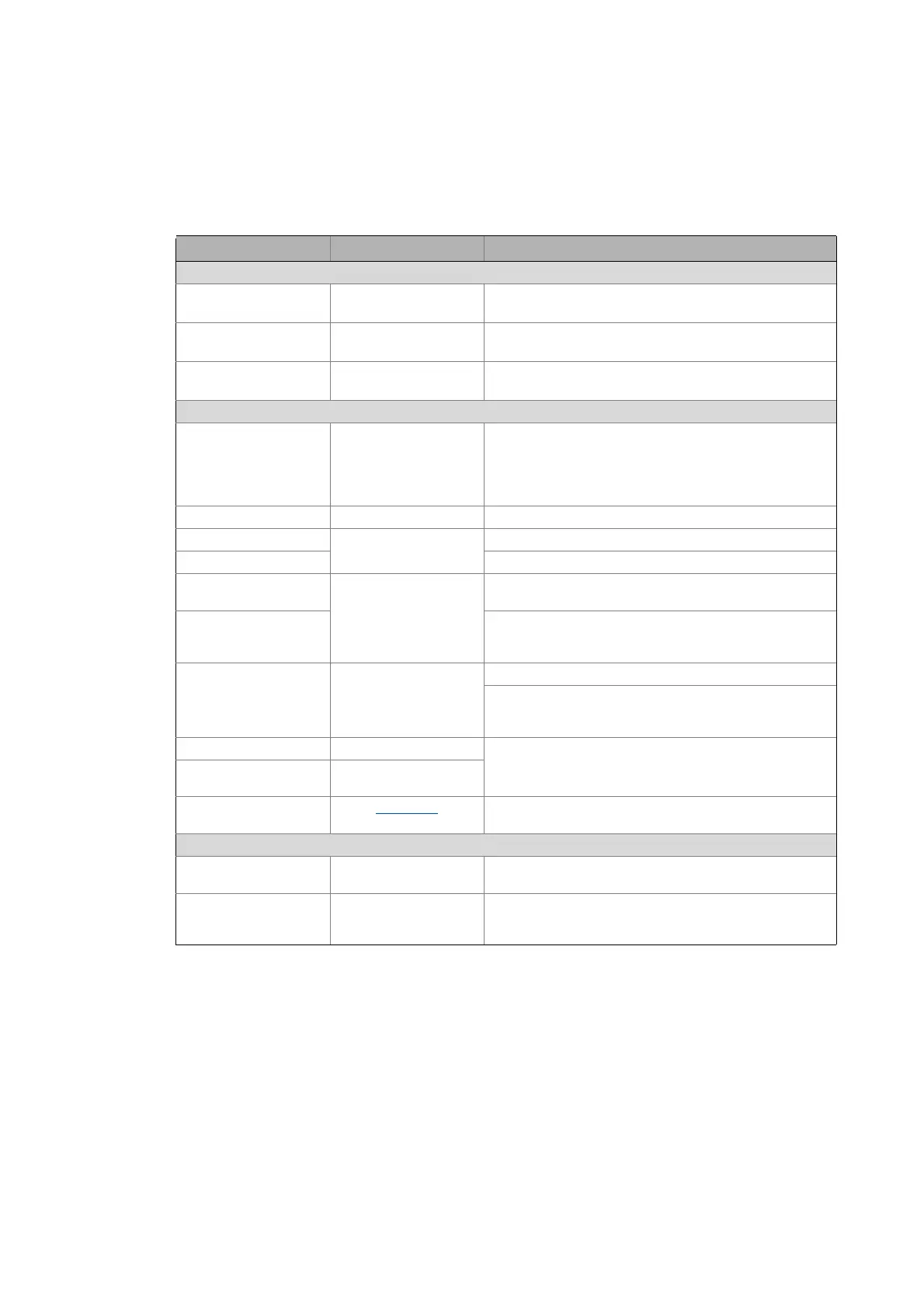
This documentation uses the following conventions to distinguish between different types of
information:
Type of information Highlighting Examples/notes
Spelling of numbers
Decimal separator Point The decimal point is always used.
Example: 1234.56
Hexadecimal number 0x For hexadecimal numbers, the "0x" prefix is used.
Example: 0x60F4
Binary number 0b For binary numbers, the "0b" prefix is used.
Example: 0b00010111
Text
Version information Blue text colour All information that only applies to or from a certain
software version of the servo inverter is identified
accordingly in this documentation.
Example: This function extension is available from software
version V3.0!
Program name » « The Lenze PC software »PLC Designer«...
Window italics The Message window... / The Options dialog box...
Variable names Set bEnable to TRUE to...
Control element bold The OK button ... / The Copy command ... / The Properties tab
... / The Name input field ...
Sequence of menu
commands
If several commands must be used in sequence to carry out a
function, the individual commands are separated by an
arrow: Select File
Open to...
Shortcut <bold> Use <F1> to open the online help.
If a shortcut is required for a command to be executed, a "+"
has been put between the key identifiers: With
<Shift>+<ESC> ...
Program code Courier
IF var1 < var2 THEN
a = a + 1
END IF
Keyword Courier bold
Hyperlink underlined
Optically highlighted reference to another topic. It is
activated with a mouse-click in this online documentation.
Icons
Page reference ( 14) Optically highlighted reference to another page. In this
online documentation activated via mouse-click.
Step-by-step instructions
Step-by-step instructions are indicated by a pictograph.


 To Next Page