Chapter 17
Remote application update
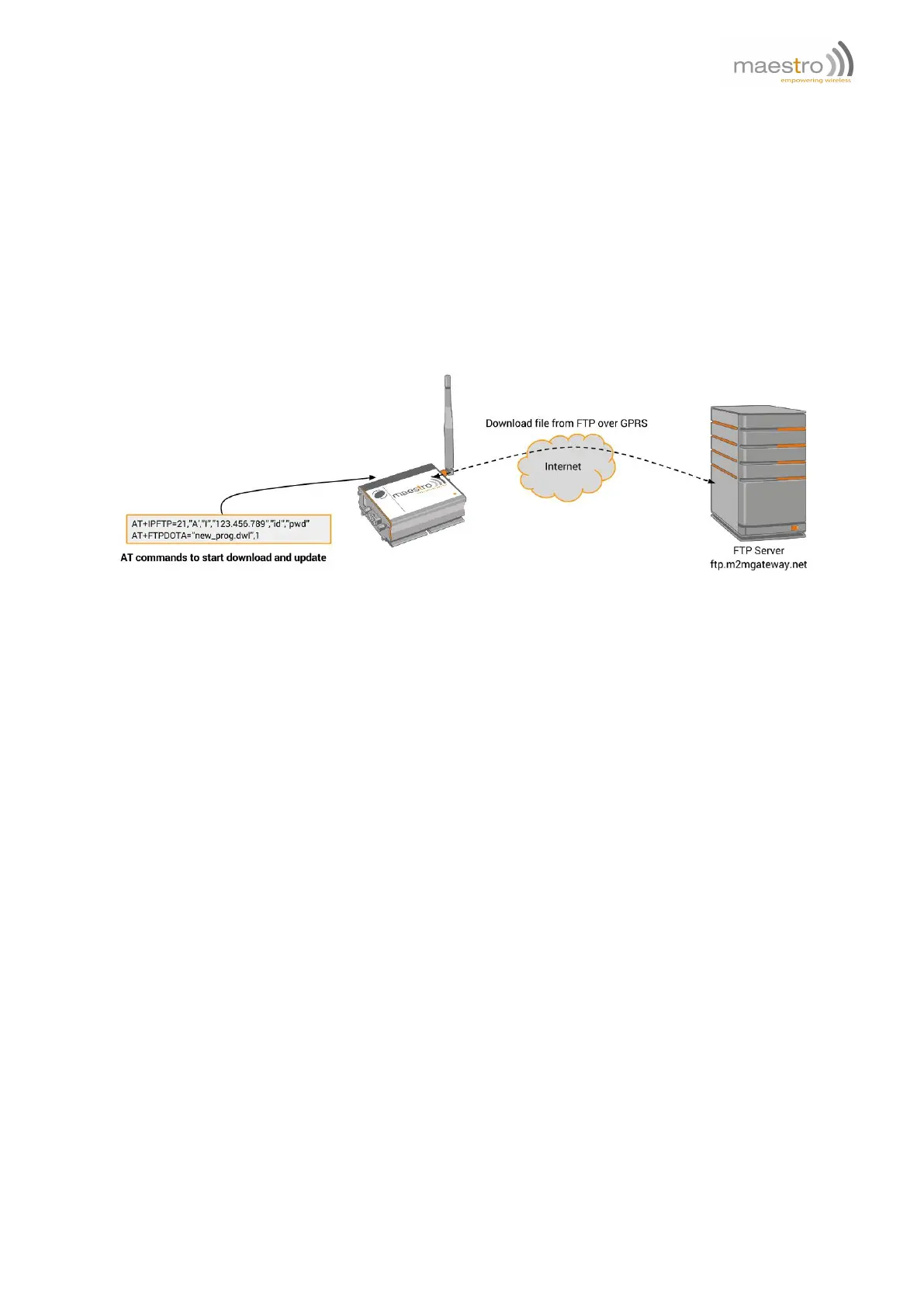
By using this feature, user can download the new version of Maestro modem application from a FTP server and
upgrade his modem. By combining remote AT command by SMS feature user can control the modem to complete
the application downloading and updating process remotely.
Figure 17.0.1: Remote application update example
To perform the whole application update process, several AT commands have to be sent:
1. AT+IPGPRS to set network parameters (APN),
2. AT+IPFTP to set FTP server parameters (name, user id, password),
3. AT+FTPDOTA to set file name and FTP path and start downloading*,
4. AT+ADINSTALL to install the downloaded new application*.
*Note: by adding one extra parameter after step 3 complete, step 4 will be executed automatically. See following
sections for details.
17.1 FTP server
AT+IPFTP
This command is to set FTP server parameters.
Syntax: AT+IPFTP =<port>,<type>,<mode>,<server>,<id>,<pwd>
Response: +IPFTP: <port>,<type>,<mode>,<server>,<id>,<pwd>
Defined Values:
<port> port number of the FTP server. Default value is 21.
Confidential, the whole document is the sole property of Maestro Wireless Solutions ltd.
support@maestro-wireless.com
81



 To Next Page