Chapter 19
Command string - Introduction
"Command String" is a set of programmable scripts for Maestro modem. User can input sets of Command String to
control various kinds of "Service". Unlike AT command, Command String can be stored inside modem and can be
executed upon output of certain services.
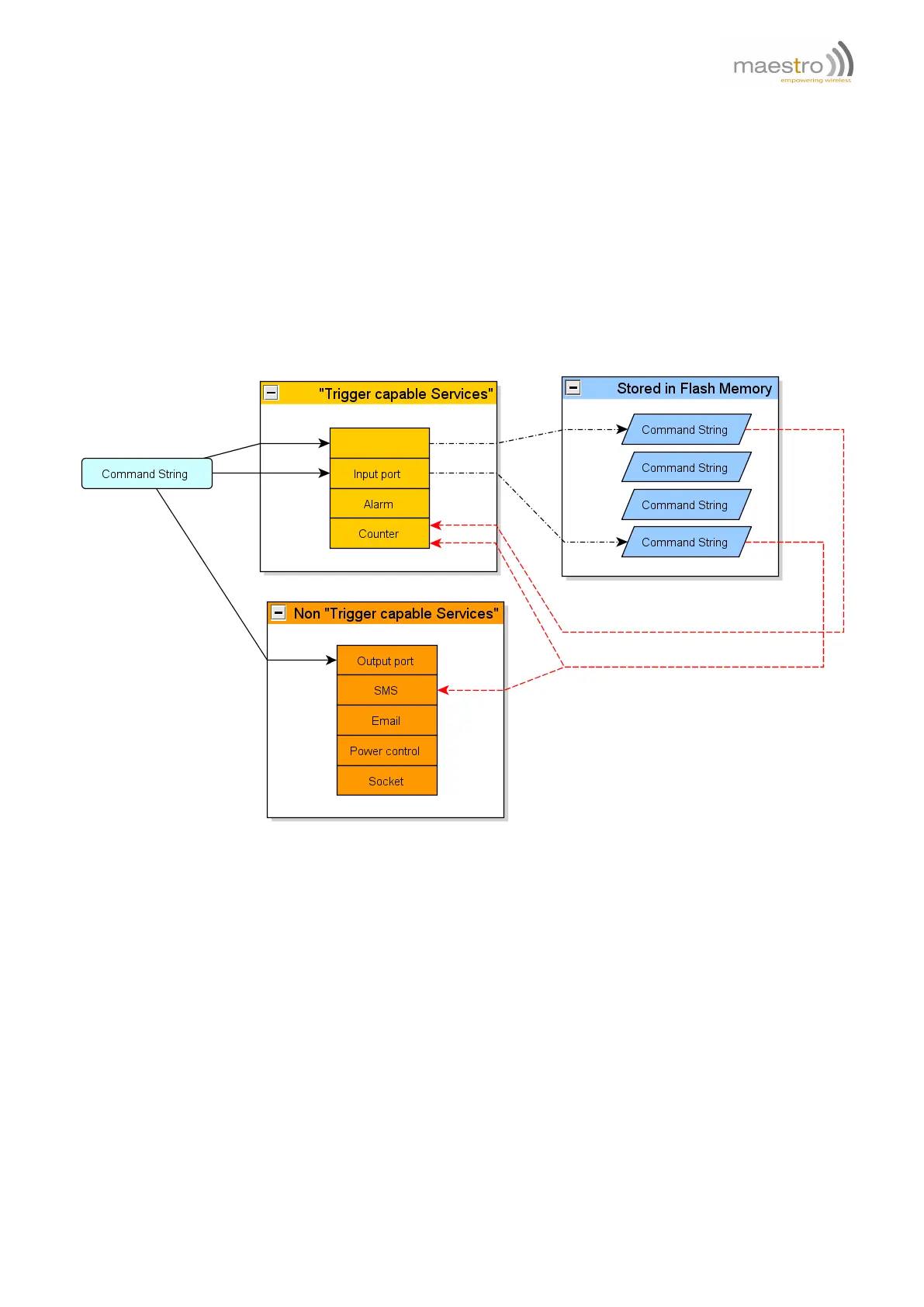
Figure 19.0.1: Command String service concept
"Command String" and "Service" operation mechanism:
1. Use AT command to enter preset Command String.
2. Command strings can be executed upon power up or directly by AT commands.
3. Executed Command String will drive some Services to be done (e.g. sending SMS or setting output pins).
4. Executed Command String can also configure and control some Services that have "trigger" capability.
5. These Services, when a certain predefined condition is matched (e.g. timer reach zero) can "trigger" a stored
Command String.
6. Execute stored Command String to control Services again.
Confidential, the whole document is the sole property of Maestro Wireless Solutions ltd.
support@maestro-wireless.com
87



 To Next Page