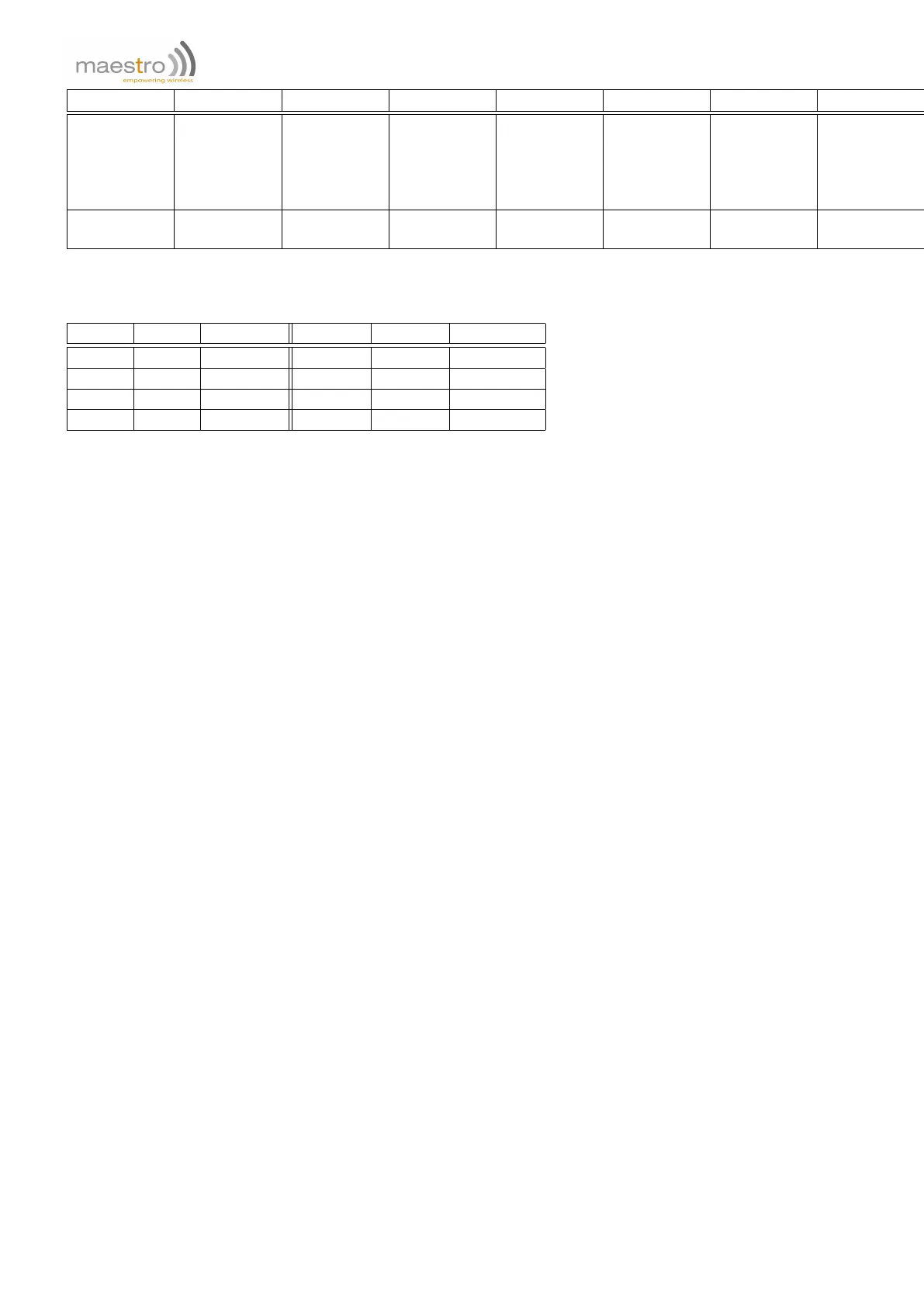
Variable
%CTn %TMn %IP %OP %AI %IMEI %DATE %TIME
Description
Current
value of
counter id#n
Current
value of
timer id#n
Current I/O
ports’ inputs
summing
value
Current I/O
ports’
outputs
summing
value
Current AI
ports values
Unit IMEI +CCLK date +CCLK time
Range of ‘n’
1 to 5 1 to 10 0 to 3 0 to 3
1 (only on
M1002G)
15 char
YY/MM/DD
format
HH:MM:SS
format
Invalid Service name or Id will be ignored.
For Inputs %IP and Outputs %OP refer to the table below:
Input 1 Input 2 %IP value Output 1 Output 2 %OP value
Low Low 3 Drain Drain 3
High Low 2 Open Drain 2
Low High 1 Drain Open 1
High High 0 Open Open 0
Note:
1. Due to modem or SIM initialization it is recommended to send SM%IPS only after 30 seconds after power up.
2. Only send SMS with "normal" characters. If SMS content has character with ASCII value outside the range
between 11 and 127, the SMS may not be sent properly.
3. In case of sending SMS failure (e.g. network problem) the program will delay 0.5 second and try to resend the
SMS. If the second time retry (i.e. 3 times total) fails this SMS delivery will be aborted.
4. The maximum length of the SMS content is limited by the maximum length of Command String (128 bytes).
The more of Command Strings, the less of SMS length.
21.7 Email Sending Service
This service is used to send out an Email to one or more email saved address, with saved email subject and saved
plus variable email content. Please read Chapter 8 on page 45 for entering email address, subject and body. Up to
10 set of groups (service type EM, id 1 to 10) can be set with different combinations of "elements": recipient (to, cc,
bcc), subject and body.
98 Confidential, the whole document is the sole property of Maestro Wireless Solutions ltd.
support@maestro-wireless.com



 To Next Page