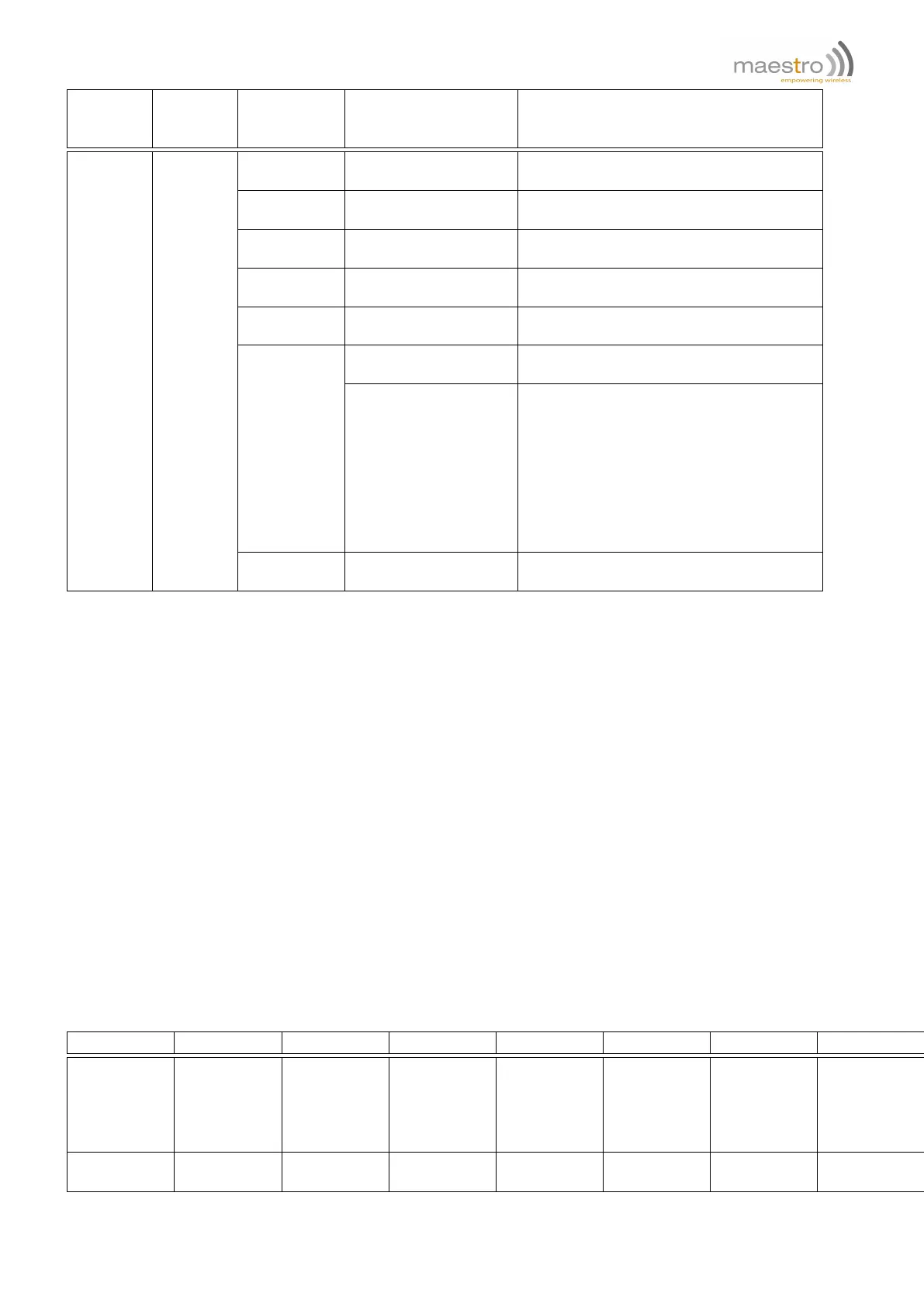
1st field
Service
type
2nd field
Service
id
3rd field
Operation
type
4th field
Operation argument
Explanation
EM (1 to 10)
TO (0-50)
id of recipient email address
0: no recipient
CC (0-50)
id of "cc" recipient email address
0: no cc recipient
BC (0-50)
id of "bcc"recipient email address
0: no bcc recipient
SU (0-10)
id of email subject
0 : no subject
BD (0-3)
id of email body
0: no body
SN
(additional content)
Send out the email with above setting
plus additional content
%CTn
%IP
%OP
%TMn
%AI
%PC
%IMEI
%DATE
%TIME
"%" to indicate "variable" options in
message content
TR
(1 to 50)
0
Set Command String to be run,
0 to cancel setting
Example: Setting up EM set #1 with elements: recipient #1, cc #3, bcc #4, subject #1, content #2.
EM␣1␣TO␣1␣EM␣1␣CC␣3␣EM␣1␣BC␣4␣EM␣1␣SU␣1␣EM␣1␣BD␣1␣1␣SN␣ALERT
Example: Sending email EM set#1 with additional content "HELLO_WORLD".
EM␣1␣SN␣HELLO_WORLD␣1␣SN␣ALERT
Example: Setting up EM set #2 with elements: recipient bcc #3, no subject and content only "0", and send out
immediately.
EM␣2␣BC␣3␣EM␣2␣SN␣0␣1␣SN␣ALERT
Example: Send an email EM set #1 with content "Counter#2_value_is_20".
EM␣1␣SN␣Counter#2_value_is_%CT2␣␣1␣SN␣ALERT
Using variable option within email content
In the email body field you can use "%" and Service type to insert the current value of Service into the email additional
content:
Variable
%CTn %TMn %IP %OP %AI %IMEI %DATE %TIME
Description
Current
value of
counter id#n
Current
value of
timer id#n
Current I/O
ports’ inputs
summing
value
Current I/O
ports’
outputs
summing
value
Current AI
ports values
Unit IMEI +CCLK date +CCLK time
Range of ‘n’
1 to 5 1 to 10 0 to 3 0 to 3
1 (only on
M1002G)
15 char
YY/MM/DD
format
HH:MM:SS
format
Confidential, the whole document is the sole property of Maestro Wireless Solutions ltd.
support@maestro-wireless.com
99



 To Next Page