Operating Instructions – Labmaster
©
130 and MB20G Systems
Instruction Manual
Chapter 5: System Screens
© MBraun, Inc. Edition 1/2007 Page 5-2
5.2 Start Screen
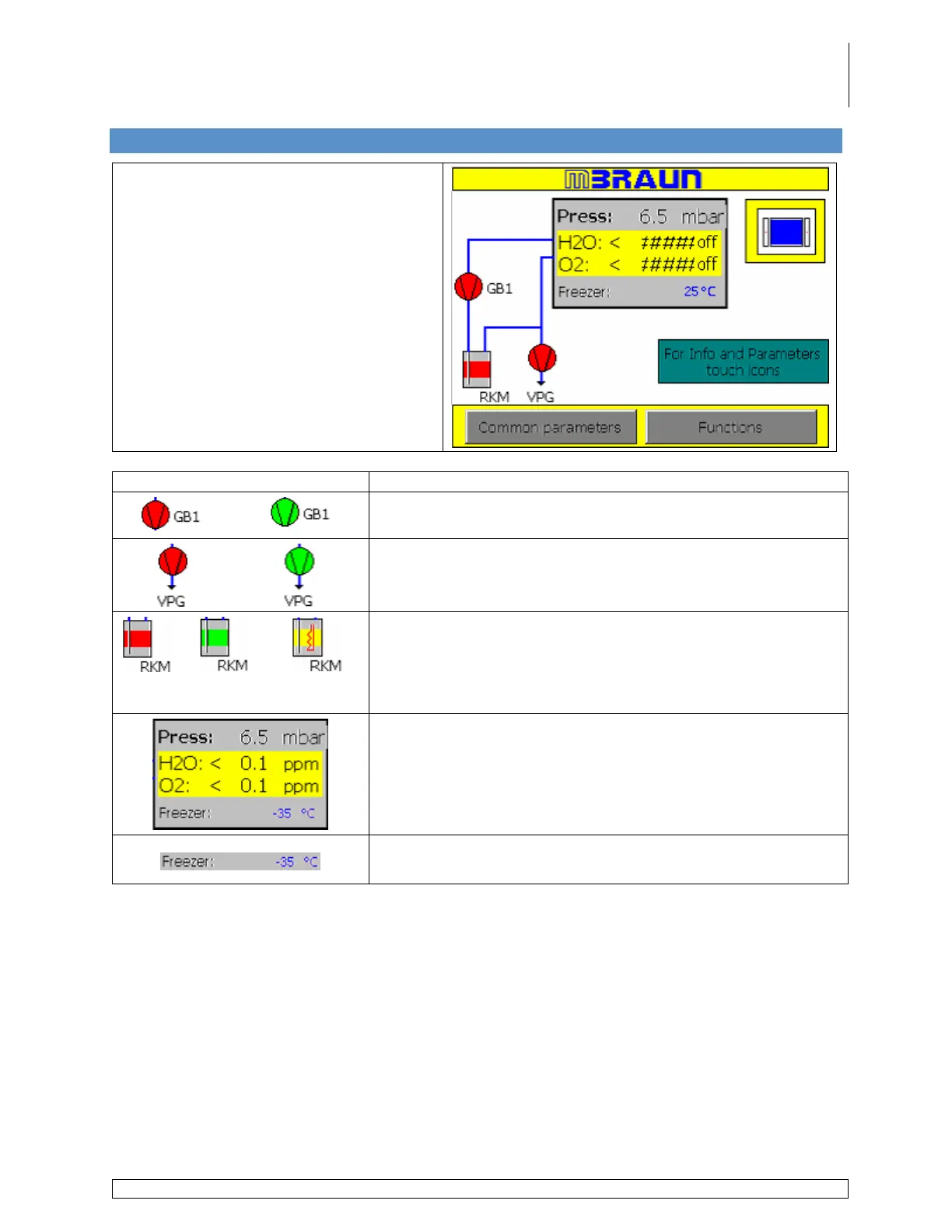
Main screen displayed on the touch
panel.
All functions and screens related to the
operation of the glovebox and other
components are accessed via the Start
Screen.
Icon / Button Description
Displays the status of the blower.
Displays the status of the vacuum pump.
Purifier
Inactive
Circulation
Active
Regeneration
Active
Displays the status of the purifier.
Used to access the Purifier Layout screen.
Displays the current pressure inside the glovebox.
Displays the Moisture and/or Oxygen levels inside the
glovebox as determined by the analyzer(s) when present.
Touching any area in this box will display the Box Pressure
Parameters Screen.
Displays the actual freezer temperature. This field is not
displayed when there is no freezer present on the system.



 To Next Page