Operating Instructions – Labmaster
©
130 and MB20G Systems
Instruction Manual
Chapter 10: Maintenance & Troubleshooting
© MBraun, Inc. Edition 1/2007 Page 10-2
Quarterly and Annual Maintenance and Service
Quarterly Annually
• Inspect the gloves and glove ports, replace
as needed.
• Inspect the fluorescent box lights, replace as
needed.
• Inspect the solenoid valves, replace as
needed.
• Leakage test.
• Test of the functions.
• Inspect box filters, replace as needed.
• Replace the gloves.
• Inspect the glove ports, replace as needed.
• Inspect the fluorescent box lights, replace
as needed.
• Inspect the solenoid valves, replace as
needed.
• Leakage test.
• Test of the functions.
• Replace box filters.
• Calibrate oxygen and moisture analyzers.
10.3 Touch Panel Maintenance
General Information
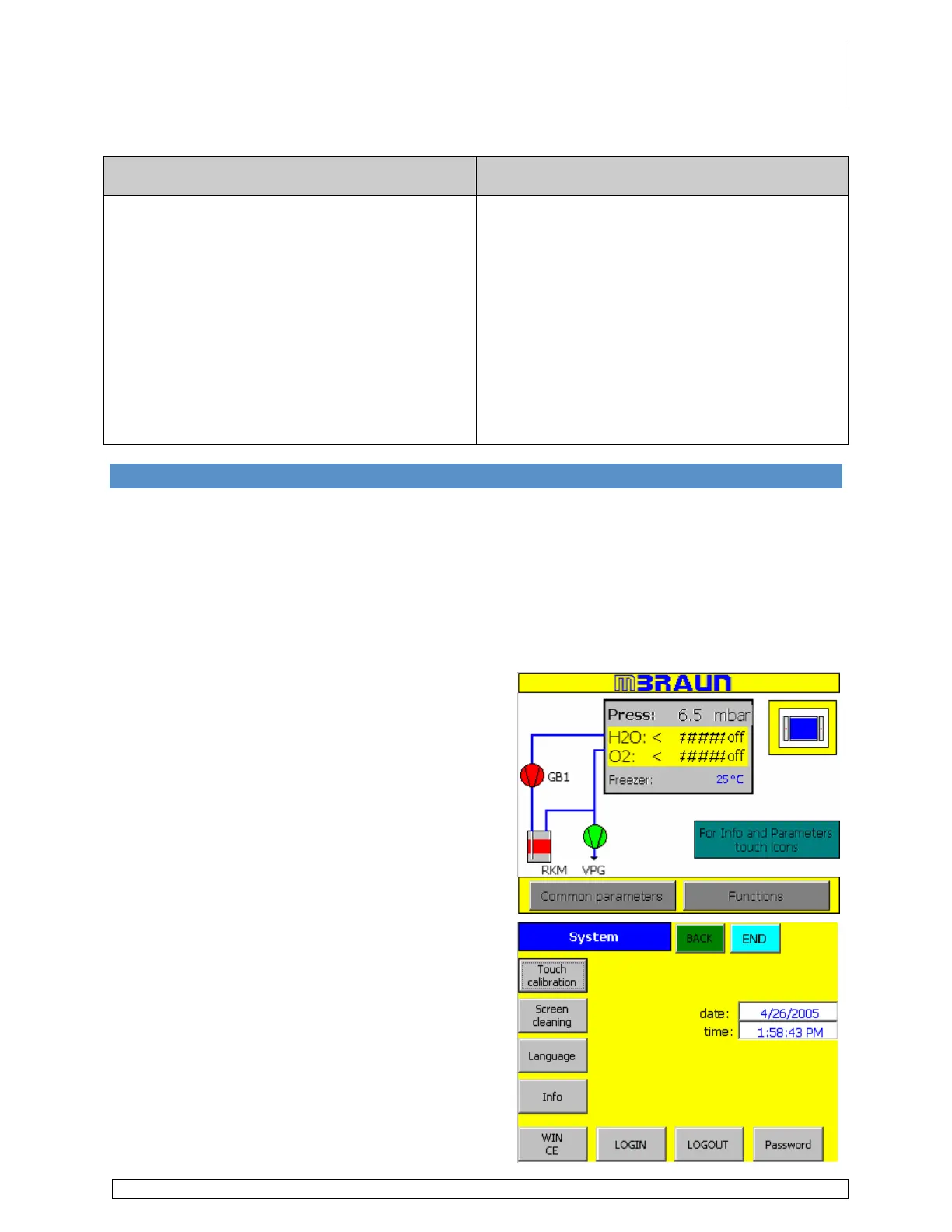
By accessing the System Screen the user can:
• Calibrate the touch panel screen
• Clean the touch panel screen
• Adjust the date & time settings
Below are instructions for each function.
Screen Calibration
Touch the System button on the Start Screen to
access the System Settings Screen.
Touch the Touch Calibration button to activate
the calibration process.



 To Next Page