Operating Instructions – Labmaster
©
130 and MB20G Systems
Instruction Manual
Chapter 5: System Screens
© MBraun, Inc. Edition 1/2007 Page 5-7
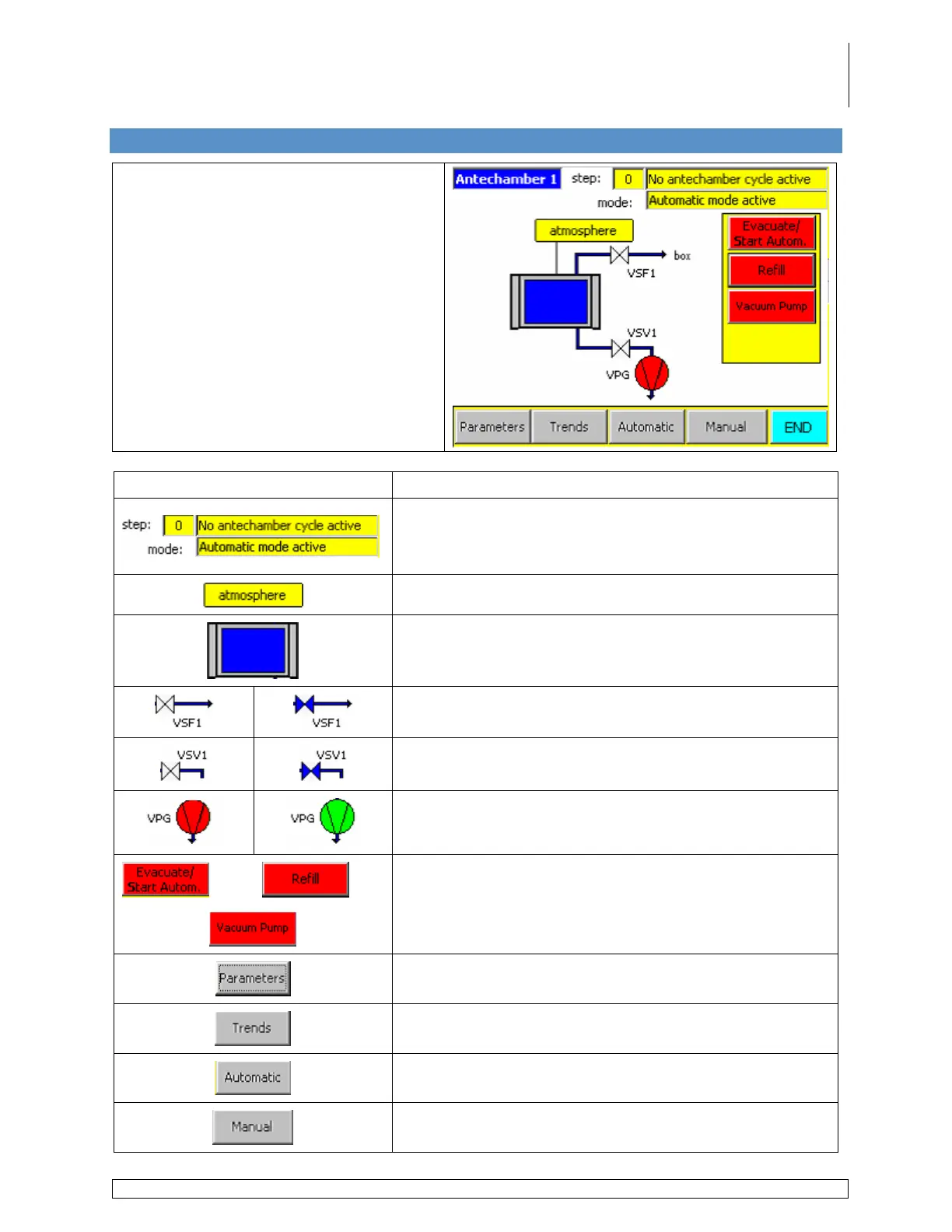
5.7 Antechamber Screen
Accessed via the Start Screen by
touching the Antechamber icon.
This screen is used to operate the large
antechamber only.
Information Field / Icon / Button Description
Displays the active step number and step description
when the system is being run.
Identifies which mode the system is being run in.
Displays the actual pressure inside the chamber.
Displays the status of the pressure level inside the
antechamber.
Displays the status of the refill valve.
Displays the status of the evacuation valve.
Displays the status of the vacuum pump.
Used to activate and deactivate the various components
and processes. These buttons work the same as the
buttons located on the Functions screen.
Used to access the antechamber parameters screen.
Used to access the antechamber trends screen.
Used to operate the antechamber in Automatic Mode.
Used to operate the antechamber in Manual Mode.



 To Next Page