Operating Instructions – Labmaster
©
130 and MB20G Systems
Instruction Manual
Chapter 5: System Screens
© MBraun, Inc. Edition 1/2007 Page 5-10
Information Field Description
Displays the default pressure alarm limits for the system.
Displays the Freezer/Box Cooling screen.
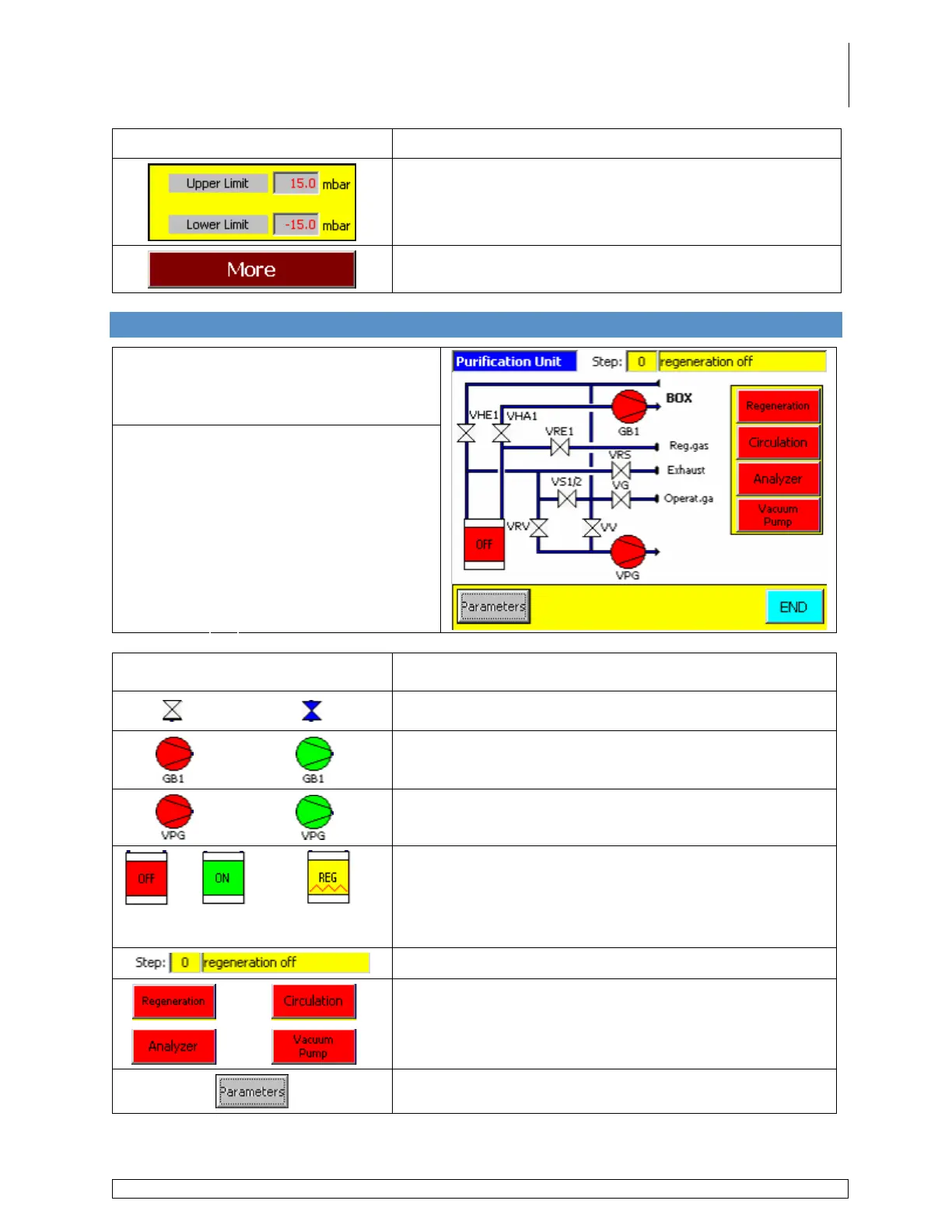
5.11 Purifier Layout Screen
Accessed via the Start Screen by
touching the RKM icon.
Valve Definitions
VHE1
VHA1
VRE1
VRS
VS1/2
VG
VRV
VV
VPG
-
-
-
-
-
-
-
-
-
Purifier Inlet
Purifier Outlet
Regen. Gas Inlet
Regen. Gas Outlet
Pressure Compensation
Working Gas Inlet
Regen. Vacuum
Box Vacuum
Vacuum Pump
Icon / Information Field / Button Description
Displays the status of the various valves throughout the
system.
Displays the status of the blower.
Displays the status of the vacuum pump.
Purifier
Inactive
Circulation
Active
Regeneration
Active
Displays the status of the purifier.
Displays the active step of the regeneration process.
Used to activate and deactivate the various components
and processes. These buttons work the same as the
buttons located on the Functions screen.
Used to access the purifier parameters screen.



 To Next Page