Operating Instructions – Labmaster
©
130 and MB20G Systems
Instruction Manual
Chapter 9: System Operation
© MBraun, Inc. Edition 1/2007 Page 9-1
CHAPTER 9: SYSTEM OPERATION
9.1 General Information
After the system has been fully commissioned, it may now be used for normal operation in
circulation mode. Prior to using the glovebox in circulation mode the box pressure parameters
can be adjusted for the upper and lower working limits. There are no recommended set
parameters, the setpoints are based on user preference.
At any time during use of the box, the foot pedal can be used to add or remove working gas
from the box temporarily. This is especially useful when attempting to place hands inside the
gloves and into the box when working in the positive pressure state.
Adjusting the parameters is done in the same manner as was done during the static leak test
and purging during the commissioning of the box. Please refer to Chapter 8 of this manual for
instructions.
9.2 Circulation Mode
• The circulation process can only be started if all other functions
(purge and regeneration) are inactive.
• There are no recommended setpoints for the circulation mode.
Upper and lower working pressure limits are based on user
preference.
• If the oxygen level in the system rises above 150ppm, deactivate
circulation and begin purging. Continue purging until the oxygen
level drops below 100ppm.
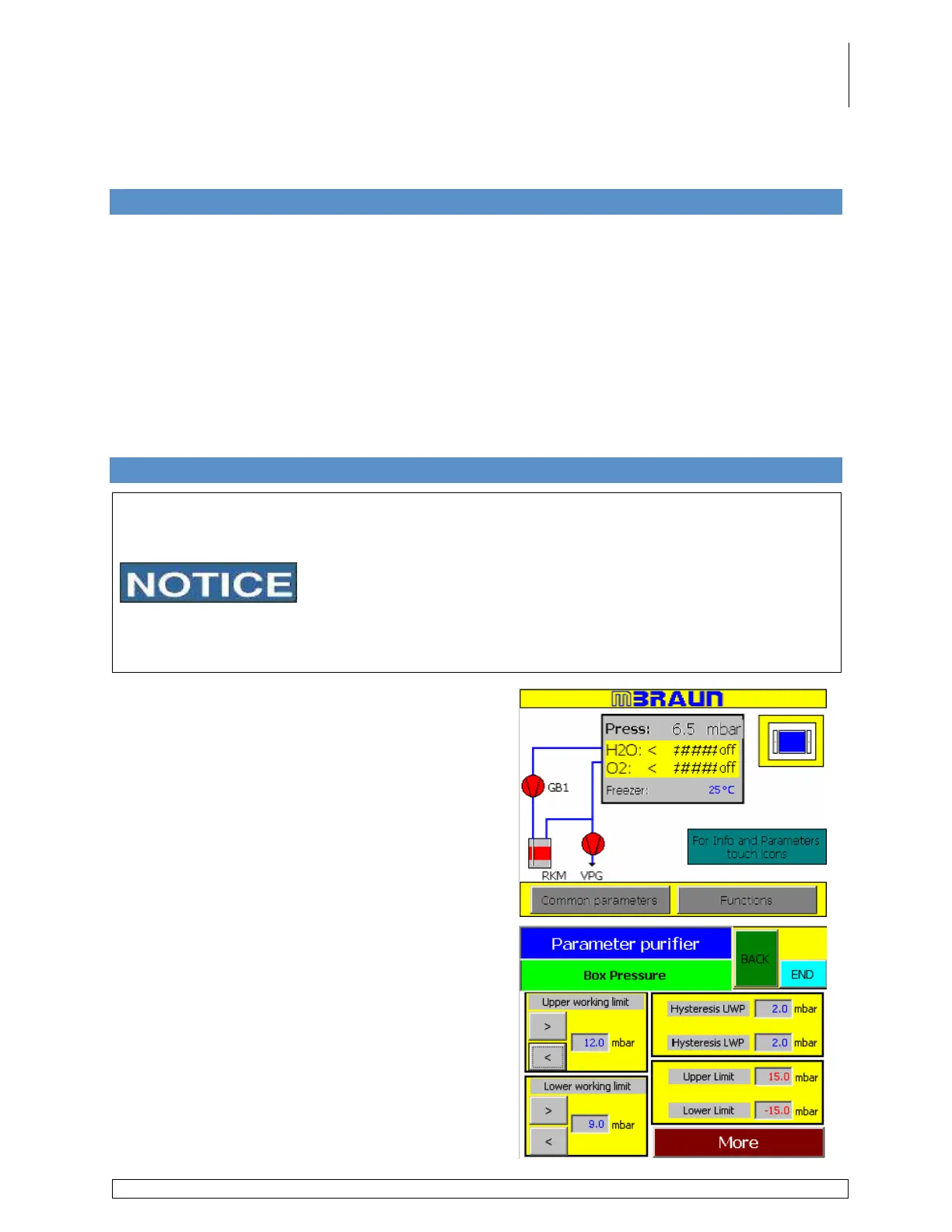
Touch the Box Pressure/Analyzer display box on
the start screen.
Use the arrows listed under Upper Working Limit
and Lower Working Limit to increase or decrease
the box atmosphere pressure setpoint in one tenth
decimal intervals.
or
Touch the number field next to the corresponding
parameter to display the alphanumeric keypad.
Use the keypad to adjust the parameters in the
same manner as before.



 To Next Page