Operating Instructions – Labmaster
©
130 and MB20G Systems
Instruction Manual
Chapter 7: Installation
© MBraun, Inc. Edition 1/2007 Page 7-7
If system is equipped with a mini
antechamber:
Attach the end of the vacuum hose (H) with
the elbow to the port located on the rear side
of the mini antechamber.
Use care not to cross thread brass to brass connections and
stainless steel to stainless steel connections when fitting together
and tightening.
7.7 Stand Alone Purifier
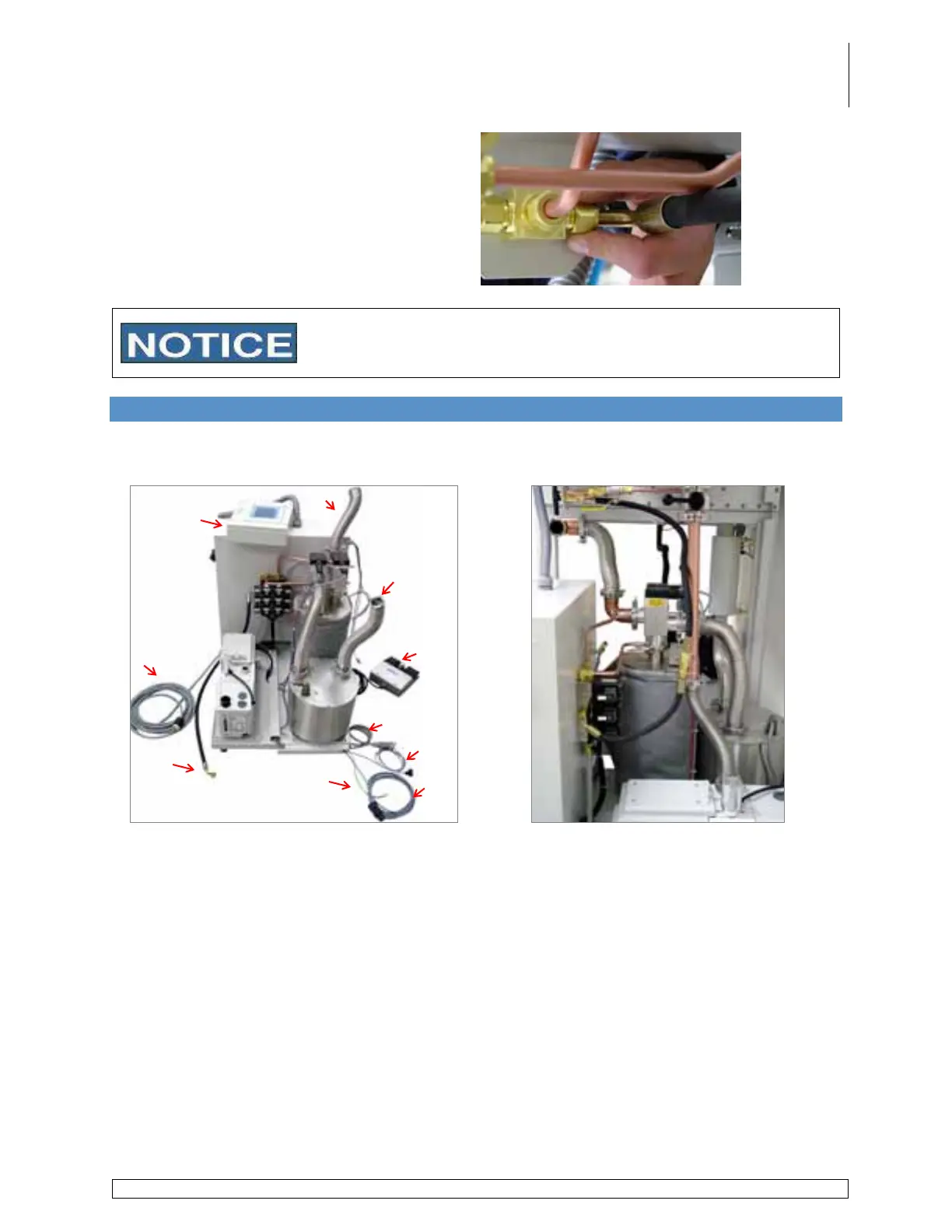
Below is a rear view of the purifier showing the various components and cables which require
connection to the glovebox. Please refer to these pictures when following the instructions.
Figure 5 - Purifier Layout
Figure 6 - Completed Purifier Setup
Purifier Cart
A. PLC-Touch Screen Panel and Housing
B. Inlet Hose from Glovebox to Purifier
C. Outlet Hose from Blower to Glovebox
D. Lighthood Cable
E. Pressure Sensor Cable
F. Ground Wire
G. Freezer Connection Cable
H. Purifier Vacuum Hose
I. Main Power Cable
J. Foot Pedal
A
B
C
D
E
F
G
H
I
J



 To Next Page