Operating Instructions – Labmaster
©
130 and MB20G Systems
Instruction Manual
Chapter 9: System Operation
© MBraun, Inc. Edition 1/2007 Page 9-19
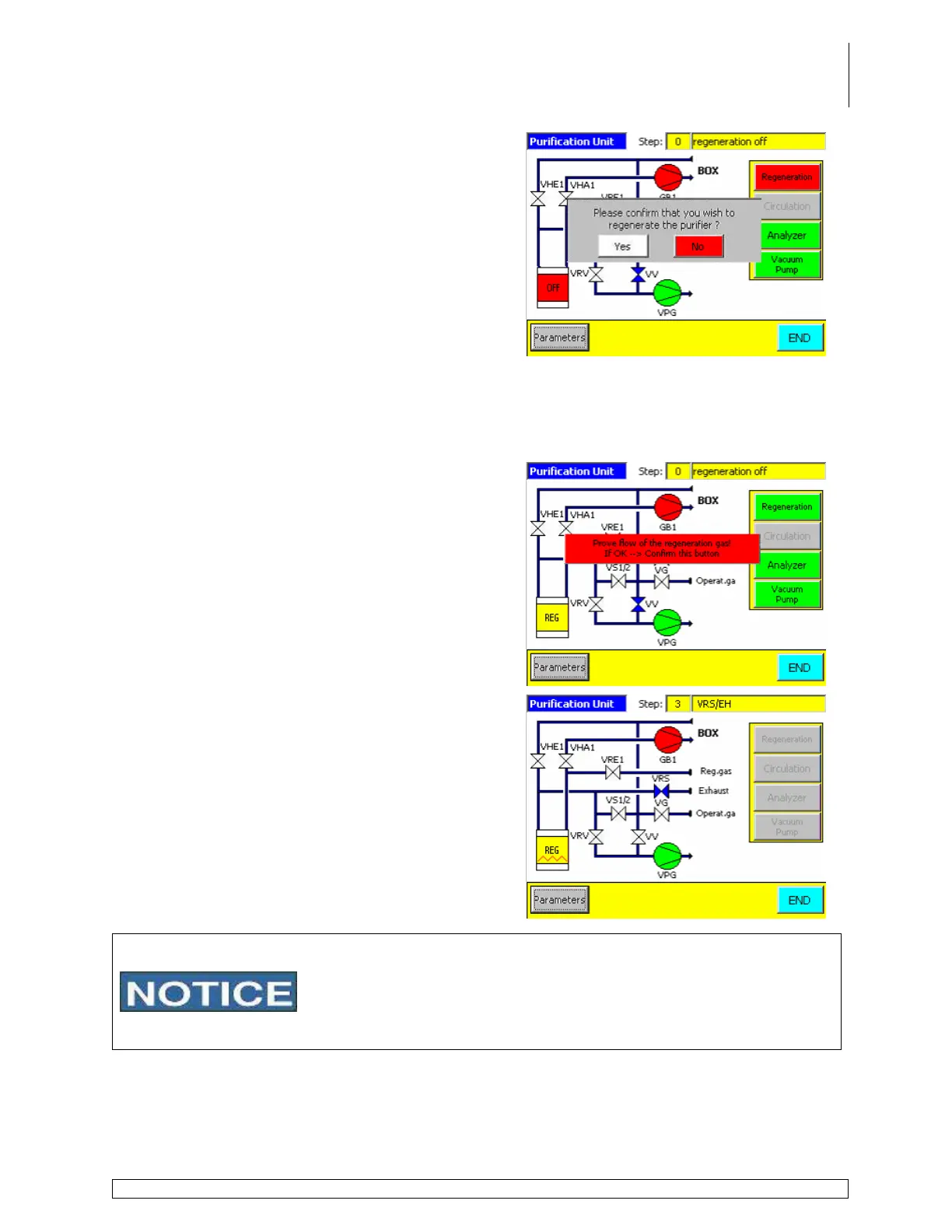
The purifier layout screen is displayed with the
following message.
Please confirm that you wish to regenerate the
purifier?
This message must be acknowledged (yes or no)
before regeneration will initialize.
Using the regulator, turn on the regeneration gas supply and set the pressure to 5psi.
Place the end of the regeneration vent line running from the VRS valve on the valve block
located on the back of the purifier to a 100ml (minimum size) collection vessel.
Vent the line and vessel to fume hood or other facility ventilation system.
A second message is displayed:
Prove flow of the regeneration gas! If OK
Æ
Confirm this button
This message must also be acknowledged before
regeneration will initialize. Touch the message on
the screen after confirming the flow is correct
according to the above information.
After acknowledging the second message the
purifier layout screen can remain displayed. This
screen will display the active step in the
regeneration process.
or
Touch the End button to display the start screen. To
display the purifier layout screen at any time during
the regeneration process touch the RKM icon on the
start screen.
• After completing a regeneration process, the vacuum pump oil
should be changed. Refer to vendor supplied manuals for
instructions on changing the oil.
• Used oil should be disposed of in accordance with all facility,
local and federal guidelines.



 To Next Page