TA80V User Manual
3.2.1. Ventilation Mode Setting
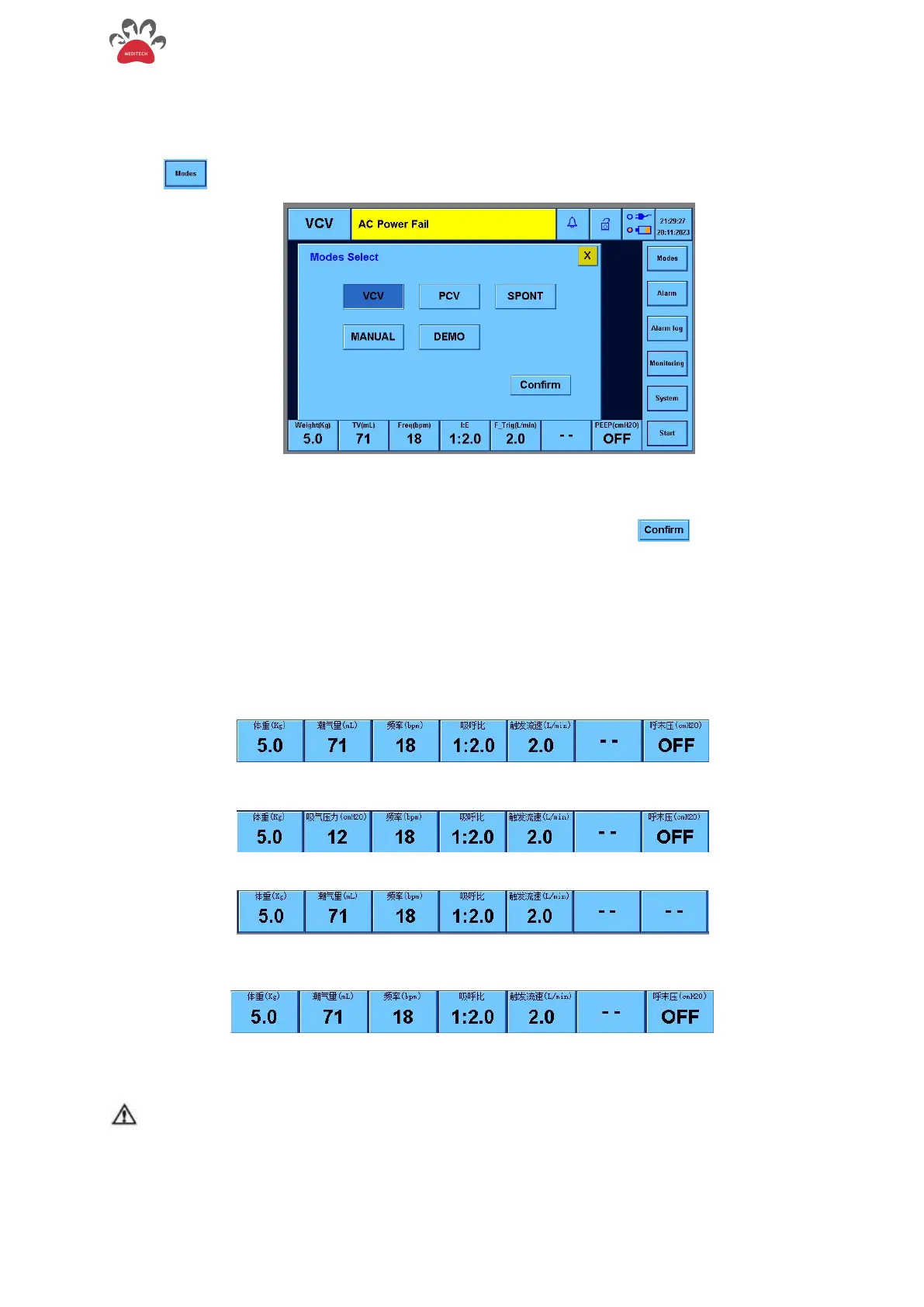
The ventilation mode is displayed in the upper left corner of the screen.
Touch " " , the following mode selection menu shown in Figure 3-3.
Figure 3-3 The Mode Selection Interface
Touch the mode button you want to switch, and then touch the " " to switch to the
corresponding mode, or you can use the knob to operate.
3.2.2. Ventilator Control Parameter Setting
The anesthesia ventilator setting parameters are on the lower side of the screen
1. VCV mode:
2. PCV mode:
3. SPONT mode:
4. MANUAL mode: Parameters can be adjusted in VCV mode, but do not work in Manual mode
5. Standby Mode: You can set different ventilation modes and adjust parameters
NOTE
When reading the tidal volume value, the monitoring value of the ventilator is used as an accurate
value, and the bellows is only used as a trend observation, There are exceptions such as: the sensor
probe is blocked by water, the electrical appliance is seriously faulted or out of control. At this time,
the bellows can be temporarily used as an emergency for the tidal volume value.


 To Next Page