User Interface
1006en01 03-11-24 73
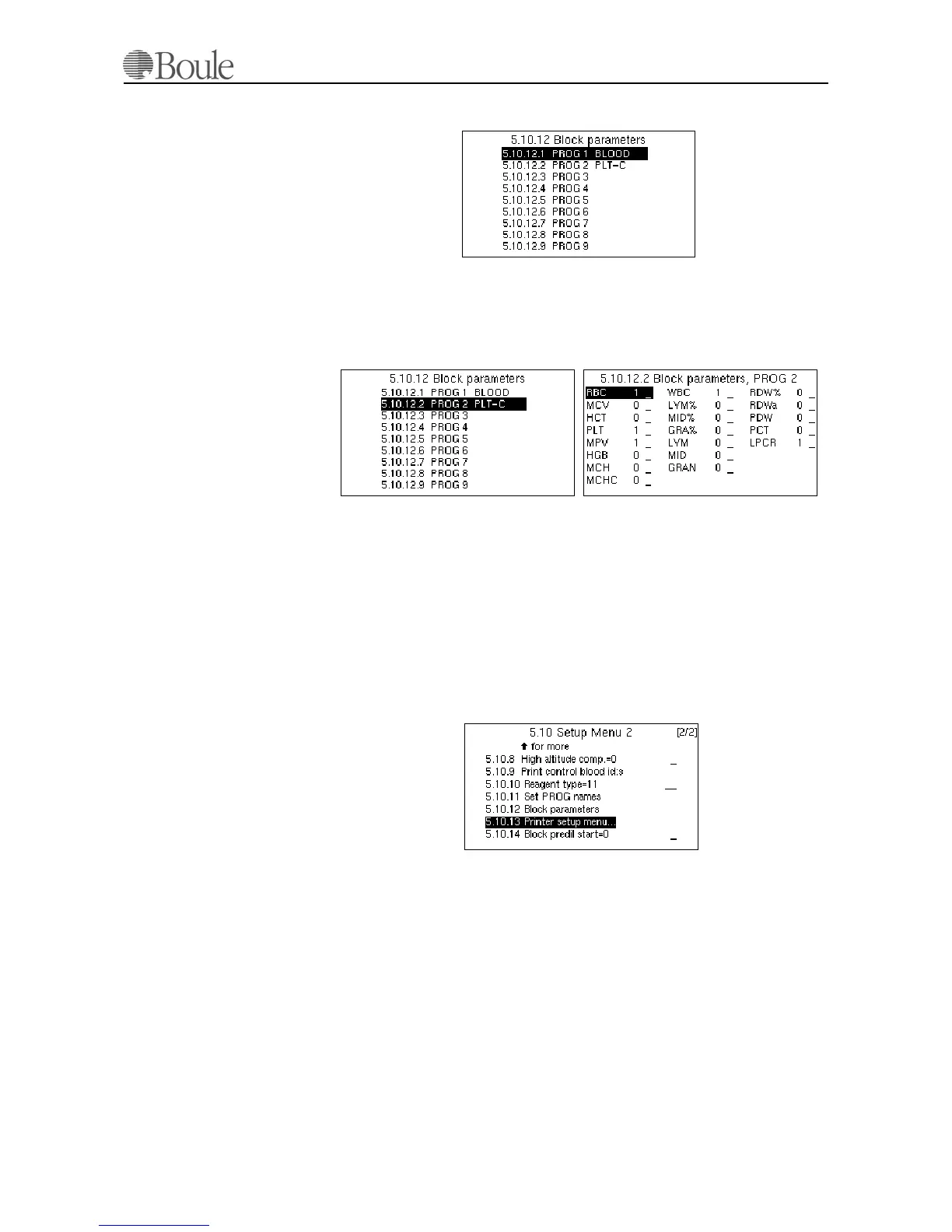
The following is displayed.
1. Scroll down to the line PROG 2 in case some of the parameters in the PLT
concentrate mode should be blocked. See below.
2. Press [Enter] and the next sub menu is displayed.
In this menu, setting a “1” to a parameter means that it will be displayed and
printed. Setting “0”, will block the parameter from the display and printout.
In the above example it is seen that all parameters are blocked except RBC, PLT,
MPV, WBC and LPCR whenever the CA620-CellGuard is used in PLT concen-
trate mode.
Printer setup menu CA620
This menu is used for advanced printer options and user definable printout pro-
gramming.
Detailed information is available in appendix 530-30-205. Please contact your lo-
cal distributor in case special printer functions are required. This appendix is
available in the English language only and requires basic knowledge about print-
ing protocol, formats, font setups etc.
Block pre-dilute start
This menu is used to delay the pre-dilute start switch with 5 seconds. Set '1' to
enable this function.
To minimize the risk that a user enters whole blood at the pre-dilute inlet, this
mode might be enabled.
1105en.gif
1107en.gif
1106en.gif
1108en.gif



 To Next Page