5
Operator's Manual English 81
7. Power on the monitoring system and set the serial port protocol to VUE LINK, as
described in the monitoring system's service manual. After the monitoring system
restarts, it begins communicating with the Philips monitor.
8. Begin a case as described in Set Up for Patient Monitoring, page 42.
5.5.3. Transmitting Case Data to a Computer
The following instructions explain how to transmit case data to a computer using a null
modem cable and a terminal emulation program such as Tera Term™* or HyperTerminal™*
programs.
Data is transmitted approximately once every second as the case progresses. Data can be
transmitted in two formats: PC LINK 1and PC LINK 2. Instructions for selecting a format are
provided in the monitoring system's service manual. See Case Data Downloaded via Serial
Port, page 83 for descriptions of the formats.
5.5.3.1. Null Modem Cable Requirements
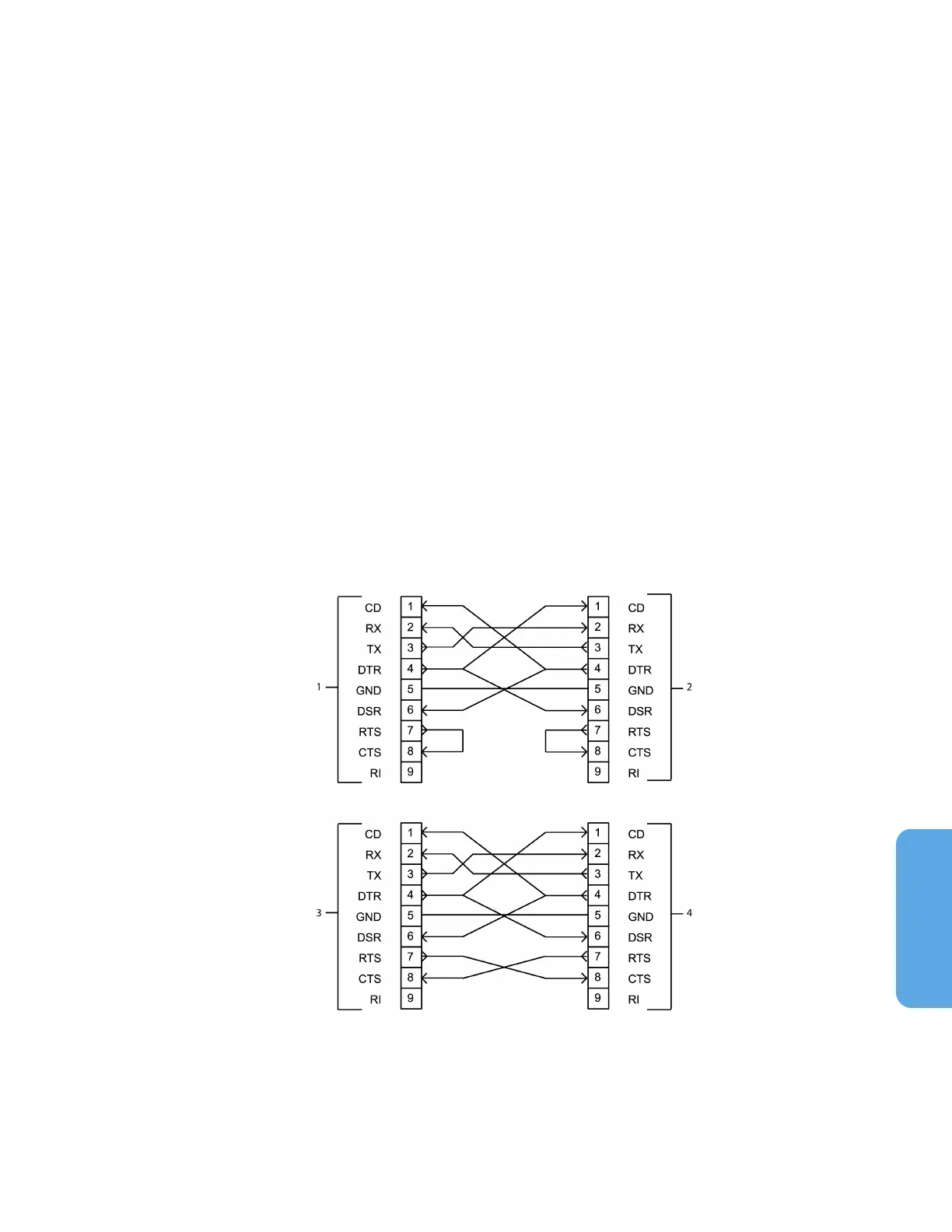
A 9-pin to 9-pin null modem cable is required for transmitting case data to a computer via
the serial port.
The null modem cable must be no longer than 50 feet (15.24 m).
Refer to Figure 69 for acceptable 9-pin to 9-pin wiring configurations.
Figure 69. Null Modem Cable Diagram for Connection to Serial Port (Two Options)
1. Monitoring System Serial Port (Option
1)
2. Computer (PC) COM Port (Option 1)
3. Monitoring System Serial Port (Option
2)
4. Computer (PC) COM Port (Option 2)



 To Next Page
 Loading...

