64
6.1 Automatic Measurement
Measurement setting
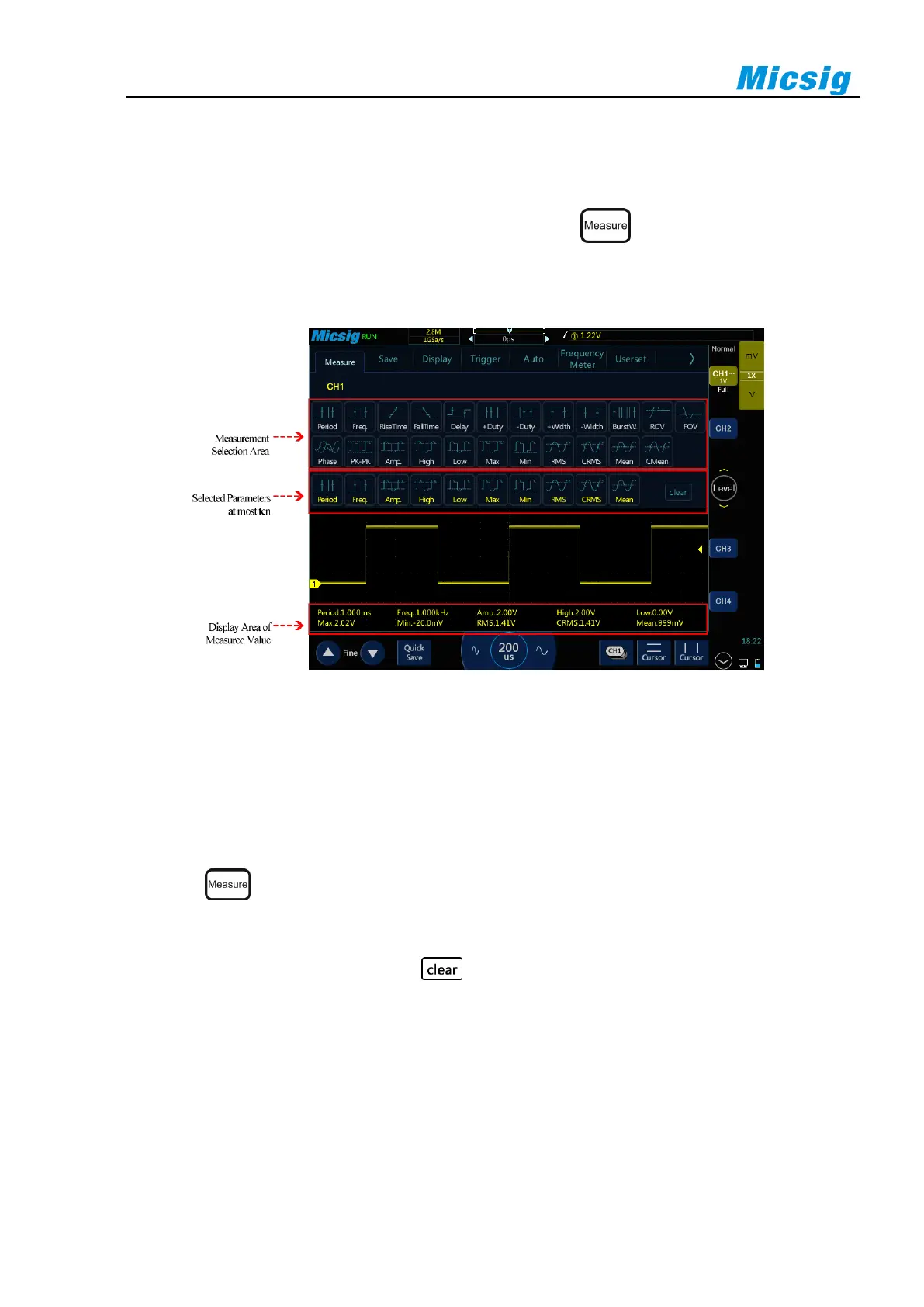
Slide down from top, open the main menu, tap “Measure” or click on the right side of the screen to
enter the measurement menu. There are 23 measurement items on the measurement menu. Measurement menu,
selected measurement item display and measurement item display are shown in Figure 6-1:
Figure 6-1 Automatic Measurement Menu
Automatic measurement
1) Select channel: Select the channel to be measured above the measurement menu.
2) Select measurement: Select the desired measurement item on the measurement menu. The selected
measurement item is displayed in the “Selected Parameters” display area below.
3) Press button on the key area to quickly close the measurement menu.
4) Cancel measurement item: In the “Selected Parameters” display area below measurement menu, tap the
measurement item to be cleared; or tap button to clear all measurement items.
Note:
Measurements and math functions will be recalculated when moving/zooming and opening/closing channels.
Oscilloscope has an automatic measurement memory function. Shutdown and restart will not automatically clear added
automatic measurement options.



 To Next Page